

Contact Form
The WP-ImmoMakler contact form is used in two variants:
- Property inquiry: the form in the property detail view. The inquiry is sent to the contact person stored in the property record.
- Direct inquiry: a standalone form without a property reference, for example on your contact page. The inquiry is sent to the general recipient address.
Both variants use the same settings. You will find them in your website’s backend (wp-admin) under WP-ImmoMakler → Settings → Contact Form.
Email Configuration
Section titled “Email Configuration”| Label | Type | Default | Description |
|---|---|---|---|
| Sender Name | Text | — | Sender name for WP-ImmoMakler contact form emails (to the agent and for confirmation emails to prospects). |
| Sender Email | Text | — | Sender email for WP-ImmoMakler contact form emails. |
| Fallback Recipient Name | Text | — | Recipient name when no recipient can be determined from the property record, or for forms without a property reference. |
| Fallback Recipient Email | Text | — | Fallback email address for contact inquiries. Stored as kontaktperson_email_feedback in the property if no other value is present. |
| Attach XML PLUS | Checkbox | active | Attaches contact data as an OpenImmo feedback XML to the email. |
| Send Automatic Confirmation Email | Checkbox | inactive | Automatically sends a confirmation email to the prospect after an inquiry. |
| Attach PDF Exposé to Confirmation Email PLUS | Checkbox | inactive | Attaches the PDF exposé of the requested property (or properties) to the confirmation email. Requires the PDF print view and the automatic confirmation email to be enabled. If multiple properties are requested, a separate PDF is attached for each one. |
| CC for Contact Enquiry | Select | None | Sends contact enquiries additionally as a CC to a second address of the property. Useful when “Feedback Email” is a CRM address that only processes emails within the CRM. None: no CC. Direct Email: CC to the “Direct Email” field of the contact person. Office Email: CC to the “Office Email” field of the contact person. |
Automatic OpenImmo Feedback XML PLUS
Section titled “Automatic OpenImmo Feedback XML ”Starting with WP-ImmoMakler PLUS, the contact form automatically generates an OpenImmo feedback XML file upon inquiry and sends it to your real estate CRM software. This ensures that prospects and inquiries are automatically created as contacts in your software and assigned to the respective property. Users of the BASIC edition can upgrade to PLUS at any time to use this feature. If you would like to upgrade, please contact our support. You do not need to purchase the plugin again — you only pay the difference.
Spam Protection and Alternative Form
Section titled “Spam Protection and Alternative Form”As of version 5.67.0, spam protection is no longer configured here but centrally for all forms under WP-ImmoMakler → Settings → Spam Protection. For an overview of the levels, see Spam Protection; for ALTCHA details, see ALTCHA.
| Label | Type | Default | Description |
|---|---|---|---|
| Alternative: Use Custom Form via Shortcode | Text | — | Shortcode of a form plugin that replaces the WP-ImmoMakler contact form in the property detail view. |
Form Fields
Section titled “Form Fields”| Label | Type | Default | Description |
|---|---|---|---|
| Show Form Fields | Multiple Select | see below | Selection of visible form fields. |
| Required Fields (if displayed) | Multiple Select | see below | Selection of required fields (when the field is displayed). |
Default displayed fields: Company, Salutation, Name, Email, Phone, Street, City, Message, Terms Checkbox, Cancellation Policy Checkbox, Commission Checkbox, Privacy Checkbox
Default required fields: Name, Email, Phone, Street, City, Message, Terms Checkbox, Cancellation Policy Checkbox, Commission Checkbox, Privacy Checkbox
Checkboxes and Legal Texts
Section titled “Checkboxes and Legal Texts”| Label | Type | Default | Description |
|---|---|---|---|
| Also Request Cancellation Policy for Commercial Properties | Checkbox | inactive | Otherwise only for non-commercial offers with external commission. |
| Always Request Cancellation Policy for All Properties | Checkbox | inactive | Displays the cancellation policy regardless of commission and property type. |
| General Text Before the Checkboxes | Textarea | — | Optional text (HTML supported) before the checkbox fields. |
| Page with Terms and Conditions | Page Select | — | WordPress page linked to the terms checkbox. |
| Terms as PDF | File | — | PDF file for the terms checkbox (takes precedence over the page). |
| Text for Terms Checkbox | Textarea | default text | Checkbox text. Text in curly braces is displayed as a link. |
| Page with Cancellation Policy | Page Select | — | WordPress page for the cancellation policy checkbox. |
| Cancellation Policy as PDF | File | — | PDF for the cancellation policy (takes precedence over the page). |
| Text for Cancellation Policy Checkbox | Textarea | default text | Checkbox text for the cancellation policy. |
| Text for Commission Checkbox (Purchase Properties) | Textarea | default text | Checkbox text for purchase properties with commission. |
| Text for Commission Checkbox (Rental Properties) | Textarea | default text | Checkbox text for rental properties with commission. |
| Page Link for the Custom Checkbox | Page Select | — | Page for a custom configurable checkbox. |
| File Link for the Custom Checkbox | File | — | File for the custom checkbox (takes precedence over the page). |
| Text for the Custom Checkbox | Textarea | example text | Checkbox text for the custom checkbox. |
| Page with the Privacy Policy | Page Select | WordPress privacy setting | Automatically read from the WordPress privacy settings. |
| Privacy Policy as PDF | File | — | PDF for the privacy checkbox (takes precedence over the page). |
| Text for Privacy Checkbox | Textarea | default text | Checkbox text for the privacy notice. |
Submit Button
Section titled “Submit Button”The submit button displays the default text “zahlungspflichtig bestellen” (order with payment obligation).
Due to the BGH ruling I ZR 159/24 of 09.10.2025, we have implemented this accordingly. You can change the button text in your website’s backend (wp-admin) under WP-ImmoMakler → Settings → Contact Form at the very bottom.
| Label | Type | Default | Description |
|---|---|---|---|
| Text for the Submit Button | Select | Send Inquiry | Predefined, multilingual translated button text. |
| Alternative: Custom Text for the Submit Button | Text | — | Custom button text (single language). |
| Commission: Text for the Submit Button | Select | Buy | Predefined button text for properties with commission. |
| Alternative: Commission: Custom Text for the Submit Button | Text | — | Custom button text for commission forms (single language). |
Direct Inquiry Without a Property Reference
Section titled “Direct Inquiry Without a Property Reference”The direct inquiry allows visitors to submit a general contact request without enquiring about a specific property. You embed the form with the shortcode [immomakler-contact] PLUS, for example on your contact page or a landing page:
[immomakler-contact][immomakler-contact recipient="info@example.com" subject="Landing page inquiry"][immomakler-contact propertyid=12345]| Attribute | Description | Default |
|---|---|---|
recipient | Recipient email address for this instance | Fallback Recipient Email from the settings |
subject | Subject line of the email | Default subject |
propertyid | WordPress post ID of a property the inquiry refers to | — |
Without the recipient attribute, the inquiry is sent to the address from Fallback Recipient Email (see Email Configuration). Which fields, required fields, and checkboxes are displayed is controlled by the same settings as for the property form.
In page builders such as Elementor Pro, Divi, Bricks, Oxygen, and WPBakery, the contact form is additionally available as a dedicated widget or module. For an overview of all shortcodes, see Shortcodes.
Contact Inquiries in the Backend
Section titled “Contact Inquiries in the Backend”Every incoming inquiry is stored in WordPress in addition to being sent by email. You will find the inquiries in the backend of your website (wp-admin) under WP-ImmoMakler → Contact Inquiries. This means an inquiry is preserved even if the notification email ends up in the spam folder or is not delivered at all.
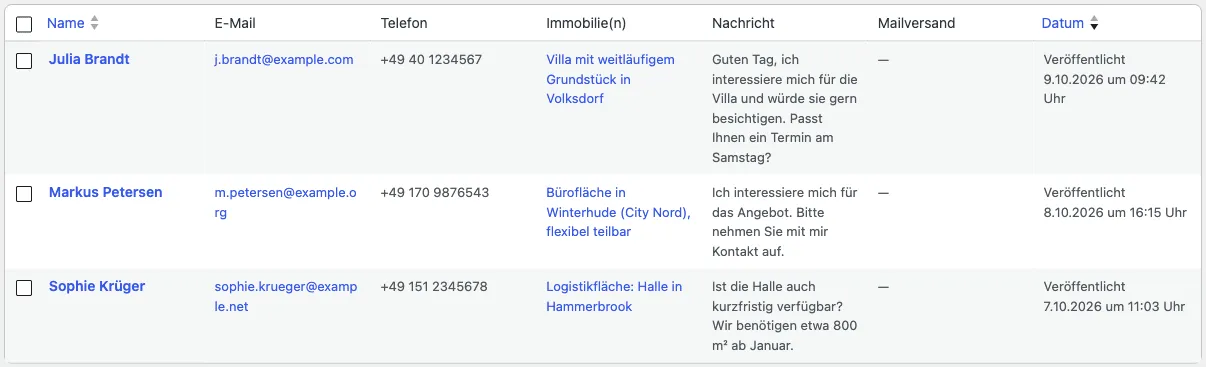
The list shows the name, email address, phone number, the requested property and the beginning of the message. Clicking an entry opens the full inquiry with all submitted fields and the consents given. The entries are read-only and reflect exactly what the requesting person submitted.
The requested properties are linked. If a property has since been re-imported, the link still points to the current version. If it has been deleted, the title the property had at the time of the inquiry remains.
Settings
Section titled “Settings”| Label | Type | Default | Description |
|---|---|---|---|
| Store Contact Inquiries in the Backend | Checkbox | active | Stores every incoming contact inquiry in addition to sending it by email. If this option is disabled, inquiries are delivered by email only. |
| Automatically Delete Contact Inquiries | Select | Never | Period after which stored contact inquiries are automatically deleted — selectable from one month up to ten years. The emails sent to the contact person are not affected by this. |
Inquiries with Suspected Spam
Section titled “Inquiries with Suspected Spam”If spam detection classifies an inquiry as suspicious, it is still delivered and stored instead of being discarded. The list then shows a Suspected Spam notice next to the name, and the detail view additionally names the signal that triggered it — for example, a filled-in hidden form field. The detection levels are described in Spam Protection.
Access and Erasure on Request
Section titled “Access and Erasure on Request”Stored contact inquiries are connected to WordPress’s privacy tools: if a person requests access to their data or its erasure, Tools → Export Personal Data and Tools → Erase Personal Data include the inquiries stored for their email address. The process is described in Access and Erasure of Personal Data.
Ensuring Email Delivery
Section titled “Ensuring Email Delivery”Many hosting providers block unauthenticated PHP email sending. To ensure reliable delivery, install an SMTP plugin and configure your email provider’s credentials there.
Error Message After Submission
Section titled “Error Message After Submission”If the following message appears after the form is submitted, WordPress was unable to hand the email over to the mail server:
Entschuldigen Sie bitte, beim Senden an folgende Empfänger ist leider ein Fehler aufgetreten: … Bitte kontaktieren Sie uns per E-Mail oder telefonisch, danke! (We are sorry, an error occurred while sending to the following recipients: … Please contact us by email or phone, thank you!)
The inquiry itself was filled in and processed correctly — only the email dispatch failed. In almost all cases the cause is that the server blocks sending via the PHP mail() function, or discards the message. Install an SMTP plugin (for example WP Mail SMTP), enter your email provider’s credentials there, and send a test email. Once SMTP is configured successfully, the message disappears.
Also check that Sender Email contains an address from your own domain and that the sender address stored in the SMTP plugin matches it.
You will find more information on troubleshooting emails in the article Improving email delivery.
Customizations via Filter Hooks
Section titled “Customizations via Filter Hooks”Beyond the settings, the contact form can be customized via filter hooks. Place the respective code in the functions.php of your WP-ImmoMakler child skin plugin.
Submit Button Label
Section titled “Submit Button Label”As an alternative to the setting, the submit button label can be set via a filter:
add_filter( 'immomakler_contactform_submit_value', function() { return 'Submit form';} );Replace the text in quotes with your desired label.
Customizing the Recipient Email Address
Section titled “Customizing the Recipient Email Address”For a property inquiry, the email address stored in the property record is used by default (the “Feedback Email” field from your estate agent software); if nothing is stored there, the Fallback Recipient Email setting applies. The following filters let you override the recipient address and name:
add_filter( 'immomakler_contactform_mail_to_email', function( $email, $item_id = 0 ) {    return 'your@email.com';}, 10, 2 );
add_filter( 'immomakler_contactform_mail_to_name', function( $name, $item_id = 0 ) {    return 'Your estate agency';}, 10, 2 );
The $item_id parameter contains the post ID of the inquired property. For a direct inquiry without a property reference, the filter is called without this parameter — which is why the example gives it a default value.
Sending CC Copies
Section titled “Sending CC Copies”To additionally send contact inquiries as CC copies — for example, to a fixed address or dynamically to the contact person assigned to the property — use the immomakler_contactform_cc filter.
With some real estate CRM systems (e.g. Propstack, Justimmo), the inquiry is sent to an internal, technical address of the provider. If you would like to also receive the email at your own address, use one of the following filters:
Fixed CC address:
add_filter('immomakler_contactform_cc', function() { return 'my.name@realestatecompany.com';});CC to the individual contact person of the property (field “Email direct”):
add_filter('immomakler_contactform_cc', 'immomakler_contactform_cc', 10, 4);function immomakler_contactform_cc($cc, $recipients, $items, $values) { return get_post_meta($items[0], 'kontaktperson_email_direkt', true);}For the two standard cases “Direct Email” and “Office Email”, the CC for Contact Enquiry setting is sufficient; no filter is needed for those.
Customizing the Email Subject
Section titled “Customizing the Email Subject”Property inquiry and direct inquiry use different filters. Note that some real estate CRM systems limit the subject to 50 characters.
Property inquiry (inquiry about a property):
add_filter('immomakler_contactform_mail_with_posts_subject', function() {return 'Property inquiry from the website';});Direct inquiry (form without a property reference):
add_filter( 'immomakler_contactform_mail_no_posts_subject', function() { return 'Direct inquiry from the website';} );Property ID in the Subject
Section titled “Property ID in the Subject”A filter hook is also available to include the property ID of the inquired property in the email subject.
add_filter('immomakler_contactform_mail_with_posts_subject', 'custom_immomakler_contactform_subject_with_property_id', 10, 2);function custom_immomakler_contactform_subject_with_property_id( $subject, $requested_items ) {$subject = 'Property inquiry:';foreach ( $requested_items as $post_id ) {$subject .= ' ' . get_post_meta( $post_id, 'objektnr_extern', true);}return $subject;}Customizing the OpenImmo Feedback XML
Section titled “Customizing the OpenImmo Feedback XML”The OpenImmo feedback XML generated when the contact form is submitted can be customized via filter hooks. For example, you can set the sender name in the XML to a fixed value:
add_filter('immomakler_openimmofeedback_sender_name', function() { return 'Homepage';});Redirect After Submission
Section titled “Redirect After Submission”After a successful form submission, visitors can be redirected to a thank-you page. Control the redirect via the immomakler_contactform_mailsent filter and dynamically include the property ID in the target URL:
add_filter('immomakler_contactform_mailsent', 'immomakler_mailsent', 10, 3);function immomakler_mailsent($text, $requested_items, $values) { $objektid = $requested_items[0]; return $text . '<script>location.href="/inquiry-sent/?id=' . get_post_meta( $objektid, 'objektnr_extern', true ). '";</script>';};For a direct inquiry without a property reference, $requested_items is empty. In that case, check the array before accessing it and redirect to a fixed URL.
Analytics Tracking
Section titled “Analytics Tracking”Under WP-ImmoMakler → Settings → Contact Form you can enable the Analytics event on form submission option. This automatically triggers an event in Google Analytics (gtag.js) or Google Tag Manager whenever a contact request is submitted successfully — no custom code required. You set the event name in the Event name for the analytics event field (default: contactform_submit_wp_immomakler); use that name to set up the desired goal (conversion) in your Analytics or Tag Manager configuration.
The ga("send", "event", ...) code documented here previously belonged to Universal Analytics and has not worked since its retirement — current Google Analytics properties (GA4) use gtag.js, just like the built-in option.
If you need additional, custom event parameters, you can still use the immomakler_contactform_mailsent filter yourself (independent of the option above):
add_filter( 'immomakler_contactform_mailsent', 'immomakler_contactform_mailsent_analytics_event', 10, 2 );function immomakler_contactform_mailsent_analytics_event( $response, $requested_items ) { return $response . '<script>gtag("event", "direktanfrage_versendet", { objekt_id: "' . esc_js( get_post_meta( $requested_items[0], 'objektnr_extern', true ) ) . '" });</script>';}