

Working with Consent Plugins
WP-ImmoMakler has always obtained consent for embedded content — videos, virtual tours and maps — itself. If you also run a consent plugin, this used to result in two independent prompts on the same page.
From version 5.69.0 onward, WP-ImmoMakler defers to your consent plugin whenever one is active. Your consent plugin is where your visitors’ consent is documented and where it can be withdrawn — that is why its decision takes priority.
What Changes for Your Visitors
Section titled “What Changes for Your Visitors”- Visitors are only asked once. Anyone who has accepted cookies in your consent plugin’s banner no longer sees a second prompt on the property page — the video can be started directly.
- A decline is respected. Anyone who declined in the banner could previously still start the video via WP-ImmoMakler’s own prompt. That is no longer possible.
- The button leads to the banner. If consent is missing, the button on the preview image reads Open cookie settings and opens your consent plugin’s prompt. As soon as consent is given there, the content unlocks — without the page reloading or another click being needed.
The Setting
Section titled “The Setting”You’ll find the setting in your website’s backend (wp-admin) under WP-ImmoMakler → Integrations → Privacy.
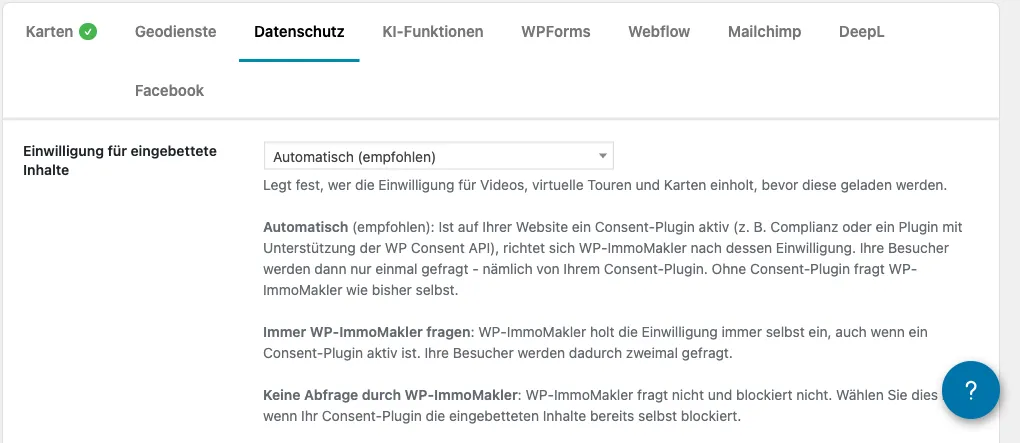
| Setting | Meaning |
|---|---|
| Automatic (recommended) | If a consent plugin is active, WP-ImmoMakler defers to its consent. If none is active, WP-ImmoMakler asks itself as before. This is the default. |
| Always let WP-ImmoMakler ask | WP-ImmoMakler always obtains consent itself, even if a consent plugin is active. This means your visitors are asked twice. |
| No prompt from WP-ImmoMakler | WP-ImmoMakler neither asks nor blocks. Only choose this if your consent plugin already blocks the embedded content itself. |
Supported Consent Plugins
Section titled “Supported Consent Plugins”Complianz is supported directly and needs no further setup.
WP-ImmoMakler also supports the WP Consent API — a standard through which consent plugins and other plugins communicate about the consent that has been given. Any consent plugin that supports this standard is recognised through it.
Which Services Are Mapped
Section titled “Which Services Are Mapped”WP-ImmoMakler specifically asks your consent plugin about the services YouTube, Vimeo and Google Maps.
Virtual-tour providers — such as Matterport, Ogulo or Kuula — are not known to most consent plugins as a separate service. Consent to the marketing category therefore applies to them. The same goes for maps that do not come from Google Maps but from OpenFreeMap, basemap.de, Mapbox or MapTiler.
Maps from Mapbox, MapTiler and MapLibre are likewise not requested as a separate service but through the marketing category.
Without a Consent Plugin
Section titled “Without a Consent Plugin”If no consent plugin is active, nothing changes: WP-ImmoMakler continues to ask itself, and consent is stored per service in the browser’s local storage. For maps, that service is the one that supplies the map: if a visitor has agreed to the map in the search results, they are not asked again on the detail page, as long as both maps come from the same service. How this prompt looks is described in GDPR-Compliant Cookie Consent.
Verify After Switching
Section titled “Verify After Switching”-
Clear caches
Clear your caching plugin’s cache and your browser cache.
-
Test a decline
Open a property page with a video in a private browser window and decline in the banner. The video must not be startable.
-
Test consent
Open the cookie settings via the button on the preview image and give consent. The video must then play without you reloading the page.