

Embedding Virtual Tours in WordPress – Matterport, Ogulo & More
Virtual tours – also known as 360-degree walkthroughs or 3D tours – are now standard on successful property websites: prospective buyers and tenants explore the property online before booking a viewing. WP-ImmoMakler automatically displays virtual tours from Matterport, Ogulo, Giraffe360 and many other providers in a dedicated “Virtual Tours” section of the property detail view on your WordPress website as soon as they are stored for a property.
How Virtual Tours Reach Your Properties
Section titled “How Virtual Tours Reach Your Properties”Tour links are transferred automatically from your real estate software during import, e.g. as an OpenImmo attachment of type “Link”. WP-ImmoMakler automatically recognises the URLs of supported providers – such links appear in the “Virtual Tours” section instead of the link list.
Method 1: Link Integration (Standard)
Section titled “Method 1: Link Integration (Standard)”With link-based integration, the virtual tour opens in a new window. This method works without any additional setup, provided the tour URL is transferred from your real estate software.
Method 2: Direct Embedding (PLUS Feature)
Section titled “Method 2: Direct Embedding (PLUS Feature)”With the embedded display, the tour is shown directly on the property detail page. This increases visitor engagement, as they do not need to leave your website.
Direct embedding is included in WP-ImmoMakler PLUS: as soon as a tour URL is available for the property, the tour automatically appears in the detail view — no additional setup required.
Display as a Preview Image with Lightbox
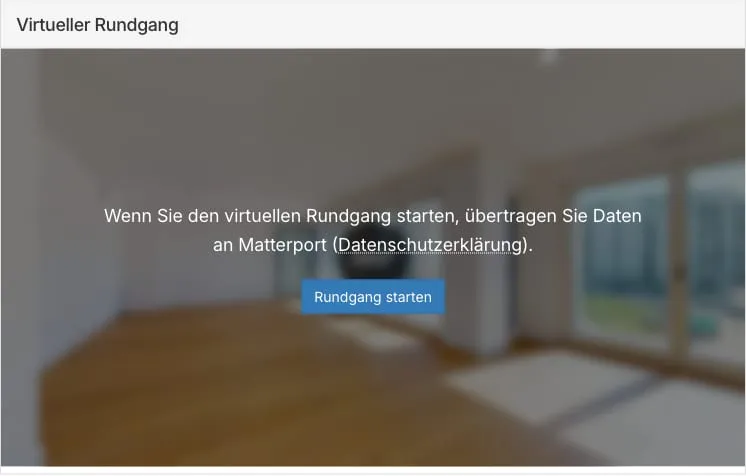
Section titled “Display as a Preview Image with Lightbox”Embedded virtual tours are displayed as a preview image with a start button. The tour only opens in a full-size lightbox after a click. This speeds up page rendering, as no tour players are embedded while the page loads.
The preview images are cached server-side and delivered from your own website. If no preview image can be determined, WP-ImmoMakler displays a neutral placeholder tile.
GDPR: Consent Prompt Before the Tour Starts
Section titled “GDPR: Consent Prompt Before the Tour Starts”Virtual tours are always loaded from the respective provider’s servers (e.g. Matterport or Ogulo). That’s why WP-ImmoMakler obtains the website visitor’s consent before starting the tour: the preview image shows a notice with the provider’s name, a link to its privacy policy, and a “Start tour” button. The tour is only loaded and displayed after this button is clicked.
- As with the Google Maps consent box and videos, consent is stored per provider in the browser’s local storage (similar to a cookie) and applies to all further tours from the same provider on your website. If a consent plugin is active on your website, from version 5.69.0 onward that plugin handles the prompt instead — see Working with Consent Plugins.
- Before consent is given, the visitor’s browser does not transfer any data to the tour provider. The preview images also come from your own website, not from the providers’ servers.
You can find more information on embedding external services in a GDPR-compliant way under GDPR-Compliant Cookie Consent.

Disabling the Consent Prompt
Section titled “Disabling the Consent Prompt”If you prefer to handle blocking of tour providers with a third-party consent plugin instead (e.g. Borlabs Cookie or Real Cookie Banner), you can disable the lightbox and consent feature in the backend of your website (wp-admin) under WP-ImmoMakler → Settings → Display. Virtual tours are then embedded directly into the page as in earlier versions.
Loading Speed, Core Web Vitals and SEO
Section titled “Loading Speed, Core Web Vitals and SEO”Virtual tours pay off for your property website’s search engine optimisation in several ways:
- Longer dwell time: Visitors who explore a property online stay on the page noticeably longer – a positive user signal.
- Faster page rendering: With the lightbox display, the tour player only loads after the click. Loading speed is a Google ranking factor via Core Web Vitals.
- Modern image formats without layout shifts: WP-ImmoMakler delivers the preview images as AVIF or WebP and generates them in multiple sizes, delivered responsively via
srcset— mobile devices load a suitably small variant instead of the full-resolution preview image. The tiles reserve their dimensions while loading, avoiding layout shifts (Cumulative Layout Shift). - Structured data: For properties with a virtual tour, WP-ImmoMakler can output a schema.org “360° virtual tour” event that tells search engines about the online walkthrough as a virtual event.
Supported Providers
Section titled “Supported Providers”WP-ImmoMakler automatically recognises tour links from the following providers:
- Matterport
- Ogulo
- immo.tours
- immoviewer
- ImmoScout24 (virtualtours.immobilienscout24.de)
- Feelestate
- Giraffe360
- Spherovision
- Nodalview
- iStaging
- Momento360
- Kuula – WP-ImmoMakler automatically converts shared
kuula.co/post/…links into the embeddable share form of the same tour - RICOH360
- VR-360-Tour
If your provider is not listed here, the WP-ImmoMakler team is happy to check compatibility – simply contact Support. You can find an overview of our partners on the Software Partners page, and real-world examples in the reference overview.
Tour Language
Section titled “Tour Language”WP-ImmoMakler automatically passes the language of the page being viewed to the tour player. Providers that support a language setting (e.g. Matterport and Ogulo) then display their interface in the matching language; all others use the language stored in the tour or the visitor’s browser language.
Unreachable Tours Are Hidden Automatically
Section titled “Unreachable Tours Are Hidden Automatically”WP-ImmoMakler regularly checks whether the stored tour links are still reachable. Deleted or expired tours are no longer offered to visitors, without you having to do anything.
Setup in onOffice
Section titled “Setup in onOffice”In onOffice, make sure that the tour file is marked as type “Link” in the property and is enabled for homepage publication.

Placing Virtual Tours with Page Builders
Section titled “Placing Virtual Tours with Page Builders”In custom layouts, place the section with the “Virtual tours” widget or element that WP-ImmoMakler provides for Elementor and Divi, as well as with the Gutenberg block of the same name in the WordPress block editor.
Virtual Tours in the PDF Exposé PLUS
Section titled “Virtual Tours in the PDF Exposé ”The PDF exposé automatically includes a section with the property’s virtual tours after the property photos and floor plans. Each entry shows the tour’s preview image along with a QR code – both link directly to the tour. Anyone holding the printed exposé simply scans the QR code with their smartphone to start the tour; in the digital PDF, a click on the preview image is enough.
Tour Icon in the List View
Section titled “Tour Icon in the List View”Properties with a virtual tour automatically receive a 360° icon on the preview image in the list view, showing visitors at a glance which properties have a walkthrough.
Frequently Asked Questions
Section titled “Frequently Asked Questions”How do I embed a Matterport tour in WordPress?
Section titled “How do I embed a Matterport tour in WordPress?”Automatically with WP-ImmoMakler: transfer the Matterport link as an attachment from your real estate software – the tour appears in the property detail view without any further setup. With the PLUS “Direct Embedding” package, the walkthrough is shown directly on your WordPress website instead of in a new window.
Is embedding Matterport, Ogulo & co. GDPR-compliant?
Section titled “Is embedding Matterport, Ogulo & co. GDPR-compliant?”Yes. WP-ImmoMakler only loads the tour after visitors have agreed via the consent prompt. Before that, no data is transferred to the tour provider; the preview images also come from your own website.
Which virtual tour providers are supported?
Section titled “Which virtual tour providers are supported?”WP-ImmoMakler automatically recognises tours from 14 providers, including Matterport, Ogulo, Giraffe360, Feelestate, immoviewer and Kuula – you’ll find the full list above. Additional providers can be added via filter or through support.
What does a virtual tour do for property marketing?
Section titled “What does a virtual tour do for property marketing?”Prospective buyers and tenants can view the property online at any time – this pre-qualifies enquiries and saves on-site viewings. It also increases dwell time on your website, and properties with a tour get an eye-catching 360° icon in the list view.
You might also be interested in
Section titled “You might also be interested in”- Videos
- PDF Expose / PDF Print View
- GDPR-Compliant Cookie Consent
- Structured Data (schema.org) – properties with a virtual tour can output an
Event“360° virtual tour”