

Virtual Tours Block
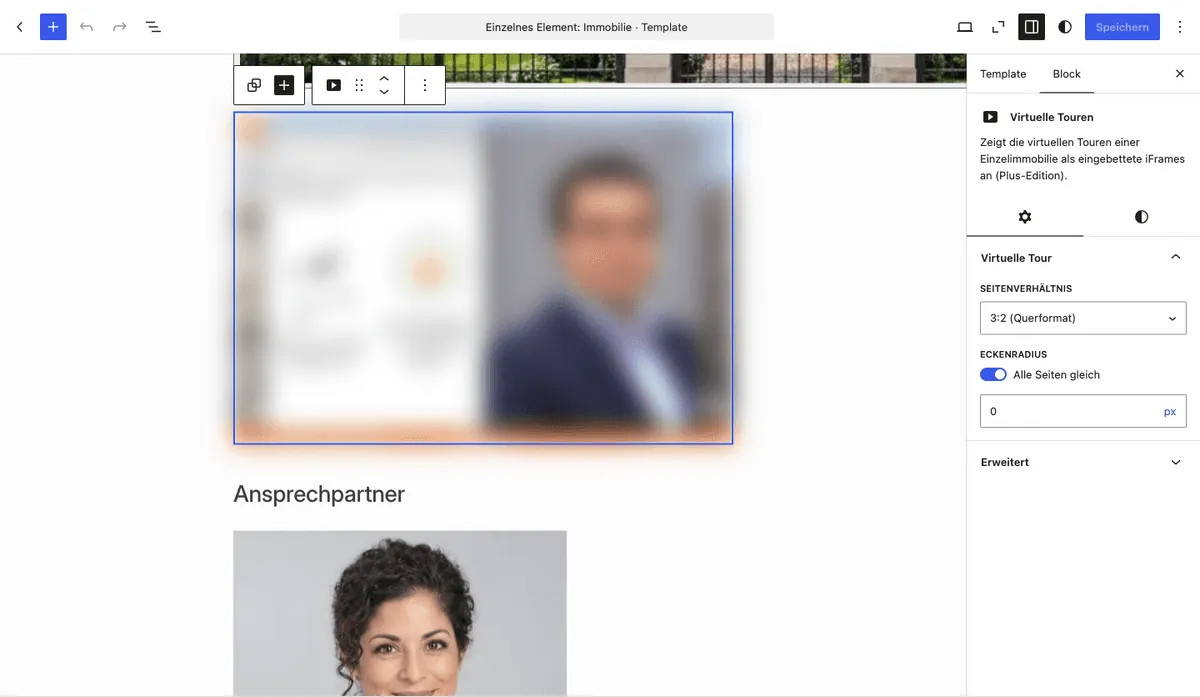
With the Virtual tours PLUS Gutenberg block (immomakler/single-virtual-tours) you embed virtual 360° tours of a property directly in block templates or any pages. Each tour appears as a preview image that opens the tour in a lightbox once visitors have given consent – just like in the detail view and in the page builder elements (see 360-Degree Tours). If you have switched off the preview image display, the block embeds the tour directly as an <iframe>.
Requirements
Section titled “Requirements”- WordPress with the Gutenberg editor (WordPress 5.0 or later)
- WP-ImmoMakler PLUS (the block is not available in the Basic edition)
- The property must have a link with a recognised 360° tour URL stored
Inserting the block
Section titled “Inserting the block”-
Edit a property or open a template
Open an existing property in the editor or a block-based template for the Property post type (requires a block theme or the Site Editor).
-
Insert the block
Click the + icon and search for Virtual tours, or navigate to the Widgets category. Insert the block.
-
Check the preview
In the editor — provided at least one sample property with tour URLs is available — a live preview with the preview images is displayed. If no tour URLs are present, a placeholder text appears.
Configuring the style
Section titled “Configuring the style”In the block panel Virtual Tour you set the appearance:
Aspect ratio
Section titled “Aspect ratio”| Option | Description |
|---|---|
| 16:9 (landscape) | Standard format for video content — recommended for most tours |
| 3:2 (landscape) | Wide landscape format, default for this block |
| 4:3 (landscape) | Classic screen format |
| 1:1 (square) | Square display |
The configured value applies to the preview image or the embedded <iframe> of each tour. The content blocker overlay (e.g. Borlabs Cookie) also inherits the aspect ratio.
Corner radius
Section titled “Corner radius”The corner radius applies to each individual tour. The four corners can be set together or independently:
- All sides equal: Enables a single input for all four corners simultaneously (default: on).
- Individual sides: Turn off the toggle to set top, right, bottom and left separately.
Supported units: px, %, em, rem.
CSS classes for custom styling
Section titled “CSS classes for custom styling”/* Block wrapper */.wp-block-immomakler-single-virtual-tours { }
/* List of tours and an individual tour */.wp-block-immomakler-single-virtual-tours .immomakler-virtual-tours { }.wp-block-immomakler-single-virtual-tours .immomakler-media-list__item { }
/* Embedded iframe when the preview image display is switched off */.wp-block-immomakler-single-virtual-tours .immomakler-virtual-tours__frame { }Filter hook
Section titled “Filter hook”The HTML of each individual tour can be customised via the immomakler_virtual_tour_html filter — e.g. to insert a custom consent overlay:
add_filter( 'immomakler_virtual_tour_html', function ( string $iframe_html, string $url, string $preview_image_url ): string { // Return custom HTML, e.g. with a consent wrapper return $iframe_html; }, 10, 3);Compatible providers
Section titled “Compatible providers”The block displays all tour URLs that WP-ImmoMakler recognises as 360° tours. An overview of supported providers can be found under 360-Degree Tours.