

Access and Erasure of Personal Data
WP-ImmoMakler stores personal data of your website visitors in two places:
- Property Alerts PLUS: When a prospect creates a property alert, WordPress stores their email address, the contact details they entered, the consents they gave and the saved search criteria.
- Contact Inquiries: When someone submits the contact form, the inquiry is stored in the backend in addition to being sent by email — with name, contact details, message, the consents given and the requested property.
If one of these people later requests access to their data (Art. 15 GDPR) or its erasure (Art. 17 GDPR), you can handle this directly through the privacy tools that WordPress ships with — WP-ImmoMakler reports both data sets there automatically.
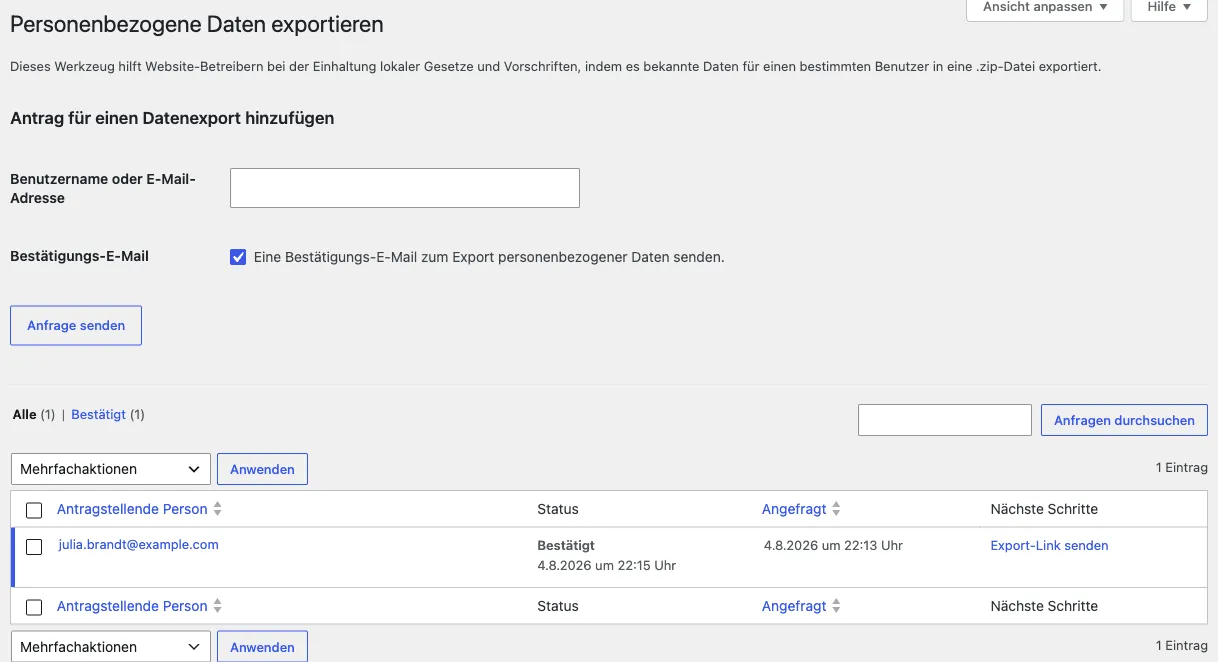
Exporting a Person’s Data
Section titled “Exporting a Person’s Data”- In the backend of your website (wp-admin), open Tools → Export Personal Data.
- Enter the email address of the requesting person and click Send Request. WordPress sends that person a confirmation email.
- Once the request has been confirmed, click Download Personal Data or Email Data in the list.
The resulting ZIP file contains a Property Alerts section with one entry per stored property alert:
- status (confirmed and active, or not yet confirmed) and creation date
- salutation, first name, surname, street, postcode, city, email address and phone number — as far as they were filled in
- the consents for being contacted and for the privacy policy
- email format, chosen notification interval and the time of the last notification
- the saved search criteria as well as the free-text entries from the advanced property alert form
A second Contact Inquiries section lists every inquiry stored for that address, with all submitted form fields: salutation, company, name, address, phone, message, appointment request, as well as the checked boxes for the terms and conditions, privacy policy, commission and cancellation policy.
Erasing a Person’s Data
Section titled “Erasing a Person’s Data”- Open Tools → Erase Personal Data.
- Enter the email address and send the request. Here, too, the person confirms the process by email.
- Then click Erase Personal Data.
Every property alert and contact inquiry stored for that address is removed completely — without going through the trash. The person will no longer receive notifications about new properties.
If an entry cannot be removed — for example because another plugin blocks deletion — WordPress reports this in the request’s result instead of confirming complete erasure.
What WP-ImmoMakler Takes into Account
Section titled “What WP-ImmoMakler Takes into Account”- Unconfirmed property alerts as well. A property alert that the person has not yet activated via the link in the confirmation email already contains their contact details. It is therefore exported and erased just like an active one.
- Several property alerts per address. If someone creates several property alerts using the same email address, all of them are covered.
- Even when the feature is disabled. If you switch the property alert feature off, the property alerts already stored remain in the database. Export and erasure continue to work. The same applies to contact inquiries if you disable their storage afterwards.
- Inquiries flagged as suspected spam, too. A contact inquiry marked as suspicious contains the same personal data as any other and is therefore exported and erased in the same way.
- The emails that were sent remain untouched. What gets erased is what is stored in WordPress. You need to remove the notification emails that have already reached your inbox or your real estate CRM software yourself, there.
Automatic Deletion as a Complement
Section titled “Automatic Deletion as a Complement”Independently of individual requests, you can have both data sets deleted automatically after a set period.
For property alerts, you’ll find this in the backend of your website (wp-admin) under WP-ImmoMakler → Settings → Property Alerts. The Automatically delete property alerts after X months option removes confirmed property alerts once the configured period has elapsed, and a separate option discards unconfirmed property alerts after 24 hours. You can find details under Configuring Property Alerts.
For contact inquiries, the same option is available under WP-ImmoMakler → Settings → Contact Form: the Automatically delete contact inquiries option removes stored inquiries after a period of your choice, from one month up to ten years. The default is Never. You can find details under Contact Form.