

Python OpenImmo Property Transfer
If you built your website with Python — for example with Django or Flask — you can still use WP-ImmoMakler as a full-featured real estate plugin: through an iFrame integration. WP-ImmoMakler runs on a separate WordPress installation, and the property view is embedded as an iFrame into your Python website.

Requirements
Section titled “Requirements”You need a WordPress installation on which WP-ImmoMakler runs and into which your properties are imported. That installation can sit on the same server as your Python application or on a separate host. Simply book the WP-ImmoMakler licence that matches the size of your property portfolio.
For exactly this scenario, WP-ImmoMakler comes with its own iFrame mode. So you do not write an <iframe> tag yourself — you switch the mode on in the settings and use the code WP-ImmoMakler then shows you, ready to paste.
Step 1: Enable iFrame mode
Section titled “Step 1: Enable iFrame mode”-
Open the settings
In the backend of your WordPress installation (wp-admin), go to WP-ImmoMakler → Settings → Display.
-
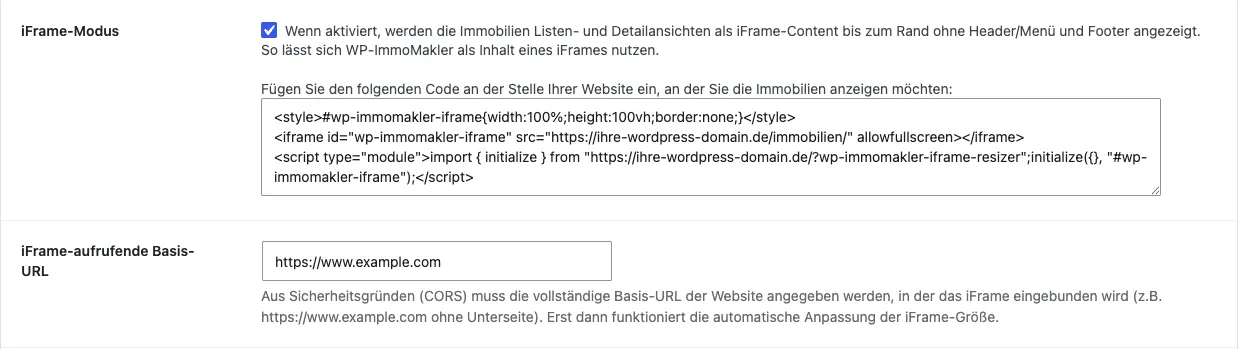
Switch on iFrame mode
Tick iFrame mode. The list and detail views of your properties are then output as iFrame content, edge to edge — without the header, menu and footer of the WordPress installation. Image galleries open in full screen in this mode so that they are not limited to the height of the iFrame.
-
Enter the iFrame-calling base URL
Under iFrame-calling base URL, enter the full base URL of your Python website — that is, the address of the site the iFrame is embedded in, for example
https://www.example.comwithout a subpage. For security reasons (CORS), the automatic iFrame resizing only works once this entry is in place. -
Save
Save the settings.
Step 2: Copy the embed code
Section titled “Step 2: Copy the embed code”Directly below the iFrame mode option, WP-ImmoMakler shows the finished embed code — already containing the URLs of your own installation. Clicking into the field selects the whole code so you can copy it.
The code looks like this:
<style>#wp-immomakler-iframe{width:100%;height:100vh;border:none;}</style><iframe id="wp-immomakler-iframe" src="https://your-wordpress-domain.com/immobilien/" allowfullscreen></iframe><script type="module">import { initialize } from "https://your-wordpress-domain.com/?wp-immomakler-iframe-resizer";initialize({}, "#wp-immomakler-iframe");</script>It consists of three parts: a small stylesheet that gives the iFrame its full width, the iFrame itself, and a JavaScript module that continuously adjusts the height of the iFrame to its content. This means there is no second scrollbar, and the height adapts automatically when a visitor moves from the list to the detail view.
Step 3: Embedding it in your Python website
Section titled “Step 3: Embedding it in your Python website”-
Pick the template
Open the template that renders the property page of your website — in Django, for example,
templates/immobilien.html; in Flask, the corresponding Jinja template. -
Insert the code
Paste the code where the properties should appear.
-
Publish the route
Make sure the template is reachable under its own URL, and deploy the change.
If the height is not adjusted automatically
Section titled “If the height is not adjusted automatically”If the iFrame stays at its initial height or a second scrollbar appears, it is almost always down to one of these three causes:
- The
<script type="module">is no longer in the delivered HTML because the template engine altered it. Check the output in the source code of the finished page. - The iFrame-calling base URL is empty, contains a typo, or points at a subpage. Only the base URL, including
https://, belongs there. - The base URL entered does not match the address actually being called, for example
https://example.cominstead ofhttps://www.example.com.
Hosting options
Section titled “Hosting options”You can set the iFrame up yourself or have your agency set it up. Alternatively, we offer a setup service for configuring the iFrame, including visual integration of the plugin into the layout of your Python website, based on our standard design as shown in our demo.
Our reference list shows examples of WP-ImmoMakler integrated via an iFrame solution.
We also offer to host the iFrame on our server. Of course, you can equally run the iFrame on your own server or on your agency’s server. If the iFrame is to run on our server, you would need to take out a maintenance contract. You can move the iFrame from our server to your own at any time.
If you have any further questions, please contact our support team.