

Set Up the Carousel
PLUS The carousel is a visually appealing element that displays selected properties as a horizontally scrollable carousel. It is particularly well suited to home pages or landing pages, to deliberately highlight featured properties.
Requirements
Section titled “Requirements”The carousel is a feature of the PLUS edition of WP-ImmoMakler. Make sure the PLUS edition is activated.

Embedding the carousel via shortcode
Section titled “Embedding the carousel via shortcode”The simplest way to embed it is the shortcode:
[immomakler-carousel]Insert this shortcode on any WordPress page. In the Gutenberg editor, use the Shortcode block.
Embedding the carousel with page builders
Section titled “Embedding the carousel with page builders”Elementor Pro
Section titled “Elementor Pro”In Elementor Pro, a dedicated Carousel widget is available under the WP-ImmoMakler: usable site-wide category. Drag and drop it onto the desired position and configure it in the Elementor editor.
On the Content tab, the widget offers the same options as the Customizer’s Carousel section (see the table under Configuring the display options below) — each one individually overridable for this widget.
Divi Theme Builder
Section titled “Divi Theme Builder”In Divi, you can embed the WP-ImmoMakler carousel module in your layout.
WPBakery and other builders
Section titled “WPBakery and other builders”Use the shortcode block of the respective page builder and insert [immomakler-carousel].
Configuring the display options
Section titled “Configuring the display options”You control how the carousel is displayed in the backend of your website (wp-admin) under WP-ImmoMakler → Settings → Display. Among other things, you can set up how many properties are shown in the carousel at the same time:
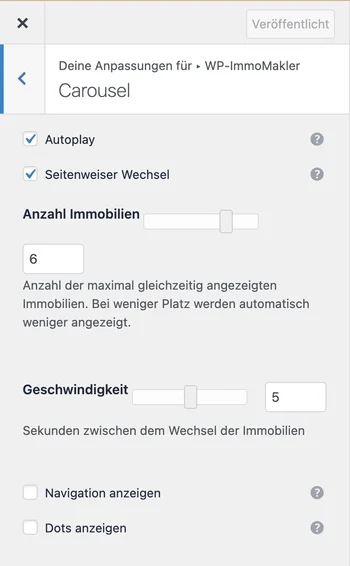
| Option | Description |
|---|---|
| Number of visible properties | How many cards are shown at the same time |
| Autoplay | Whether the carousel advances automatically |
| Autoplay speed | Time interval between transitions |
| Navigation | Arrow navigation and/or dot navigation |
Showing specific properties in the carousel
Section titled “Showing specific properties in the carousel”By default, the carousel shows the latest properties. The carousel accepts the same filter attributes as the [immomakler-archive] shortcode – for example, to show only properties with a particular status, such as featured “Topobjekt” properties:
[immomakler-carousel status=topobjekt]The value for status corresponds to the slug of the relevant status term. Check the actual term in the backend of your website (wp-admin) under WP-ImmoMakler → Properties → Status, as it may vary depending on your real estate software and any custom adjustments.