

Sorting the Property List
By default, WP-ImmoMakler sorts properties in the list view by date — the newest properties appear at the top. This is based on the date of first publication on your website: a later update to a property (e.g. through a re-import) does not change its position in the list.
You can switch the default sort order to a fixed criterion in the Customizer; your website visitors can then further adjust it via the sorting dropdown (if enabled).
Sorting for Your Website Visitors
Section titled “Sorting for Your Website Visitors”Property seekers can adjust the sort order to their preferred criterion by clicking the arrow to the right of “Newest first”. You can try out the various sorting options live in our demo.

Setting the Default Sort Order in the Customizer
Section titled “Setting the Default Sort Order in the Customizer”You configure the default sort order in your website’s backend (wp-admin) under Appearance → Customizer → WP-ImmoMakler → Immobilien Listenansicht (Property list view) in the option Default sort order. Use the dropdown to select the desired default sort order:
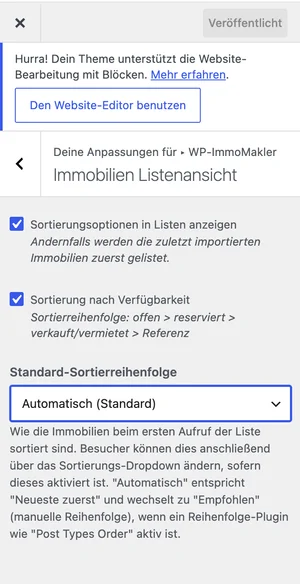
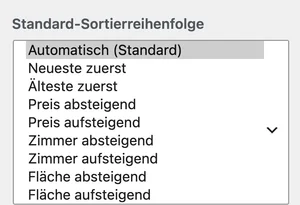
The following options are available:
| Option | Description |
|---|---|
| Automatic (default) | “Newest first” — automatically switches to manual order when an order plugin such as “Post Types Order” is active |
| Newest first | Most recently added properties appear at the top |
| Oldest first | First added properties appear at the top |
| Price descending | Most expensive property first |
| Price ascending | Cheapest property first |
| Rooms descending / ascending | Sorted by number of rooms |
| Area descending / ascending | Sorted by living/usable area |
Setting the Customizer Option’s Default Value via Filter (for Developers)
Section titled “Setting the Customizer Option’s Default Value via Filter (for Developers)”Before the Customizer option was introduced, the default sort order could only be set via the immomakler_default_order filter. The filter still exists, but now only acts once, as the default value of the Customizer option: it determines which sort order is preselected as long as nothing has been explicitly saved yet in the Default sort order option — for example right after installation, or if you were already using the filter before the update (your previous value is then adopted automatically). Once the option has been saved, it takes precedence and the filter is no longer evaluated.
For example, to sort newly created websites by price by default, add the following filter to the functions.php of your WP-ImmoMakler child skin plugin in an update-safe way:
add_filter( 'immomakler_default_order', function( $order_key ) { return 'priceasc';} );Allowed values: datedesc, dateasc, pricedesc, priceasc, roomsdesc, roomsasc, spacedesc, spaceasc, recommended, idasc, iddesc. The recommended value is not selectable in the Customizer option itself — only via this filter (before the option is saved for the first time) can you set the manual order as the default, independently of any of the detected order plugins.
Moving Updated Properties to the Top
Section titled “Moving Updated Properties to the Top”By default, the sort date is based on the date of first publication on your website — a later update to an existing property (e.g. through a re-import) does not change its position in the “Newest first” sort order. If you’d instead like recently updated properties to move to the top, you can disable the preservation of the original date with the following filter, added in an update-safe way to the functions.php of your WP-ImmoMakler child skin plugin:
add_filter( 'immomakler_preserve_post_date_on_update', '__return_false' );Adjusting the Order via Drag & Drop
Section titled “Adjusting the Order via Drag & Drop”With the “Recommended” sort order and a suitable add-on plugin, you control which properties are permanently displayed at the top of the list view.
In the WordPress backend, you can then easily set the order of your properties via drag & drop — your best listings end up exactly where you want them. Technically, WP-ImmoMakler uses the WordPress Order field (menu_order) for this, which the following plugins set for manual post ordering via drag & drop:
- Post Types Order
- Metronet Reorder Posts
- Intuitive Custom Post Order
- Simple Custom Post Order
- Real Custom Post Order
WP-ImmoMakler automatically detects Post Types Order and Metronet Reorder Posts: if either plugin is active and the default sort order in the Customizer is set to “Automatic” (default), the list view is sorted by this custom order, and the “Highlights” option additionally appears in the sorting dropdown. If you use one of the other plugins, set the immomakler_default_order filter to recommended instead, before saving the Customizer option for the first time (see above).