

ImmoScout24 WordPress Plugin: Connect ImmobilienScout24.de
WP-ImmoMakler is the WordPress plugin for ImmoScout24: it connects your WordPress website directly to ImmobilienScout24.de and automatically imports your properties including images — no additional real estate software required.
What Is the ImmobilienScout24 API?
Section titled “What Is the ImmobilienScout24 API?”The ImmoScout24 API is a programming interface that allows property data and images from immobilienscout24.de to be retrieved automatically. WP-ImmoMakler uses this interface directly — no separate real estate software is required. You can also use the ImmoScout24 connection in parallel with other sources, e.g. simultaneously with your real estate software, an ImmoScout24 account, or with listings created manually in the WordPress backend.
Advantages of the ImmoScout24 WordPress Plugin
Section titled “Advantages of the ImmoScout24 WordPress Plugin”With the ImmoScout24 integration in WP-ImmoMakler, your properties are synchronised automatically and regularly between ImmoScout24 and your WordPress website. You can also offer deactivated or archived listings on your website without having to keep them active on ImmoScout24 at additional cost.
Alternative: OpenImmo Interface
Section titled “Alternative: OpenImmo Interface”If you are already using real estate software, you can transfer your properties free of charge via the OpenImmo interface — this export function is available at no cost in virtually all common software solutions.
Requesting an API Key
Section titled “Requesting an API Key”Visit the ImmoScout24 developer page and apply for your API credentials there. Click “Click here to get access” and sign in with your ImmoScout24 credentials. Then enter your website URL (e.g. “mueller-immobilien.de”).

ImmoScout24 provides you with a “Consumer Key” and a “Consumer Secret”. You will enter both values in WP-ImmoMakler in the next step.
Setting Up and Connecting an Account
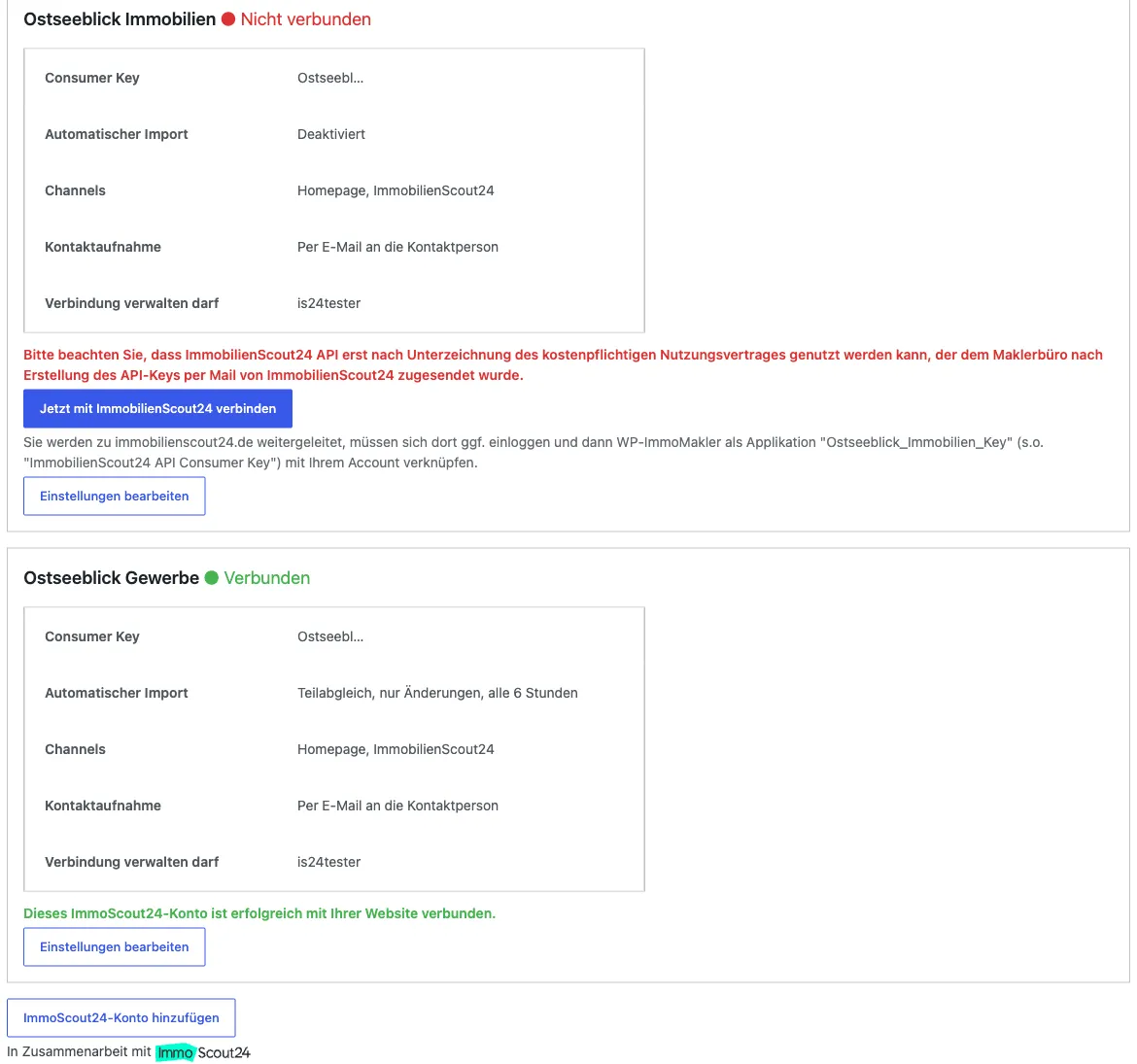
Section titled “Setting Up and Connecting an Account”The ImmoScout24 connection is managed as an account in the backend of your website (wp-admin) under WP-ImmoMakler → Software/Portals → ImmobilienScout24. Each account bundles the API credentials, the connection, and all import settings.

The complete form for an account includes all import settings in addition to the API credentials:

-
Create an account
Click the “Add ImmoScout24 account” button. Enter a label (e.g. the location or office — it is shown in overviews and e-mails) and enter the Consumer Key and Consumer Secret from the previous step.
-
Save the account
Click “Save account”. The account then appears in the overview with the status “Not connected”.
-
Connect with ImmobilienScout24
Click “Connect with ImmobilienScout24 now”. You are redirected to immobilienscout24.de, sign in there with your ImmoScout24 credentials if necessary, and link WP-ImmoMakler as an application to your account. You are then automatically returned to your website; the account now shows the status “Connected”.
Optionally, you can leave this step to a specific user who establishes the connection without administrator rights — see Connection Page for Non-Admins.
-
Enable the automatic import
Open the account via the “Edit settings” button and enable “Import properties automatically”. From now on, your properties are retrieved automatically on a regular basis without you needing to log into WordPress.
Import Settings
Section titled “Import Settings”All import settings apply per account and can be adjusted via the account’s “Edit settings” button:
- Transfer mode — “Incremental sync” transfers only the latest changes, “full sync” the entire inventory. The incremental sync is recommended for the regular retrieval: a full sync generates considerably more API calls, which can lead to higher costs charged by ImmobilienScout24.
- Retrieval interval — hours between the automatic retrievals (default: 6 hours). The more frequently data is retrieved, the more API calls are generated.
- Channels — import of the properties marked on ImmoScout24 for the “Homepage” channel and/or the “ImmobilienScout24” channel. For the “Homepage” channel, listings transferred as INACTIVE can also be included.
- Deactivated and archived properties — both groups can additionally be imported and, if desired, automatically marked as reference listings.
- Always import property images at Full HD maximum — limits imported images to 1920 × 1080 pixels; this saves web space and data traffic.
- ImmobilienScout24 contact requests — determines whether your website’s contact form sends enquiries to the ImmoScout24 message manager or by e-mail directly to the contact person. Sending to the message manager only works for listings that are published on immobilienscout24.de at the time of sending; otherwise the message is automatically sent by e-mail. With multiple accounts, each enquiry is automatically sent via the account the respective property was imported from.
For manual retrieval, the backend of your website (wp-admin) additionally offers the “Retrieve current data from ImmoScout24 now” buttons (incremental sync or full sync) under WP-ImmoMakler → Property Importer.
Disconnecting or Deleting an Account
Section titled “Disconnecting or Deleting an Account”Both actions are available within the account settings (“Edit settings” button), right at the bottom next to “Save account” and “Cancel”:
- “Remove authentication” disconnects the connection to ImmobilienScout24. The account itself is retained with all credentials and settings, so you can reconnect at any time. Without a connection, WP-ImmoMakler no longer retrieves any properties.
- “Delete account” removes the account completely from WP-ImmoMakler. For safety, you need to confirm a second time. Properties already imported remain on your website and are no longer updated from that point on.
Multiple ImmoScout24 Accounts PREMIUM
Section titled “Multiple ImmoScout24 Accounts ”From WP-ImmoMakler PREMIUM, you can connect any number of ImmoScout24 accounts to your website at the same time — for example for several locations or offices. Each account has its own API credentials, its own connection, its own retrieval interval, and its own import settings.
The imported properties are permanently assigned to their respective account: a sync of one account never modifies or deletes the properties of another account, and contact enquiries are always sent via the account the property belongs to.
The BASIC and PLUS editions include one ImmoScout24 account. If you need multiple accounts, please talk to our support team.
Connection Page for Non-Admins
Section titled “Connection Page for Non-Admins”The connection to ImmobilienScout24 has to be established by the person who has access to the ImmoScout24 account — and that is not always the person administering the website. This is what the connection page is for: as an administrator, you select a user of your WordPress website in the account settings under “May manage the connection”.
The selected person then receives their own “ImmoScout24 connection” page in the backend and can use it exclusively to connect this account to ImmobilienScout24 or to disconnect it again — entirely without administrator rights and without access to the other WP-ImmoMakler settings. API credentials and import settings remain hidden.

Project Import PLUS
Section titled “Project Import ”If you want to import building projects (new-build projects with multiple units) from ImmoScout24, enable the “Import projects” option in the settings of the respective account. In addition, you need to ask the ImmoScout24 support team to activate the RealEstateProject and RealEstateProjectAttachments APIs for your API key.
Please note: the ImmoScout24 Projects API currently does not support modification timestamps, so the projects are retrieved in full on every sync — generating billable API calls each time. Increase the account’s retrieval interval if necessary.
Usage Statistics and Cost Control
Section titled “Usage Statistics and Cost Control”For each account, WP-ImmoMakler shows a monthly usage statistic of the API calls under Software/Portals → ImmobilienScout24. If the API is called unusually often (more than 10,000 calls in the current month across all accounts), you automatically receive a notice in the backend and an e-mail notification — helping you avoid unexpected costs charged by ImmobilienScout24.
Updating from an Earlier Version
Section titled “Updating from an Earlier Version”If you update WP-ImmoMakler from a version before multi-account support, your existing ImmoScout24 connection is automatically carried over as the first account — including all settings and the existing authentication. You do not need to reconnect with ImmobilienScout24, and your already imported properties remain assigned to the account.
For further questions, please contact our support team.