

Showing/Hiding Property Data
WP-ImmoMakler offers two ways to determine which property data appears in the list and detail views: without any programming knowledge via the WordPress Customizer, and for developers via filter hooks.
Selecting fields in the Customizer
Section titled “Selecting fields in the Customizer”Fields are selected in the Customizer. You can reach it in the WordPress admin of your website (wp-admin) under WP-ImmoMakler → Customizer or under Appearance → Customizer.
List view
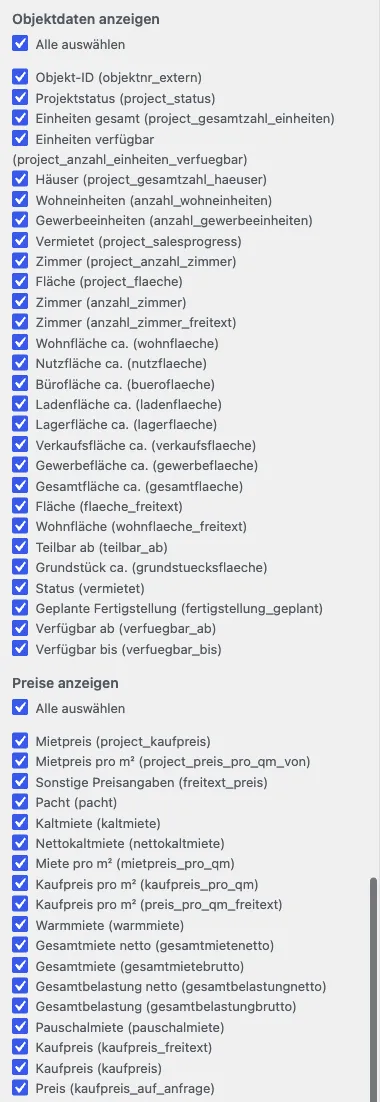
Section titled “List view”Under WP-ImmoMakler → Property List View you will find checkbox lists that let you assemble the displayed fields. Each list has a switch to select or deselect all fields at once.
| Setting | Description |
|---|---|
| Show property data | Property data such as number of rooms, living area, or plot area. By default the list view shows fewer fields than the detail view — here you add further details or remove ones you do not need, such as the internal property number. |
| Show prices | Price details such as purchase price, base rent, service charges, or commission. |
| Show custom fields in the list view | The fields created under WP-ImmoMakler → Settings → Custom Fields. This setting only appears once at least one custom field has been created. |
The technical key is shown in parentheses after each field name (for example wohnflaeche). You need this key if you want to control a field via a filter instead.
Detail view
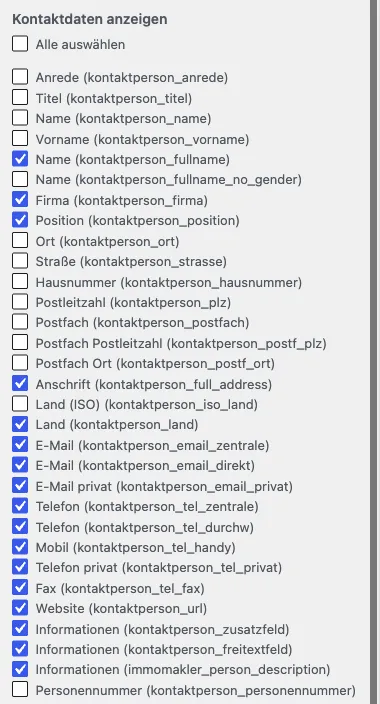
Section titled “Detail view”Under WP-ImmoMakler → Property Detail View, the Show contact data checkbox list controls which details of the contact person appear in the exposé — for example name, phone number, email address, or postal address.
There is no checkbox list for the property data of the detail view: the detail view shows all available fields. You hide individual fields here via a template filter (see below).
Customising fields via template filters
Section titled “Customising fields via template filters”Using WordPress filters, developers can control which property data fields appear in the list and detail views. Always place the code in the functions.php of your child skin so that the changes are update-safe.
Hiding fields via a filter
Section titled “Hiding fields via a filter”To remove a field from the detail view, add the immomakler_property_data_single_keys filter to the functions.php of your WP-ImmoMakler child skin:
add_filter( 'immomakler_property_data_single_keys', function( $property_data ) { $remove_keys = [ 'objektnr_extern', ]; return array_diff( $property_data, $remove_keys );} );In the example, the external property number (objektnr_extern) is hidden from the detail view.
Available filters
Section titled “Available filters”| View | Data type | Filter |
|---|---|---|
| List view | Text data | immomakler_property_data_archive_keys |
| Detail view | Text data | immomakler_property_data_single_keys |
| List view | Price data | immomakler_property_data_archive_price_keys |
| Detail view | Price data | immomakler_property_data_single_price_keys |
Customising number formats
Section titled “Customising number formats”The display format of currency amounts and other numbers is configurable. For example, you can control whether prices are output as “1,000,000 €” or in a different format. You will find the corresponding settings under Configuring number formats.
Support
Section titled “Support”For implementation, please contact your web agency or WP-ImmoMakler support.