

Creating Properties Manually
Manual Data Entry
Section titled “Manual Data Entry”Properties can also be entered and managed manually directly in the WordPress admin — without additional interfaces or third-party systems.
Enabling Manual Data Entry
Section titled “Enabling Manual Data Entry”Manual data entry is not active by default. Enable it in the backend of your website (wp-admin) under WP-ImmoMakler → Settings → General via the “Manuelle Dateneingabe aktivieren” option, and click Save Changes.
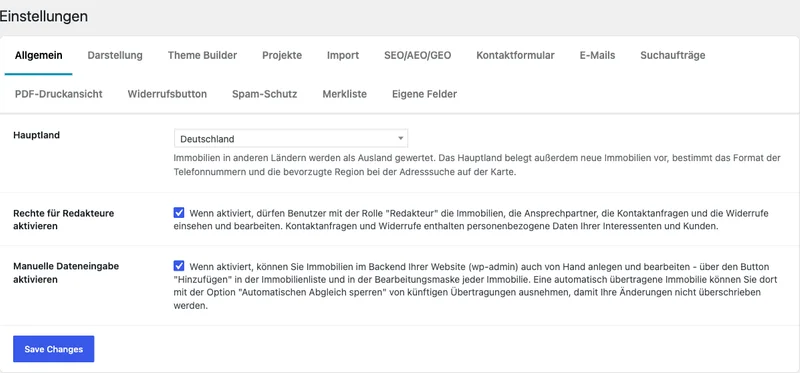
After that, you will find the Add button in the properties list, and each property opens in an editing screen instead of the plain data view.
Creating and Editing Properties
Section titled “Creating and Editing Properties”In edit mode, you have access to the same fields that are also populated when importing from estate agent software — master data, address, areas, prices, features, images, energy certificate and more. The fields are grouped by topic blocks so you can work through the property data step by step.
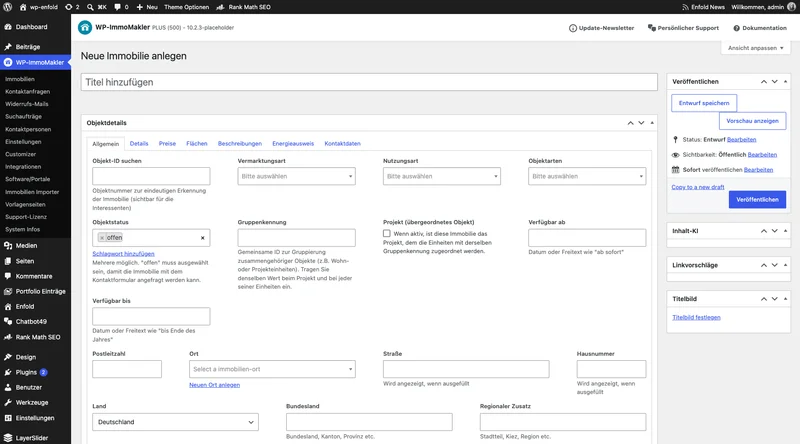
On an existing property, the editing screen also shows the Database fields and Attachments boxes below it. They display the property’s stored raw data and files for viewing only and are collapsed when the page opens; clicking the heading expands them.
Benefits
Section titled “Benefits”- Properties can be created and edited directly in the WordPress admin
- Ideal for smaller portfolios, individual properties, or special properties
- No external software required
- Quick and intuitive content management
Combining with Existing Imports
Section titled “Combining with Existing Imports”Manual data entry can also be combined with existing import and interface solutions if needed. This allows WP-ImmoMakler to adapt optimally to different working styles and project requirements.
Existing properties transferred from your estate agent software can also be edited manually. Whether your changes survive the next transfer depends on whether you lock the property for it.
The first time you edit such a property, you must first make an explicit choice between three options in a dialog before you can change anything at all: “Immobilie vor Updates schützen” automatically enables the Disable automatic adjustment checkbox, permanently excluding the property from future transfers from your estate agent software, so that a change cannot be accidentally discarded again at the next sync. “Immobilie vorübergehend bearbeiten” leaves the checkbox unchanged — your change then only applies until the next automatic transfer, which can overwrite it again. Cancel instead leaves the editing screen without changing anything.
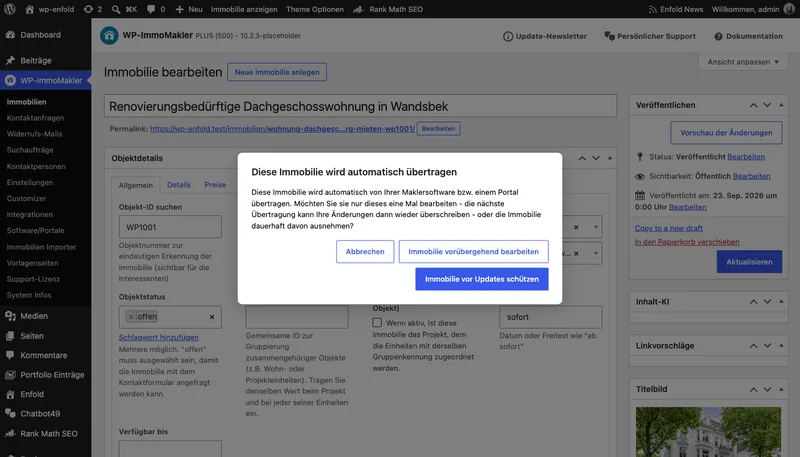
For each property, you can decide whether it should continue to be synchronised via the estate agent software or permanently switched to manual entry. You can lift the lock again at any time via the Disable automatic adjustment checkbox at the top of the editing screen.
Creating Development Projects with Units
Section titled “Creating Development Projects with Units”You create a development project with its units via the General tab of the editing screen:
- Enter the same Group Identifier for the project and for each of its units, for example
PROJ-001. The value does not need to follow any particular format; however, a single digit from 1 to 9 alone does not count as a project identifier, because some estate agent software sends such values as a general grouping counter. - Enable the Project (parent property) checkbox for the project. Leave it disabled for the units.
When you save, WP-ImmoMakler assigns the units to the project: the units no longer appear individually in the properties overview, and from PLUS onwards the project’s detail page displays the units table. How the units table looks is configured under Settings: Projects.
Permissions
Section titled “Permissions”Administrators can always create and edit properties. Whether users with the “Editor” role can too is set on the same General tab via the Activate rights for editors option. Further information can be found in the article Permissions & Roles.
Who is this feature for?
Section titled “Who is this feature for?”- Estate agents without external property software
- Special cases where manual maintenance is more practical than an import
For further questions, please contact our Support.