

Using WP-ImmoMakler with Complianz
WP-ImmoMakler embeds three kinds of content that transmit data to third parties: videos (YouTube, Vimeo), virtual tours (Matterport, Ogulo, Kuula and others) and maps (Google Maps). For all three, WP-ImmoMakler obtains consent before they load.
If you also run Complianz, two systems reach into the same task. This page describes how the two work together and what you need to set up.
From Version 5.69.0: Complianz Decides
Section titled “From Version 5.69.0: Complianz Decides”If Complianz is active, WP-ImmoMakler defers to its consent — for videos, tours and maps alike. For your visitors, that means:
- They are asked only once — by Complianz.
- A declined consent in Complianz is respected. Videos, tours and maps then stay blocked.
- If consent is missing, the button on the preview image leads to Complianz’s cookie settings. As soon as consent is given there, the content unlocks immediately — without reloading the page.
You don’t need to set up anything for this: the default Automatic setting detects Complianz on its own. The three possible settings are described in Working with Consent Plugins.
Set Up Complianz
Section titled “Set Up Complianz”Set up Complianz as usual, using its wizard. So that consent is mapped correctly per service, enable the services your website actually uses in Complianz — typically YouTube, Vimeo and Google Maps.
WP-ImmoMakler specifically asks Complianz about exactly these three services. Complianz doesn’t know virtual-tour providers as a separate service; consent to the Marketing category therefore applies to them. The same goes for maps that do not come from Google Maps but from OpenFreeMap, basemap.de, Mapbox or MapTiler.
WP-ImmoMakler’s Map Blocking
Section titled “WP-ImmoMakler’s Map Blocking”For maps, there is an additional, dedicated option. It is enabled by default and ensures the map only loads after consent has been given: in your website’s backend (wp-admin), go to WP-ImmoMakler → Integrations → Maps, option “Enable WP-ImmoMakler consent prompt / content blocker”.
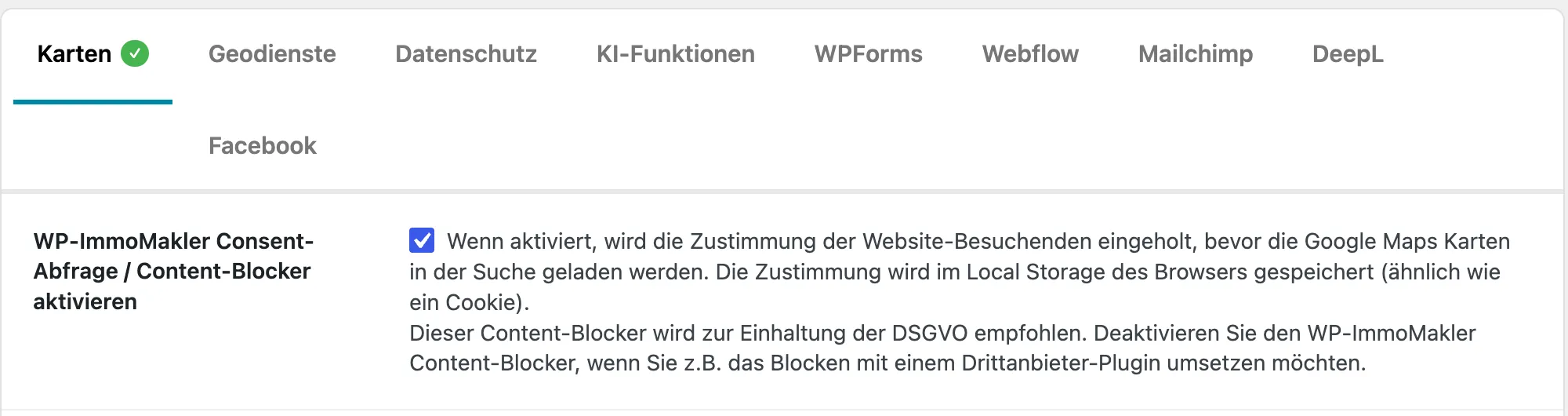
Leave the option enabled with Complianz. With the Automatic setting under Privacy, the map’s consent box follows Complianz: its button then reads “Open cookie settings” and opens the Complianz settings, and the map loads as soon as Complianz reports consent — including when visitors already gave it in the banner, in which case the box never appears.
If Complianz should block the map itself instead, choose “No prompt from WP-ImmoMakler” under Privacy. It applies to videos, virtual tours and maps together; the map option above only switches off the map’s prompt. In both cases, make sure Complianz reliably blocks Google Maps — both as an iFrame and as JavaScript.
Test After Making Changes
Section titled “Test After Making Changes”-
Clear caches
Clear your caching plugin’s cache, then your browser cache. Otherwise a page served from cache keeps showing the old state.
-
Test a decline
Open a property with a video, a tour and a map in a private browser window, and decline in the Complianz banner. None of the three kinds of content must be able to load.
-
Test consent
Then give consent. The video, tour and map must then open, without you reloading the page.
If Content Stays Empty Despite Consent
Section titled “If Content Stays Empty Despite Consent”If a tile stays non-functional after consent, or the map doesn’t appear, Videos and Maps Not Visible Despite Consent can help. It also describes how to recognise this case.