

Reference Properties
With WP-ImmoMakler, you can showcase completed projects as reference properties on your website. Reference properties are displayed with reduced information — typically only descriptions, images, and location, without prices or technical details.
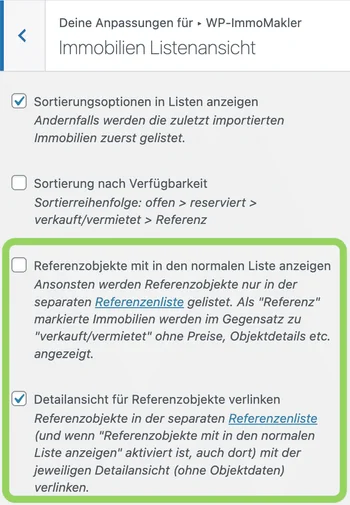
Reference properties can also be displayed as a separate menu item or at the end of the list view. You can find this setting in the Customizer under WP-ImmoMakler → List view.
Marking Properties as References
Section titled “Marking Properties as References”Depending on the real estate software you use, proceed as follows:
onOffice
Section titled “onOffice”In onOffice, enable the “Reference” checkbox on the “Marketing” tab under “Own Website”. You have two options for transferring this to your website:
- Via the OpenImmo interface: Please contact the onOffice support to have the transfer of the so-called “marketing fields” for the portal interface to your website enabled free of charge.
- Via the onOffice API: WP-ImmoMakler retrieves the reference properties directly, so no activation by onOffice support is needed. This requires the API access to be included in your onOffice version. Setup is described in the section Transferring Reference Properties.

Propstack
Section titled “Propstack”Enable reference transfer in the backend of your website (wp-admin) under Administration > Interfaces > Portals > “Reference transfer for specific property status”.

ImmobilienScout24
Section titled “ImmobilienScout24”Deactivated or archived properties from ImmobilienScout24 (also known as ImmoScout24, ImmoScout, or ImmobilienScout) can continue to be presented on your website as reference properties instead of being removed. You can find the settings for this in the backend of your website (wp-admin) under WP-ImmoMakler > Settings > ImmobilienScout24:
- Deactivated properties — Enable transfer of deactivated properties
- Mark deactivated properties as references — Automatically mark these properties as references
- Archived properties — Enable transfer of archived properties
- Mark archived properties as references — Automatically mark these properties as references
Enable the options you require.

Other Systems
Section titled “Other Systems”With other real estate software, several options are available:
- Create a separate export interface (e.g.,
/openimmo/referenzen/) - Enable the WP-ImmoMakler setting “Mark sold/rented properties as reference properties”
- Use custom fields that WP-ImmoMakler recognises as reference identifiers
WP-ImmoMakler recognises the following custom field values as reference indicators:
immobilie-user_defined_anyfield-Referenz = 1or'true'immobilie-user_defined_anyfield-Referenzobjekt = 'true'ausstattung-user_defined_anyfield-Referenz = 1or'true'verwaltung_techn-user_defined_anyfield-Referenzobjekt = 'Ja'
Archiving Deleted Properties as References
Section titled “Archiving Deleted Properties as References”Instead of completely removing deleted properties, you can automatically convert them into reference properties. To do so, add the following filter to the functions.php of your WP-ImmoMakler Child-Skin-Plugin:
add_filter( 'immomakler_mark_as_reference_instead_of_delete', '__return_true' );Note about immowelt.de
Section titled “Note about immowelt.de”The immowelt API does not allow the transfer of inactive properties, which means displaying them as references is technically not possible. If you transfer your properties via Immowelt and still want to display reference properties on your site, you can mark them using a keyword — for example, by prefixing the title with “Reference:”. WP-ImmoMakler will then recognise the property as a reference and mark it accordingly. Feel free to contact our Support for assistance.
Displaying Reference Properties
Section titled “Displaying Reference Properties”Reference properties are available by default at /immobilien/referenzen/. You can output a filtered list using the shortcode:
[immomakler-archive status=referenz vermarktungsart=kauf]In the backend of your website (wp-admin) in the WP-ImmoMakler Customizer under WP-ImmoMakler > Reference Properties, you can control whether references appear in the regular property list or on a dedicated page.
If infinite scrolling is active (starting with PLUS), the reference list loads further references as you scroll or via button click, each time with the configured number of properties per page. Without infinite scrolling, it shows all references on a single page.
The list view’s sorting option is not displayed in the reference list. A subtitle appears below the “reference” heading only if the list is filtered, for example by property type or location.
If you would like to show all references on a single page even with infinite scrolling active, set the filter immomakler_posts_per_page_referenzen to -1 in the functions.php of your WP-ImmoMakler Child-Skin-Plugin:
add_filter( 'immomakler_posts_per_page_referenzen', fn() => -1 );Customizing Templates
Section titled “Customizing Templates”Dedicated templates are available for displaying reference properties:
item-property-reference.php— Archive view (list view)content-property-reference.php— Detail view
Copy the desired template file to your WP-ImmoMakler Child-Skin-Plugin to customize it in an update-safe manner. To distinguish between the reference page and other pages within the templates, you can use the following condition:
if ( is_tax( 'immomakler_object_status', 'referenz' ) ) { // Only on the reference page}