

Configuring Property Alerts
How Do Property Alerts Work?
Section titled “How Do Property Alerts Work?”Property alerts allow website visitors to create individual search profiles. As soon as a new property is published that matches the stored criteria, WP-ImmoMakler automatically sends an email notification to the prospect. This keeps potential buyers and tenants informed without them having to visit your website regularly.
Prospects can narrow their search criteria by location, price, property type, and other characteristics.
A new property alert is unconfirmed at first. WP-ImmoMakler sends the prospect an email with a confirmation link. The link opens your website, where the prospect activates the alert by clicking the button Activate property alert. Likewise, the unsubscribe link in the notifications deletes a property alert only after a click on Delete property alert. Many email programs and security filters open links in incoming emails in advance to check them. Because only the click counts, such a request neither activates nor deletes a property alert.
WP-ImmoMakler does not accept property alerts with contradictory search criteria, for example a minimum area above the maximum area, and sends no confirmation email for them. The prospect sees a notice to check their search criteria instead. You add your own validation rules through a filter, see Check the search criteria of a property alert.
Enabling or Disabling Property Alerts
Section titled “Enabling or Disabling Property Alerts”To enable or disable the feature, please navigate to the backend of your website (wp-admin) and then to WP-ImmoMakler > Settings > Property Alerts.

Managing Stored Search Profiles
Section titled “Managing Stored Search Profiles”An overview of all search profiles created by visitors can be found in the backend of your website (wp-admin) under WP-ImmoMakler > Property Alerts. There you can view individual entries and delete them if needed. Editing the stored search criteria in the backend is not supported; the edit screen for a property alert only shows a read-only overview of the search criteria.
The Date column shows when a property alert was submitted and when it was activated. The Spam protection column names the CAPTCHA the submission passed, or No CAPTCHA active if none was enabled at that time. If the form’s invisible origin token was missing or had expired when the alert was submitted, that is shown there too. Property alerts created before version 5.70 show only the activation date and no spam protection entry.

Automatically Deleting Property Alerts
Section titled “Automatically Deleting Property Alerts”To prevent an unlimited number of property alerts from accumulating over time and to comply with data-retention deadlines (e.g. under the GDPR), you can have confirmed property alerts deleted automatically. In the backend of your website (wp-admin), go to WP-ImmoMakler → Settings → Property Alerts and choose the desired number of months for the Automatically delete property alerts after X months option. The default setting “never” disables automatic deletion.
A confirmed property alert is deleted once the selected number of months has passed since it was created. Unconfirmed property alerts are not affected by this — for those, the separate Delete unconfirmed property alerts option still applies, removing unconfirmed entries after 24 hours.
If you additionally enable Notify user about the deletion., the respective prospect receives an email before deletion informing them that their property alert has been deleted automatically.

Notify an Email Address about New Property Alerts
Section titled “Notify an Email Address about New Property Alerts”In the backend of your website under WP-ImmoMakler → Settings → Property Alerts you can configure which email address receives notifications about newly created property alerts.

Configuring the Advanced Property Alert Form
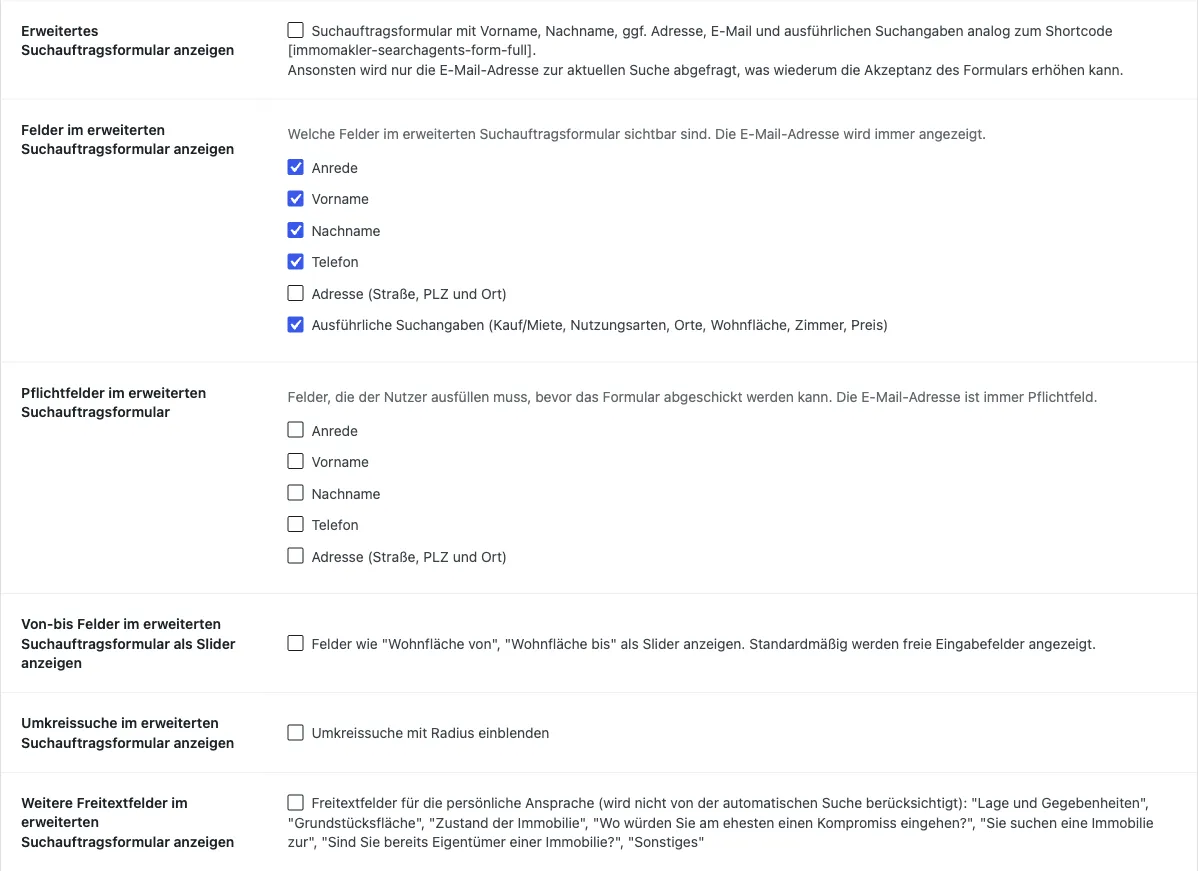
Section titled “Configuring the Advanced Property Alert Form”If you enable the Show advanced property alert form option, visitors can enter additional personal details and detailed search criteria alongside their email address when creating a property alert.
Display Fields
Section titled “Display Fields”With Fields to display in the advanced property alert form you use a multicheck to specify which fields are visible:
- First name
- Last name
- Address (street, postcode and city)
- Detailed search criteria (buy/rent, usage types, locations, floor area, rooms, price)
Required Fields
Section titled “Required Fields”With Required fields in the advanced property alert form you mark individual fields as mandatory. The required attribute prevents the form from being submitted without filling in these fields. The available options are:
- First name
- Last name
- Address (street, postcode and city)
Displaying the Search Form on Your Website
Section titled “Displaying the Search Form on Your Website”The full property alert form can be embedded on any page using the shortcode [immomakler-searchagents-form-full] — for example on a dedicated landing page for creating property alerts. The compact variant [immomakler-searchagents-form] is intended for placing the form at a specific location within a custom archive template and is rarely needed.
Full form
Section titled “Full form”
[immomakler-searchagents-form-full]With this shortcode, visitors enter their search criteria (buy/rent, usage types, locations, floor area, rooms, price) as well as their contact details. The form is independent of the current filter and works on any page — including outside the property list pages. It is therefore the standard way to embed the property alert form anywhere on your website.
Insert the shortcode directly into a page or post — including within a Shortcode or HTML block in your page builder (Gutenberg, Elementor, Divi, etc.). The exact procedure depends on your theme or page builder.
Compact form
Section titled “Compact form”
[immomakler-searchagents-form]This variant is rarely needed and is primarily aimed at theme and template developers: it places the form at a specific location within a custom archive template. With it, visitors can save the currently displayed search as a property alert. The shortcode works exclusively on WP-ImmoMakler list and archive pages and automatically adopts the filters set there (e.g. location, price, property type). By default, only the email address is requested — this lowers the barrier to creating a property alert. On pages that are not a property list, the shortcode outputs nothing.
If you have any questions about embedding, please contact our support team.
Problems with Email Delivery
Section titled “Problems with Email Delivery”If notifications are not arriving reliably for prospects, the cause is most often a missing SMTP configuration. Install an SMTP plugin such as:
For more information on email configuration, see the article Improving email delivery.