

Settings: Display
The display settings can be found in your website’s backend (wp-admin) under WP-ImmoMakler → Settings → Display.
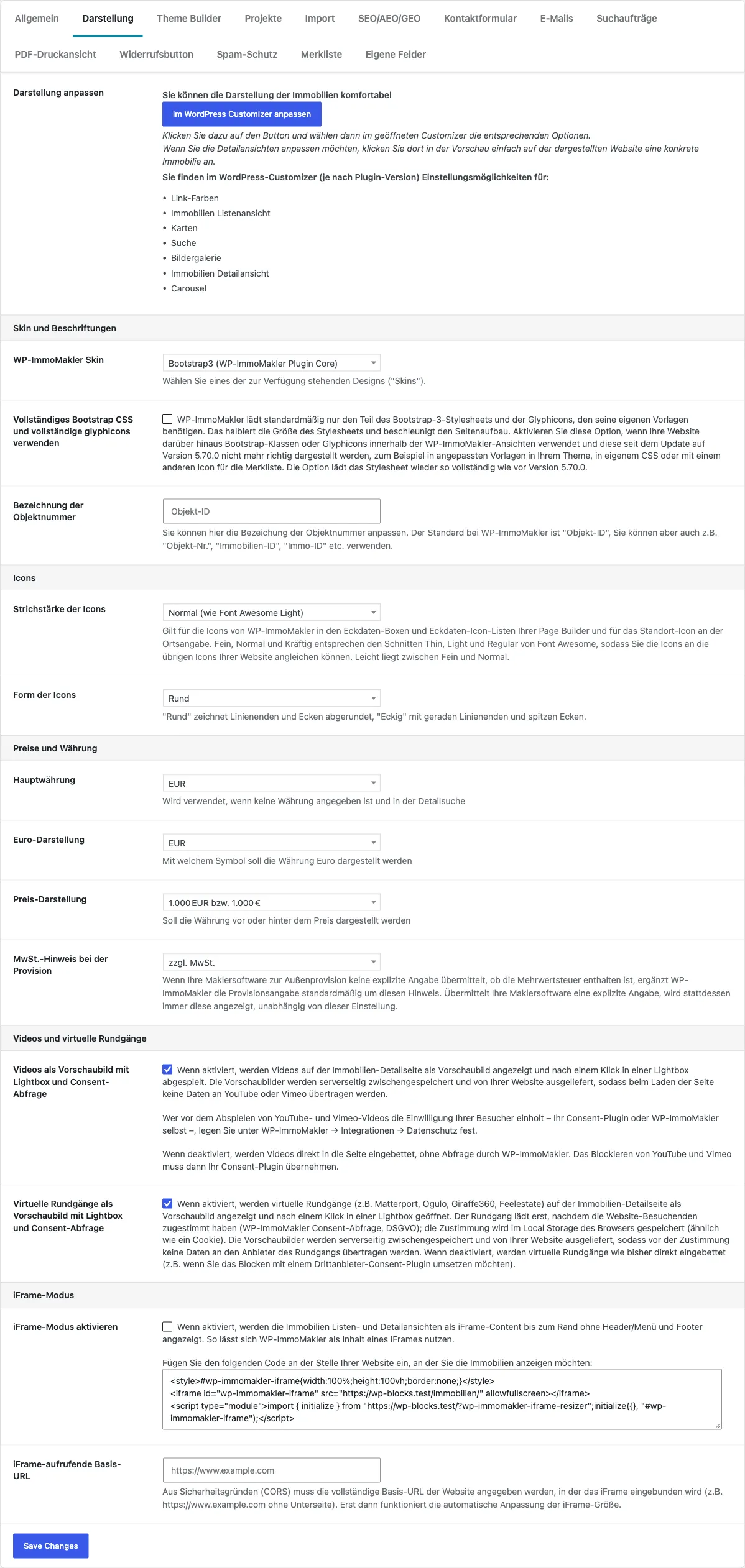
Adjusting the display in the WordPress Customizer
Section titled “Adjusting the display in the WordPress Customizer”The upper area of the tab contains no settings of its own; it links directly into the WordPress Customizer, opened with a preview of the property list view. Depending on your plugin version and edition, you will find options there for:
- Link colors
- Property list view
- Maps
- Search
- Image gallery
- Property detail view
- Carousel
If you want to adjust the detail view, simply click a specific property in the Customizer preview. The Customizer then switches to the detail view options.
Settings Overview
Section titled “Settings Overview”The options are grouped into four areas: Skin and Labels, Prices and Currency, Videos and Virtual Tours, and iFrame Mode.
| Label | Area | Type | Default | Description |
|---|---|---|---|---|
| WP-ImmoMakler Skin | Skin and Labels | Select | current skin | Switches the active design (skin). Shown as a select field only if more than one skin is available; otherwise the active skin is simply displayed. |
| “Vollständiges Bootstrap CSS und vollständige glyphicons verwenden” | Skin and Labels | Checkbox | inactive | Reloads the skin’s Bootstrap stylesheet in full, including all glyphicons. See Full Bootstrap CSS. |
| Property ID Label | Skin and Labels | Text | Property ID | Customizable label for the property number, e.g., “Property No.”, “Listing ID”, “Ref. No.”. If the field is left empty, “Property ID” is used. |
| Main Currency | Prices and Currency | Select | based on domain TLD, otherwise EUR | Default currency when no currency is specified, and for the detailed search. Possible values: EUR, CHF. For a Swiss domain TLD, CHF is preselected. |
| Euro Display | Prices and Currency | Select | EUR | Display of the Euro symbol: EUR or €. |
| Price Display | Prices and Currency | Select | after the price | Position of the currency: after the price (1,000 EUR) or before the price (EUR 1,000). |
| VAT note for the commission | Prices and Currency | Select | plus VAT | Note appended to the commission payable by the buyer or tenant if your real estate software does not supply an explicit VAT statement. Options: “plus VAT”, “incl. VAT” or “No note”. |
| Videos as preview image with lightbox and consent prompt | Videos and Virtual Tours | Checkbox | active | When active, videos on the detail page are shown as a preview image and only played in a lightbox after a click. YouTube and Vimeo videos load only after visitors have given their consent. |
| Virtual tours as preview image with lightbox and consent prompt PLUS | Videos and Virtual Tours | Checkbox | active | Same as the video option, but for virtual tours (e.g., Matterport, Ogulo, Giraffe360, Feelestate). |
| Enable iFrame Mode | iFrame Mode | Checkbox | inactive | When active, list and detail views are rendered as iFrame content without header, menu, and footer. Allows embedding WP-ImmoMakler as iFrame content in external websites. |
| iFrame Calling Base URL | iFrame Mode | Text | — | Full base URL of the website where the iFrame is embedded (e.g., https://www.example.com). Required for automatic iFrame height adjustment (CORS). |
Full Bootstrap CSS
Section titled “Full Bootstrap CSS”The skin styles the WP-ImmoMakler views with a Bootstrap 3 stylesheet. Since version 5.70.0, it includes only the Bootstrap classes and glyphicons that WP-ImmoMakler itself uses. This makes the stylesheet about half the size it used to be (around 9 KB instead of 17 KB transferred).
No longer included are, among other things, colored button and panel variants (e.g., btn-success, panel-primary), size variants (btn-lg, input-sm), tabs (nav-tabs), text alignment and text colors (e.g., text-center, text-primary), wells, labels, progress bars, grid offsets, and most glyphicons.
Enable the “Vollständiges Bootstrap CSS und vollständige glyphicons verwenden” option if your website uses such classes or icons within the WP-ImmoMakler views, for example:
- in customized templates you have placed in your theme or in a Child-Skin-Plugin,
- in your own CSS or content that uses Bootstrap classes,
- with an icon for the watchlist that is not among the bundled ones (see Watchlist).
The option reloads the stylesheet as fully as before version 5.70.0. It applies to the skin and to the blocks that load the stylesheet.
Prices and Currency
Section titled “Prices and Currency”The Main Currency acts as a fallback: if your real estate software does not supply a currency for a property, this one is used. It also determines the currency in the detailed search.
Euro Display and Price Display only affect the notation: whether the Euro appears as “EUR” or as ”€”, and whether the currency is shown after the price (1,000 EUR) or before it (EUR 1,000). How the number itself is formatted — thousands separator and decimal separator — depends on the language of your WordPress installation, see Customizing Number Format.
VAT note for the commission
Section titled “VAT note for the commission”If your real estate software does not supply an explicit statement about whether VAT is included in the commission payable by the buyer or tenant, WP-ImmoMakler appends the note selected here to the commission figure — for example “3.57 % plus VAT”. With “No note”, the figure remains unchanged.
The note only serves as a fallback: if the record contains an explicit VAT statement, or the commission text already mentions VAT, that information is always displayed — regardless of this setting.
Videos and virtual tours: lightbox and consent prompt
Section titled “Videos and virtual tours: lightbox and consent prompt”Both options are active by default. Videos and virtual tours are then shown on the property detail page as a preview image first and only opened in a lightbox after a click. This speeds up page rendering, because no third-party players are embedded while the page loads.
At the same time, the WP-ImmoMakler consent prompt applies: the content only loads after website visitors have given their consent. The consent is stored in the browser’s local storage (similar to a cookie). The preview images are cached on the server and delivered from your own website, so no data is transferred to YouTube, Vimeo, or the tour provider before consent is given.
Deactivate the respective option if you would rather block the third-party providers with a consent plugin (e.g., Borlabs Cookie or Real Cookie Banner). Videos and tours are then embedded directly in the page, as in earlier versions.
The option for virtual tours PLUS is only shown in the Plus and Premium editions.
For details on both features, see Embedding videos and Embedding virtual tours.
iFrame Embedding
Section titled “iFrame Embedding”Below the iFrame Mode option you will find a text field containing a ready-to-use code snippet. Paste it into the target website at the spot where the properties should appear. Clicking the field selects the entire code. It looks like this:
<style>#wp-immomakler-iframe{width:100%;height:100vh;border:none;}</style><iframe id="wp-immomakler-iframe" src="https://your-website.com/immobilien/" allowfullscreen></iframe><script type="module">import { initialize } from "https://your-website.com/?wp-immomakler-iframe-resizer";initialize({}, "#wp-immomakler-iframe");</script>The iFrame automatically adjusts its height to the content, provided the iFrame calling base URL is set correctly: WP-ImmoMakler sends the required CORS headers for that domain. Enter the base URL without any subpage (e.g., https://www.example.com).