

Rank Math
WP-ImmoMakler includes a comprehensive integration with the Rank Math SEO plugin. The connection is activated automatically as soon as Rank Math is installed and enabled.
Features at a Glance
Section titled “Features at a Glance”Automatic SEO Defaults
Section titled “Automatic SEO Defaults”When Rank Math is first activated, WP-ImmoMakler sets appropriate default values for the property custom post type and all property taxonomies:
- Detail view: Title
%immomakler_seo_property_title% %sep% %sitename%, Description"%title%" %sep% %immomakler_seo_property_description% - Archive: Title
%pt_plural% %page% %sep% %sitename% - Taxonomy archives: Title
%immomakler_seo_termname% %page% %sep% %sitename% - Status and features taxonomies are set to
noindexand excluded from the sitemap
Custom Rank Math Variables
Section titled “Custom Rank Math Variables”You can edit your property pages in the backend of your website (wp-admin) under Rank Math SEO → Titles & Meta → Properties.
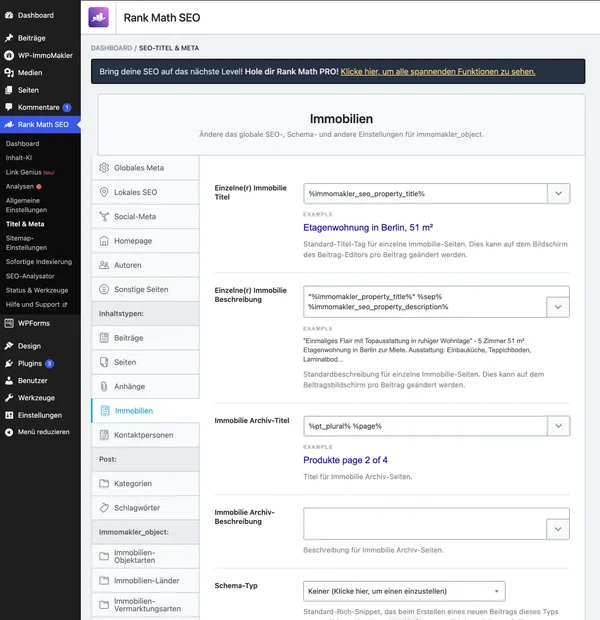
WP-ImmoMakler registers the following custom variables for Rank Math that can be used in title and description fields. These variables sit between percent signs and belong to Rank Math — not to be confused with the placeholders in curly braces such as {ort}, which you use to design the structure of the WP-ImmoMakler texts yourself (see SEO Title and SEO Description).
| Variable | Description |
|---|---|
%immomakler_property_title% | Property title as transferred from the real estate CRM software |
%immomakler_seo_property_title% | Automatically generated SEO title (e.g. “3-room apartment for rent in Berlin”) |
%immomakler_seo_property_description% | Automatically generated SEO description |
%immomakler_seo_termname% | SEO-optimized term title for property categories |
%immomakler_seo_termname_plural% | Plural form of the current property type (e.g. “Apartments” for “Apartment”), falls back to the singular form if no plural form is set |
Plural Form of the Property Type
Section titled “Plural Form of the Property Type”The %immomakler_seo_termname_plural% variable outputs the plural form of a property type (e.g. “Apartment”) on its archive page (e.g. “Apartments”). Plural forms are already built into the plugin for every property type WP-ImmoMakler creates and require no further configuration in the backend. For property types without a registered plural form, the variable returns the singular form.
Breadcrumbs
Section titled “Breadcrumbs”WP-ImmoMakler can display Rank Math breadcrumbs above and below the property pages. The setting is available in the backend of your site (wp-admin) under WP-ImmoMakler > Settings > SEO/AEO/GEO:
- Show breadcrumbs in list view
- Show breadcrumbs in detail view
Sitemap
Section titled “Sitemap”Reference properties are automatically excluded from the Rank Math sitemap when the option Link reference properties in list view is disabled.
You configure the structure of the SEO title and SEO description in the backend of your website (wp-admin) under WP-ImmoMakler → Settings → SEO/AEO/GEO, along with the display of price information. The following filters override these settings in code — an overview of all template filters can be found under SEO Title and SEO Description.
PHP Filters
Section titled “PHP Filters”// Add price to SEO titleadd_filter( 'immomakler_seo_show_price_title_desc', '__return_true' );// Omit object ID from permalinkadd_filter( 'immomakler_permalinks_append_objectid', '__return_false' );