

Gutenberg Blocks
WP-ImmoMakler provides Gutenberg blocks that let you design the list and detail view of your properties in the WordPress block editor — either as a whole with a template block, or section by section from individual blocks for gallery, data, map, and contact.
You’ll find all blocks in the block editor under the Widgets category. Blocks with the PLUS badge are only available in the Plus and Premium editions.
Template blocks
Section titled “Template blocks”With a single block you take over the complete list or detail view exactly as WP-ImmoMakler outputs it. This is the fastest way to a finished property page.
| Block | Block name | Description |
|---|---|---|
| Property List View | immomakler/archive-html | Complete results list including search form, pagination, and map view |
| Property Detail View | immomakler/single-html | Complete detail view including gallery, data tables, contact form, and map, always for the requested property |
Blocks for the list view
Section titled “Blocks for the list view”| Block | Block name | Description |
|---|---|---|
| Property map PLUS | immomakler/archive-map | Map with property markers: the properties found in the list view, all properties on any other page |
| Property search form PLUS | immomakler/archive-search-form | The property search form with one to four columns. Which fields it shows is set centrally in the plugin settings |
Blocks for the detail view
Section titled “Blocks for the detail view”If you want to build the detail view yourself, assemble it from the following blocks. Each block outputs one section of the requested property and can be individually styled in layout, colors, typography, and spacing.
Images, videos, and map
Section titled “Images, videos, and map”| Block | Block name | Description |
|---|---|---|
| Property Gallery | immomakler/gallery | Image gallery as a slideshow or static layout such as grid or mosaic, with full control over aspect ratios, sizes, and design |
| Videos | immomakler/single-videos | The videos of a property, embedded and with an optional heading |
| Virtual tours PLUS | immomakler/single-virtual-tours | The virtual tours and 360° walkthroughs of a property, embedded |
| Property surroundings map | immomakler/single-map | Map with the property’s location, with adjustable map height |
Property data
Section titled “Property data”| Block | Block name | Description |
|---|---|---|
| Property data | immomakler/single-data | All key data of a property as a two-column list. Only fields for which values are entered are shown |
| Key detail boxes | immomakler/single-data-boxes | Selected key details as boxes with label and value, fields and layout freely selectable |
| Key detail icon list | immomakler/single-icon-list | Selected key details as a compact list of icon and value |
| Price list | immomakler/single-data-prices | The price fields — purchase price, rent, additional costs, deposit, commission, and more — each field individually toggled on or off |
| Area list | immomakler/single-data-areas | The area figures — living, usable, plot area, and more — each field individually toggled on or off |
| Features/characteristics | immomakler/single-features | The features as a configurable icon list |
| Property description | immomakler/single-description-text | A description text (property description, features, location, other information, or short description) with configurable formatting |
| Energy certificate | immomakler/single-epass | The energy certificate data as a list, country-specific for Germany, Austria, Spain, and Italy |
| Energy certificate diagram PLUS | immomakler/single-epass-diagram | The graphic energy certificate diagram |
| Downloads and links | immomakler/single-downloads-links | The documents and links of a property as an icon list |
Contact and exposé
Section titled “Contact and exposé”| Block | Block name | Description |
|---|---|---|
| Contact details | immomakler/single-contact-data | The contact data of the contact person — name, company, address, email, phone, and more — each field individually toggled on or off |
| Contact person photo | immomakler/single-contact-photo | The photo of the contact person, with adjustable size, alignment, aspect ratio, and border |
| Property contact form | immomakler/single-contact-form | The WP-ImmoMakler contact form. Fields, required fields, and privacy policy links are managed centrally in the plugin settings |
| PDF exposé button PLUS | immomakler/single-pdf-button | A button for downloading the property’s PDF exposé |
Deprecated blocks
Section titled “Deprecated blocks”| Block | Block name | Description |
|---|---|---|
| Photo gallery “grid” | immomakler/gallery-grid | Has moved into the Property Gallery as the Static layout Mosaic and is no longer offered for insertion. Instances already placed continue to be displayed and can be converted with a single click |
Other blocks
Section titled “Other blocks”These blocks are not tied to a property and work on any page.
| Block | Block name | Description |
|---|---|---|
| Cancellation button | immomakler/widerruf-button | Button for canceling a contract, e.g. in your website’s footer |
| Cancellation form | immomakler/widerruf-form | Form for canceling a contract with automatic confirmation of receipt |
| WP-ImmoMakler Propstack Newsletter PLUS | immomakler/propstack-newsletter | Newsletter sign-up with double opt-in via Propstack |
Dynamic Data
Section titled “Dynamic Data”With WordPress’s Block Bindings, you can also connect the editor’s standard blocks — paragraph, heading, image, button — directly to a property’s data. This way you can build, for example, your own heading with the property title or a button with a link from the property data. See Dynamic Data (Block Bindings).
Appearance and styles
Section titled “Appearance and styles”The blocks are rendered server-side. The preview in the editor therefore shows the same output as your website later will.
- Template blocks and the search form output the list or detail view with the WP-ImmoMakler skin’s HTML templates, so they look the same as the views without a page builder.
- All other blocks bring their own lean stylesheet and otherwise adopt your theme’s fonts and colors. You adjust colors, typography, and spacing per block via the block settings. A block’s stylesheet is only loaded on pages where the block is actually used.
Preview property
Section titled “Preview property”In the Site Editor, WP-ImmoMakler blocks display a live preview with real property data. You control which property is used as the example on two levels:
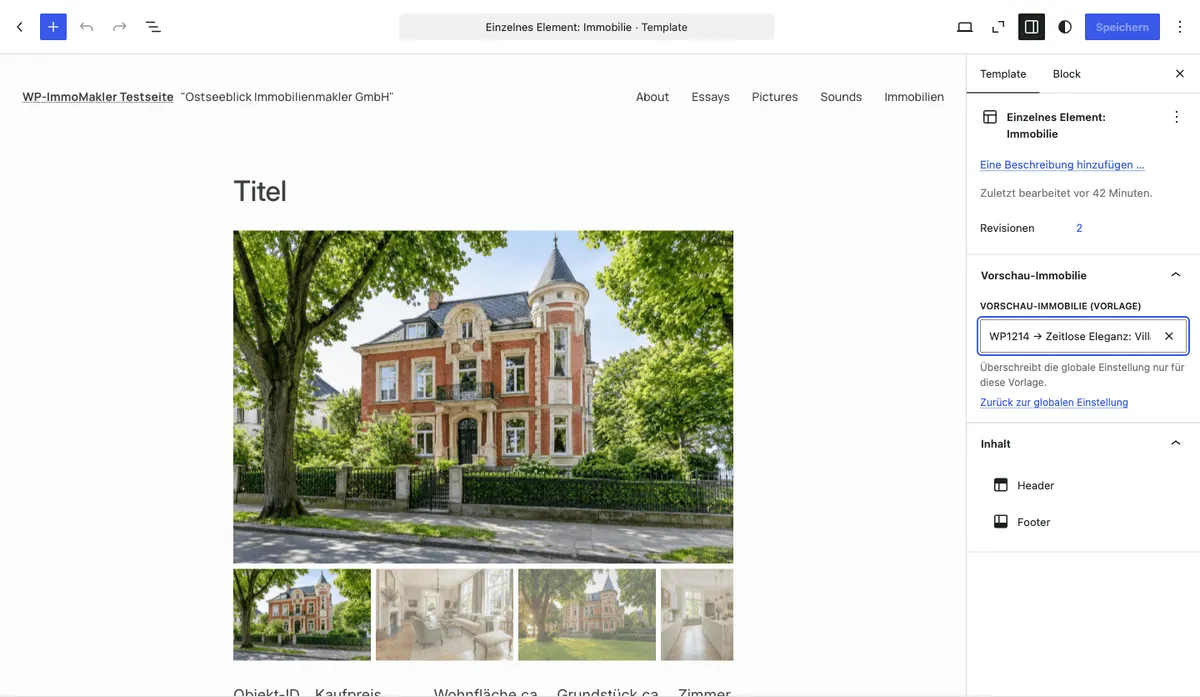
- Globally: in your website’s backend (wp-admin) under WP-ImmoMakler → Settings → Theme Builder → Preview property. This selection applies to all blocks and templates, unless a template-specific selection has been made.
- Per template: In the Site Editor, open the Template Settings (gear icon in the top right) and select a property from the search field under Preview property. This way you can, for example, store a house for a house template and a commercial property for a commercial template as the preview. The template-specific selection takes priority over the global setting.
You might also be interested in
Section titled “You might also be interested in”- Create Single Page — set up the detail view with the Gutenberg block
- Create Archive Page — set up the list view with the Gutenberg block
- Template Pages — design the list and detail view in a classic theme
- Dynamic Data — connect standard blocks like Button or Image to a property’s fields