

Prices List Block
With the Price list Gutenberg block (immomakler/single-data-prices) you output the price details of a property as a clear two-column definition list with label and value. Unlike the Property Data block, which outputs all key data at once, the Price list is limited to the price fields — and you decide per block instance which of them appear. The block matches the functionality and output of the Elementor widget of the same name, “Price list”.
Requirements
Section titled “Requirements”- WordPress with the Gutenberg editor (WordPress 5.0 or later)
- WP-ImmoMakler (any edition)
- A property in context: The block reads the prices of the property currently being viewed. Place it in a Site Editor template for the Property post type or on a template page — see Create Single Page. On an ordinary page without a property, the block stays empty.
Inserting the block
Section titled “Inserting the block”-
Open a template or template page
Open the template for the Property post type in the Site Editor (requires a block theme) or the template page on which the detail view of your properties is built.
-
Insert the block
Click the + icon and search for Price list, or navigate to the Widgets category. Insert the block.
-
Select fields
In the sidebar under Fields, switch off the price fields that should not appear in this list. All fields are enabled by default.
-
Check the preview and save
In the editor, the block immediately shows a live preview using the data of the preview property. Save the template — the prices of the respective property appear on the actual property page.
Options
Section titled “Options”In the sidebar (Settings tab) you will find the following panels:
| Panel | Option | Default | Description |
|---|---|---|---|
| Settings | Show labeling | Yes | Displays the labels of the price fields in a separate column next to the values. Switched off, the block outputs only the values, one below another. |
| Fields | one toggle per price field | all Yes | Determines which price fields this block instance may output at all (full list below). |
| Table cells | Padding (top / right / bottom / left) | 10 / 3 / 3 / 3 px | Spacing inside each cell of the list. |
| Table cells | Border | None | Divider line between the rows: None, Continuous, Dashed, Dotted or Double. The following three options only appear once a border has been selected. |
| Table cells | Border width (px) / Border colour | 1 px / theme default | Thickness and colour of the divider lines. |
| Table cells | Divider lines: outer margin (px) | 0 | Extends the divider lines outward beyond the block’s inner padding. |
| Table cells | Vertical divider between columns | No | Additionally draws a vertical line between the label and value columns, in the style of the selected border. |
| Labeling | Column width (%) | 40 | Width of the label column; the value column takes up the rest. |
| Labeling | Font size (px) / Font weight / Text colour | Theme default | Typography of the labels. |
| Values | Text alignment | Left | Alignment of the values in their column: Left or Right. |
| Values | Font size (px) / Font weight / Text colour | Theme default | Typography of the values. |
In addition, the block supports the standard WordPress options for padding and margin in the Design tab.
Available price fields
Section titled “Available price fields”The Fields panel lists every price field with its label and the corresponding field key in brackets, in the order in which WP-ImmoMakler also outputs the fields. Grouped by topic, the following fields are available:
Purchase price
| Label | Key |
|---|---|
| Purchase Price | kaufpreis |
| Net Buyprice | kaufpreisnetto |
| Purchase price VAT | kaufpreisust |
| Gross purchase price | kaufpreisbrutto |
| Purchase Price (free text) | kaufpreis_freitext |
| Price (on request) | kaufpreis_auf_anfrage |
| Buyprice per m² | kaufpreis_pro_qm |
| Buyprice per m² (free text) | preis_pro_qm_freitext |
| Guide price | richtpreis |
| Guide price per m² | richtpreisprom2 |
| Development costs | erschliessungskosten |
| Credit balance | geschaeftsguthaben |
| Distance | abstand |
Rent
| Label | Key |
|---|---|
| Base rent | kaltmiete |
| Net rent | nettokaltmiete |
| Gross rent | warmmiete |
| Rent | pauschalmiete |
| Rent per m² | mietpreis_pro_qm |
| Rent surcharges | mietzuschlaege |
| Miscellaneous net rent | sonstigemietenetto |
| Total rent (net) | summemietenetto |
| Total rent VAT | summemieteust |
| Net rent per m² from | nettomieteprom2von |
| Net rent per m² up to | nettomieteprom2bis |
| Net overall rent | gesamtmietenetto |
| Total rent VAT | gesamtmieteust |
| Total rent | gesamtmietebrutto |
| Main rent net | hauptmietzinsnetto |
| Main rent VAT | hauptmietzinsust |
| Rent | pacht |
| Hereditary lease | erbpacht |
| Security deposit | kaution |
Additional costs and ongoing charges
| Label | Key |
|---|---|
| Additional costs | nebenkosten |
| Additional costs per m² from | nebenkostenprom2von |
| Additional costs per m² up to | nebenkostenprom2bis |
| Heating costs | heizkosten |
| Net heating costs | heizkostennetto |
| Net operating costs | betriebskostennetto |
| Operating costs VAT | betriebskostenust |
| Community fees | hausgeld |
| Monthly net costs | monatlichekostennetto |
| Monthly costs VAT | monatlichekostenust |
| Monthly gross cost | monatlichekostenbrutto |
| Total costs per m² from | gesamtkostenprom2von |
| Total costs per m² up to | gesamtkostenprom2bis |
| Net overall charge | gesamtbelastungnetto |
| Total VAT charge | gesamtbelastungust |
| Total load | gesamtbelastungbrutto |
| Net reserve | ruecklagenetto |
| VAT reserve | ruecklageust |
| Miscellaneous costs (net) | sonstigekostennetto |
| Other costs VAT | sonstigekostenust |
| Net EVB | evbnetto |
| EVB VAT | evbust |
| Total VAT | mwst_gesamt |
Commission
| Label | Key |
|---|---|
| Subject to commission | provisionspflichtig |
| External commission / Courtage | aussen_courtage |
| Net commission | provisionnetto |
| Gross commission | provisionbrutto |
| Commission VAT | provisionust |
| Allocation of commission | provision_teilen |
Return and investment
| Label | Key |
|---|---|
| X-times rent | x_fache |
| Net return | nettorendite |
| Net return | nettorendite_ist |
| Net return | nettorendite_soll |
| Rental income | mieteinnahmen_ist |
| Rental income | mieteinnahmen_soll |
Miscellaneous
| Label | Key |
|---|---|
| Price valid from | preis_zeitraum_von |
| Price valid until | preis_zeitraum_bis |
| Miscellaneous quotes | freitext_preis |
| Auction date | versteigerungstermin |
Styling via CSS
Section titled “Styling via CSS”Every row of the list carries a class following the pattern immomakler-data-{key}, so you can style individual price fields in your theme in a targeted way:
/* List */.wp-block-immomakler-single-data-prices .immomakler-single-data-prices__list { }
/* Label and value of a specific field */.wp-block-immomakler-single-data-prices dt.immomakler-data-kaufpreis { }.wp-block-immomakler-single-data-prices dd.immomakler-data-kaufpreis { }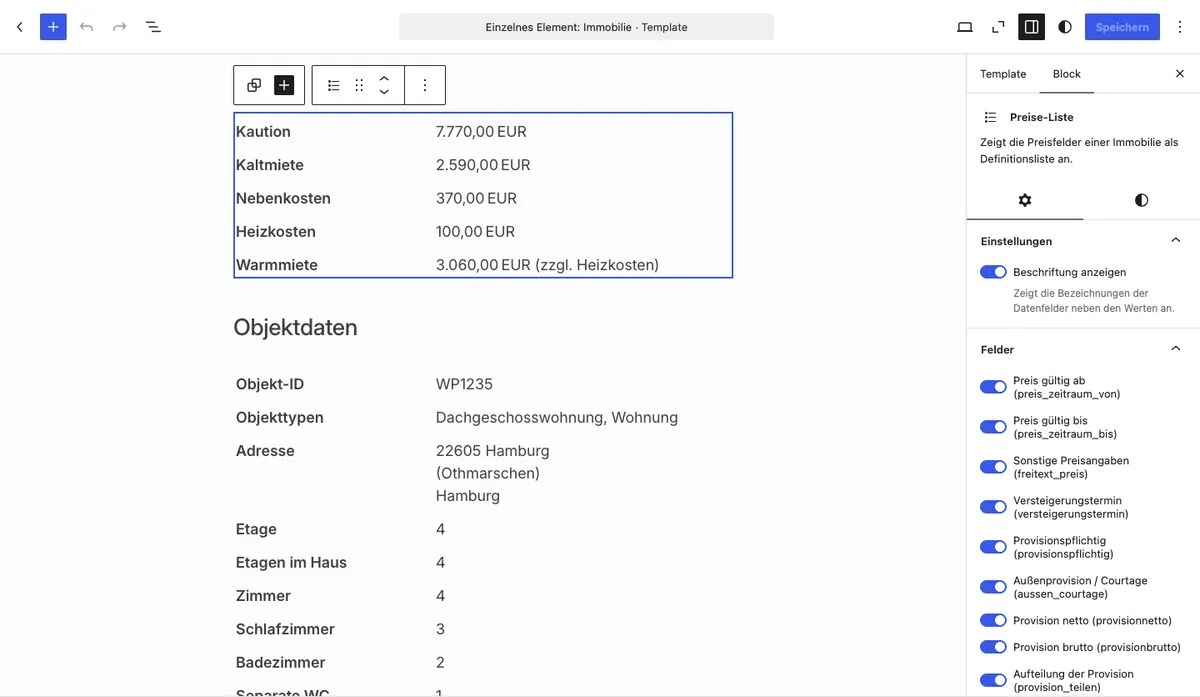

You might also be interested in
Section titled “You might also be interested in”- Create Single Page — Embed the property detail view in the Site Editor or on a template page
- Property Data — Output all key data of a property as a definition list
- Key Data Boxes — Display the most important key data as a box group with icons
- Gutenberg Blocks: Overview — All available WP-ImmoMakler Gutenberg blocks at a glance