

Icons for Property Data
WP-ImmoMakler ships with its own set of line icons for property data, for example a calendar for the year of construction, a floor plan for the rooms or a location pin for the address. The icons are embedded directly in the page as SVG: they load no additional files or fonts and adopt the text colour of their surroundings.
Where the icons appear
Section titled “Where the icons appear”- In the key data boxes of Elementor, Bricks, WPBakery, Divi 4 and Divi 5, as well as in the “Key detail boxes” block of the site editor.
- In the key data icon list of Divi 5 and in the “Key Data Icon List” block of the site editor.
- In the key data icon list of Elementor. For each entry, under Icon Source, you choose between the Standard library with the WP-ImmoMakler icons and Elementor for an icon from the Elementor library. A newly inserted widget uses the standard library; existing widgets keep the icons chosen so far.
- In the default display without a page builder, at the location line under the title, for example “22391 Hamburg, Terraced house”: in the detail view and in the list view with the “Compact” layout.
Setting stroke width and shape
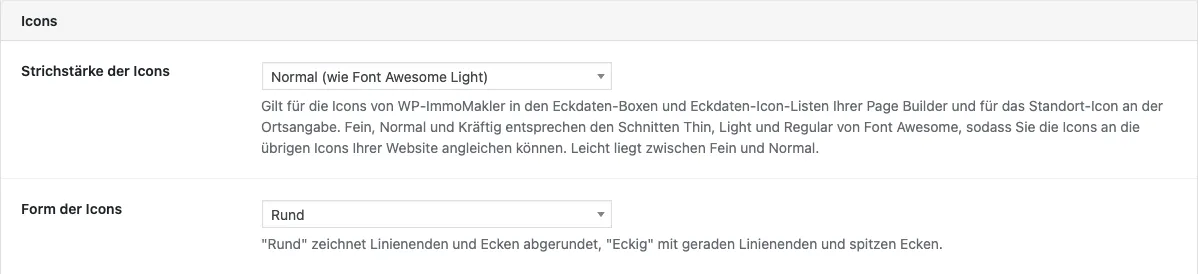
Section titled “Setting stroke width and shape”In the backend of your website (wp-admin) under WP-ImmoMakler → Settings → Display, the Icons section lets you define how all icons are drawn:
- Icon stroke width: “Fein” (fine), “Leicht” (light), “Normal” or “Kräftig” (bold). “Fein”, “Normal” and “Kräftig” correspond to the Thin, Light and Regular styles of Font Awesome; “Leicht” lies between “Fein” and “Normal”. If your theme or page builder uses Font Awesome, choose the same weight so that both kinds of icons look equally strong. The default is “Normal”.
- Icon shape: “Circular” draws line ends and corners rounded, “Square” with straight line ends and sharp corners. In the square style, the frames of the calendar and parking space icons also get sharp corners.
The settings apply to all page builders and the default display at the same time. You still set the colour and size of the icons in the respective element of your page builder.
You can additionally set the stroke width differently for an individual element: in the key data boxes of Elementor, Bricks, WPBakery and Divi 5, in the key data icon list of Elementor and Divi 5, and in the “Key detail boxes” and “Key detail icon list” blocks there is the Icon stroke width field for this. It defaults to As in the settings. The shape always applies to the whole website.
Automatic icon selection
Section titled “Automatic icon selection”If an element is set to “Automatic (by field)”, WP-ImmoMakler picks the icon that matches the data field:
| Data field | Icon |
|---|---|
| Year of construction, Available from, Last modernisation | Calendar |
| Living area, Usable area and other areas | Square with diagonal arrow |
| Plot area | Tree on a plot |
| Garden area | Tree |
| Number of rooms | Floor plan |
| Parking spaces | P in a square |
| Purchase price, Rents and other price fields | Wallet |
| Property type | House |
| Address | Location pin |
For fields without an icon of their own, such as bedrooms, bathrooms, floor or energy certificate, WP-ImmoMakler continues to use icons in the style of Lucide. They follow the same stroke width and shape.
For developers: custom icons and adjustments
Section titled “For developers: custom icons and adjustments”With the filter immomakler_property_field_icons you add or replace icons. Provide only the paths without the <svg> element, drawn as lines on a 24 × 24 grid. Fills and fixed colours are not supported, because colour and stroke come from the surrounding <svg> element.
add_filter( 'immomakler_property_field_icons', function ( $icons ) { $icons['pool'] = [ 'label' => __( 'Pool', 'my-theme' ), 'svg' => '<path d="M2 17h20M2 21h20"/>', ]; return $icons;} );With immomakler_property_field_icon_map you assign an icon to a data field for automatic selection, for example $map['hat_pool'] = 'pool';.
With immomakler_property_field_icon_style you set stroke width and shape by code, independently of the setting in the backend. Allowed stroke widths are greater than 0 and up to 4:
add_filter( 'immomakler_property_field_icon_style', function ( $style ) { $style['stroke'] = '2'; $style['form'] = 'sharp'; return $style;} );Every icon carries the CSS class immomakler-icon. Stroke width and shape are set as attributes on the <svg> element, so you can also override them for individual areas via CSS, for example with stroke-width: 2.25;.