

Configuring the Search Form
The WP-ImmoMakler search form can be extensively configured in the WordPress Customizer. This feature is available from the PLUS license onward. You can upgrade at any time and only pay the difference. If you are interested in an upgrade, please contact our Support.
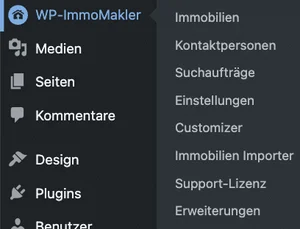
You will find all settings in the WordPress admin of your website (wp-admin) under WP-ImmoMakler → Customizer → WP-ImmoMakler → Search. Alternatively, you can reach the Customizer via Appearance → Customizer.
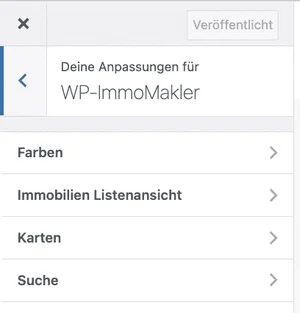
All settings at a glance
Section titled “All settings at a glance”| Setting | Description |
|---|---|
| Search form above property lists | Turns the search form above the property lists on or off entirely. |
| Show radius search | Displays the location-based radius search. Requires activated Google services and a Google Maps Geocoding API key. |
| Advanced search “more options” in the search form | Display of the numeric filters: slider, text fields, or do not display. |
| Radius search: selectable radii (km) | Comma-separated list of positive integers for the radius selection field. Default: 5, 10, 25, 50, 100, 200, 500. |
| Always show advanced search | Permanently displays the filters for area, rooms, etc. instead of hiding them behind “more options”. |
| Displayed dropdowns | Selection of the search criteria dropdowns (see below). |
| Multi-select in the dropdowns | Allows several options per dropdown at the same time, for example several locations. |
| Show sub-items in dropdowns | Shows subcategories, for example house → terraced house. |
| Show property ID search field in the search form | Additional field for searching a specific property ID. |
| Restrict search selection automatically | Restricts the remaining search parameters to the properties still available, so no combination without results can be selected. |
| Reload search result automatically | Updates the result via AJAX as soon as a search parameter changes — without clicking “Results” and without reloading the page. |
| Update heading | Also updates the page title when the result is reloaded automatically. |
| Clicking the search button loads the results via AJAX | Also updates the result without reloading the page when “Results” is clicked. Disable this option if the results button does not work with your custom template. |
| Pagination | Page numbers or “infinite scrolling”: load further pages below. Requires “Reload search result automatically”. |
| Loading further pages | Automatically while scrolling or after clicking a button. Requires “Reload search result automatically”. |
| Show WP-ImmoMakler notice in the radius search | Shows at the end of the radius search that it comes from WP-ImmoMakler. |
| Bootstrap JS (“Debug” area) | Controls whether WP-ImmoMakler loads the Bootstrap JavaScript. If your theme or another plugin already loads Bootstrap and the search filters do not expand, try “do not load” here. |
Radius search
Section titled “Radius search”The radius search finds properties within a given distance of a location. It requires a Google Maps API key and activated Google services.
You can adjust the selectable radii under Radius search: selectable radii (km) as a comma-separated list of positive integers, for example 1, 2, 5, 10, 25, 50. The middle value of the list is preselected in the dropdown. Without your own entry, 5, 10, 25, 50, 100, 200, and 500 km apply.

Displayed dropdowns
Section titled “Displayed dropdowns”Under Displayed dropdowns you control which filter dropdowns appear in the search form:
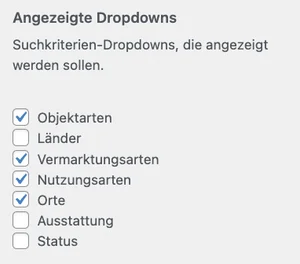
The following are available:
- Property types (house, apartment, etc.)
- Property countries
- Marketing types (sale/rent)
- Usage types (residential, commercial)
- Property locations
- Property amenities (fitted kitchen, balcony, garden, etc.)
- Property status (available, reserved, sold, rented)
Only categories that have actual properties assigned to them are displayed.
Advanced search
Section titled “Advanced search”The advanced search filters by numeric values such as living area, number of rooms, and rental or purchase prices. The fields automatically adapt to the selected marketing type (sale/rent).
Under Advanced search “more options” in the search form you choose between two display modes — or hide the advanced search entirely:
- Slider — visitors drag a slider on a scale

- Text fields — visitors enter the value directly

By default the advanced search is collapsed behind “more options”. With Always show advanced search you display it permanently.
Property ID search
Section titled “Property ID search”With Show property ID search field in the search form, visitors to your website can search for a particular property by entering the property ID directly. The additional search field appears next to the other filter options in the search form.


Regional additions
Section titled “Regional additions”This setting is not in the Customizer but in the WordPress admin of your website (wp-admin) under WP-ImmoMakler → Settings → Import. Using the “regionaler_zusatz” as district option, the regionaler_zusatz field can be integrated as a standalone location in the location structure. The district is subordinated to the actual location — useful for neighbourhoods or districts, for example “Schwabing” under “Munich”.

Adding custom search fields
Section titled “Adding custom search fields”You can register additional metadata fields as searchable via a filter. The following example adds the etage (floor) field to the search:
add_filter( 'immomakler_searchable_postmeta_keys', function( $keys ) { $keys[] = 'etage'; return $keys;} );Place the code in the functions.php of your WP-ImmoMakler child skin plugin.
Reordering filter options
Section titled “Reordering filter options”The order of the displayed filters in the search form can also be controlled via a filter in functions.php:
add_filter( 'immomakler_search_enabled_taxonomies', 'my_custom_immomakler_search_taxonomies' );