

Schema.org Structured Data
WP-ImmoMakler automatically adds JSON-LD structured data according to schema.org to every property listing view and every detail page. This allows search engines, answer engines, and AI assistants to identify your properties as real estate offers — with price, location, energy data, contact person, and availability. PLUS
This page describes which schemas WP-ImmoMakler outputs, where you can enable or disable them, and what benefit this brings for SEO, AEO, and GEO.
Why Structured Data?
Section titled “Why Structured Data?”An HTML document contains text, images, and layout — but no machine-readable statement that this page offers a flat in Hamburg-Eppendorf for €749,000 for sale. That is exactly what schema.org is for: a shared vocabulary that Google, Bing, Apple, ChatGPT, Perplexity, Gemini, and Claude all understand equally.
WP-ImmoMakler delivers this vocabulary for your properties automatically. You do not need to maintain anything manually — the data comes from your OpenImmo interface, the estate agent software import, or the entries in the property forms.
SEO — Classic Search
Section titled “SEO — Classic Search”Search engines use the structured data to enrich your search results: price and availability directly in the snippet, images next to the result, breadcrumb path instead of a bare URL. For listing views, Google can display the price range of all matching properties. This noticeably increases the click-through rate without changing the ranking itself.
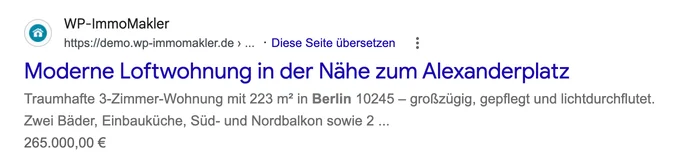
This is what the schema.org price markup looks like in Google search results: on the property detail page, Google shows the property’s single price.
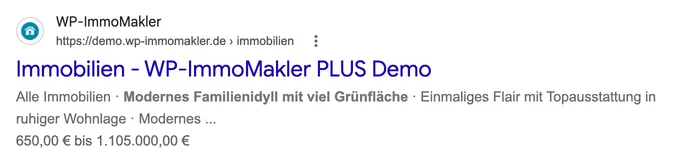
In the listing view, Google instead shows the price range of all matching properties from the AggregateOffer schema.
AEO — Answer Engine Optimisation
Section titled “AEO — Answer Engine Optimisation”Answer engines such as Google AI Overviews, Bing Copilot, or Perplexity formulate direct answers to search queries. For “Which houses in Lübeck are for sale?”, the answer engine preferentially draws on pages whose content it can read in a structured way. An ItemList schema with the properties visible on the page is exactly what these systems expect.
GEO — Generative Engine Optimisation
Section titled “GEO — Generative Engine Optimisation”Generative AI models (ChatGPT, Claude, Gemini) preferentially cite sources whose statements can be clearly attributed. A RealEstateListing with address, living area, year of construction, and energy rating is a clear, citable statement. A plain HTML page with the same information remains ambiguous for the model.
Which Schemas Does WP-ImmoMakler Output?
Section titled “Which Schemas Does WP-ImmoMakler Output?”In List Views (Archive, Search Results, Categories)
Section titled “In List Views (Archive, Search Results, Categories)”| Schema | Content |
|---|---|
ItemList | The properties visible on the current page with position, URL, and title; plus the total count of all matching properties. |
AggregateOffer | Minimum and maximum price as well as the number of offers in the current list. Optionally extended with RealEstateListing, Residence, and House or Apartment when the list is filtered to a single property type. |
In Detail Views
Section titled “In Detail Views”| Schema | Content |
|---|---|
Product | Title, description, property number (SKU), image, and Offer with price, currency, and availability (InStock or SoldOut). |
RealEstateListing | Extends the Product schema with RealEstateListing and Residence. For houses and flats, House or Apartment is added additionally. |
Accommodation | Dedicated schema with living and usage data: number of rooms and bathrooms, floor, living area (m²), year of construction, pets allowed, address with district, geo-coordinates, and energy values as LocationFeatureSpecification. Specific types: SingleFamilyResidence, House, Apartment, Room — with fallback to Accommodation. |
Place | Fallback for commercial properties (office, retail, hospitality, warehouse, parking). With additionalType pointing to the matching subtype such as OfficeBuilding or Warehouse, including area, year of construction, address, and geo-coordinates. |
RealEstateAgent | Embedded as seller in Product and as performer/organizer in Event: name, company, telephone, email, address, and photo of the contact person. |
Event “Schedule a Viewing” | Marks the detail page as a bookable appointment at the property’s location. |
Event “360° Virtual Tour” | Also output when the property has a 360° tour URL. Marked as OnlineEventAttendanceMode with VirtualLocation. |
VideoObject | One entry per property video (YouTube, Vimeo, video file) with name, description, preview image, upload date, and — where available — duration and player or file URL. See Videos. |
Summary (Excerpt)
Section titled “Summary (Excerpt)”If an excerpt (summary) is stored for a property, the detail view schemas Product, Accommodation, and Place additionally populate the disambiguatingDescription field with this brief text — separate from the detailed description (which is formed from the title and SEO meta description — see SEO Title and SEO Description for how it is structured). This gives search engines and answer engines a compact, independently citable statement about the listing, in addition to the structured key data.
disambiguatingDescription is a field of the schema.org base class Thing and is therefore valid on all three detail view schemas (unlike abstract, which would only be permitted on CreativeWork types). You can maintain the excerpt manually or have it generated automatically via the AI Features; the same text also appears on the detail page as a highlighted summary below the subtitle.
Videos (VideoObject)
Section titled “Videos (VideoObject)”If a property has videos, the detail view outputs a separate VideoObject entry for each video. The values come from data that WP-ImmoMakler already maintains for the video tiles:
| Field | Source |
|---|---|
name | “Video: ” and the property title; numbered when there are multiple videos (“Video 1: …”). |
description | The property’s title and SEO description, as with the other schemas. |
thumbnailUrl | The preview image that WP-ImmoMakler caches on your server. For video files, a featured image on the file takes precedence. |
uploadDate | For video files, the date and time of upload to the media library; for Vimeo, the date Vimeo reports – without a time, because Vimeo does not state a time zone for it. YouTube provides no date; in that case the property’s publish date is used. |
duration | For video files, the length from the media library; for Vimeo, the length Vimeo reports. Omitted for YouTube videos. |
embedUrl / contentUrl | For YouTube, the youtube-nocookie player URL; for Vimeo, the player URL; for video files, the file’s address. |
Videos for which no preview image is yet available are omitted, because Google requires thumbnailUrl. This mainly affects freshly imported video files whose preview image has not yet been generated. Pure download files without a player do not appear in the structured data.
Consent and Rich Results
Section titled “Consent and Rich Results”The entry in the JSON-LD does not load the video. When the video loads for your visitors is still governed by consent – via WP-ImmoMakler’s own consent prompt or via your consent plugin. Consent plugins such as Complianz leave JSON-LD blocks untouched, even when they contain YouTube or Vimeo addresses.
Energy Data
Section titled “Energy Data”From the energy certificate, WP-ImmoMakler transfers the following values as LocationFeatureSpecification into the Accommodation schema:
- Final energy demand (kWh/(m²·a))
- Final energy consumption (kWh/(m²·a))
- Energy efficiency class (A+ to H)
If the energy certificate status is set to “none”, “not required”, or “at viewing”, no energy data is output — in line with the GEG-compliant display in the frontend.
Status Filter
Section titled “Status Filter”Schema.org data is only output for properties with the status open. References, reservations, and sold properties are not included in the structured data and are therefore not reported by search engines as available.
Settings
Section titled “Settings”All schema outputs can be individually enabled or disabled. You will find the options in the backend of your website (wp-admin) under WP-ImmoMakler → Settings → SEO/AEO/GEO.
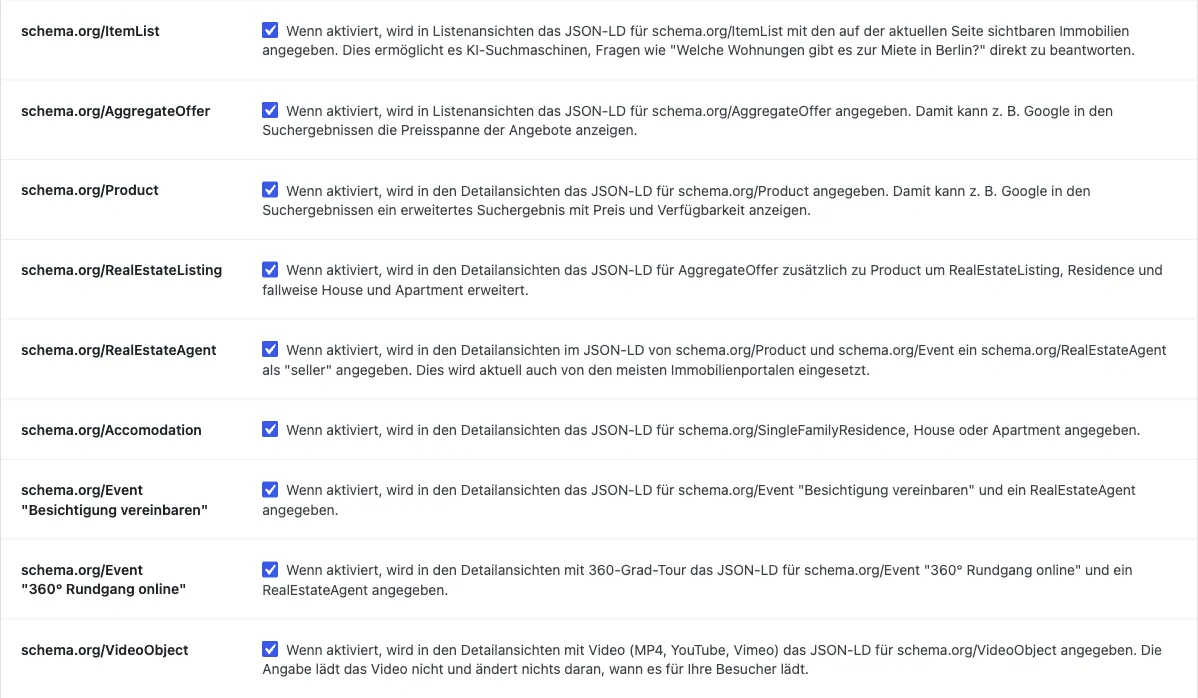
| Option | Effect |
|---|---|
| schema.org/ItemList | JSON-LD ItemList in list views. |
| schema.org/AggregateOffer | JSON-LD AggregateOffer in list views (price range and number of offers). |
| schema.org/Product | JSON-LD Product in detail views. |
| schema.org/RealEstateListing | Extends the Product schema with RealEstateListing, Residence, and where applicable House/Apartment. |
| schema.org/RealEstateAgent | Embeds the contact person as seller in the Product schema and as performer/organizer in the Event schema. |
| schema.org/Accomodation | JSON-LD Accommodation with living and usage data in detail views; for commercial properties, falls back to Place. |
| schema.org/Event “Schedule a Viewing” | JSON-LD Event for viewing requests. |
| schema.org/Event “360° Virtual Tour” | JSON-LD Event for virtual tours for properties with a 360° tour. |
| schema.org/VideoObject | JSON-LD VideoObject for each video in detail views of properties with a video. |
All options are enabled by default. If one of the options ItemList, RealEstateListing, RealEstateAgent, Accomodation or one of the two Event options is disabled, WP-ImmoMakler shows a notice in the WordPress backend that recommends enabling all Schema.org options and links to the SEO/AEO/GEO tab. You can dismiss the notice.

Checking the Output
Section titled “Checking the Output”You can see the JSON-LD output directly in the source of any detail or list page. The <script> tags are marked with an HTML comment:
<!-- BEGIN schema.org section generated by WP-ImmoMakler RealEstate Plugin ... --><script type="application/ld+json" class="immomakler-schema-product">…</script><script type="application/ld+json" class="immomakler-schema-accomodation">…</script><script type="application/ld+json" class="immomakler-schema-video">…</script><!-- END schema.org section ... -->For structured validation, these external tools are recommended:
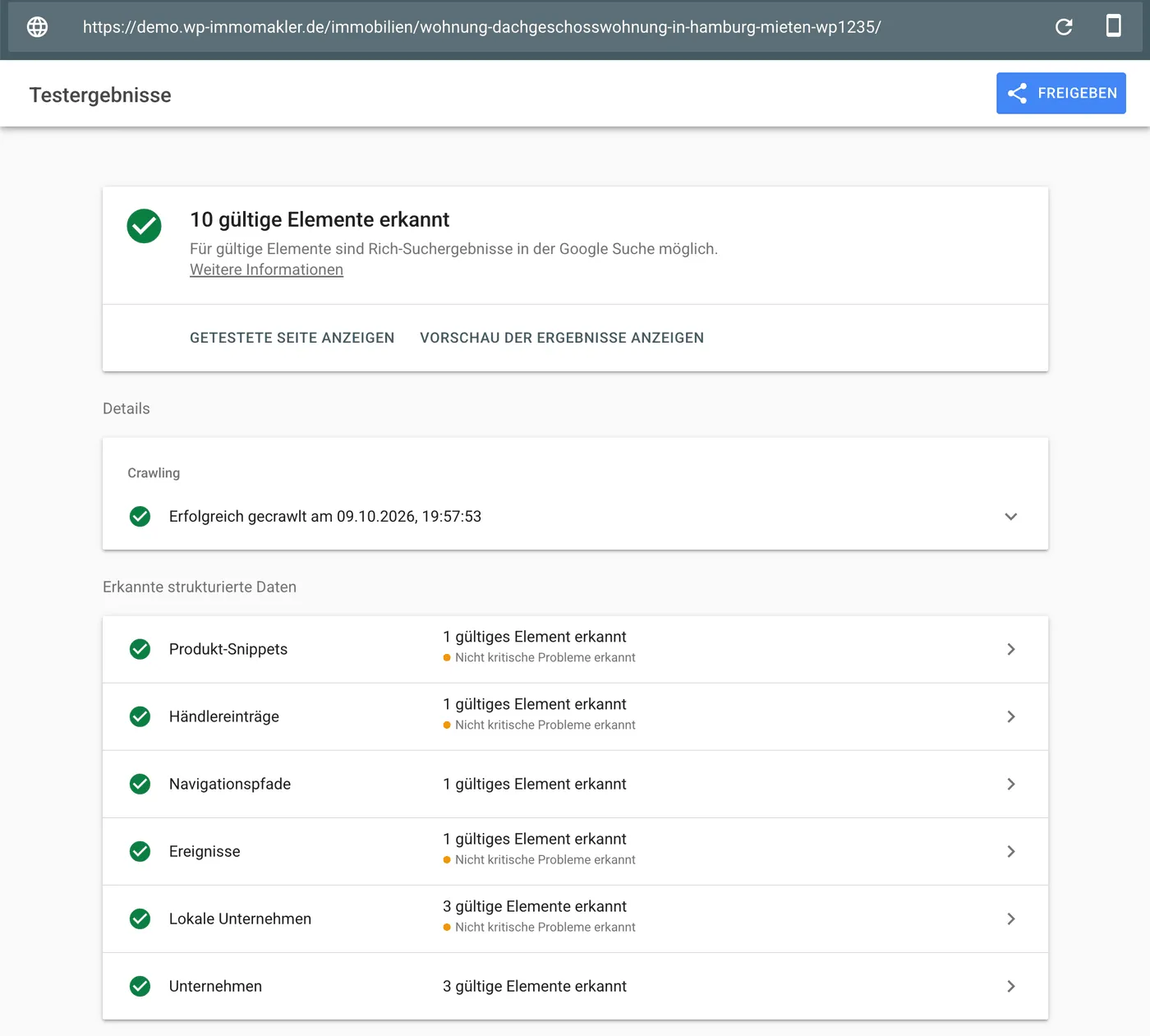
- Google Rich Results Test — shows which rich snippets Google can generate for the page.
- Schema Markup Validator — checks the syntax and conformity of the JSON-LD output.
Customisation via Filter Hooks
Section titled “Customisation via Filter Hooks”Every schema is accessible via a filter hook, allowing you to add, modify, or remove fields — update-safely in your WP-ImmoMakler child skin plugin:
immomakler_schema_item_listimmomakler_schema_aggregate_offerimmomakler_schema_productimmomakler_schema_accomodationimmomakler_schema_commercial_propertyimmomakler_schema_eventimmomakler_schema_video_object
The signatures and default values can be found in the Hooks Reference for SEO.