

Geo Services
Besides the map itself, WP-ImmoMakler uses three further services that deal with addresses. Each one can be configured individually — independently of what draws your maps.
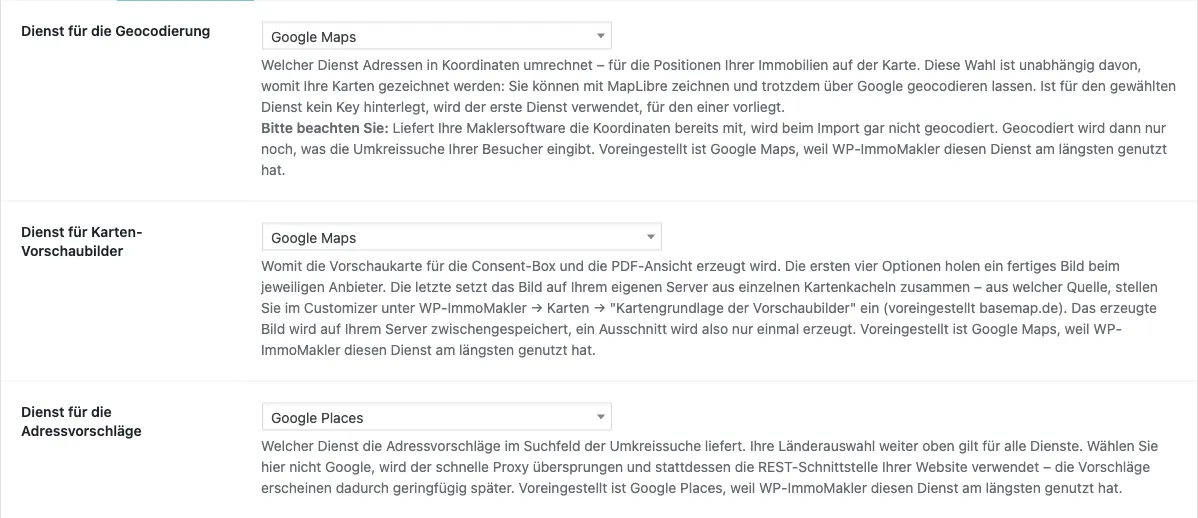
The three services
Section titled “The three services”| Service | What it does | Available options |
|---|---|---|
| Geocoding | Converts the addresses of your properties into coordinates so they sit in the right place on the map | Google Maps, Geoapify, MapTiler, Mapbox |
| Map preview images (static maps) | Creates the preview image for the consent box and the PDF view | Google Maps, Geoapify, MapTiler, Mapbox, your site’s own map tiles |
| Address suggestions (autocomplete) | Suggests addresses in the radius search field while your visitors type | Google Places, Mapbox, MapTiler, Geoapify |
You will find all three in the backend of your website (wp-admin) under WP-ImmoMakler > Integrations > Geo Services.
Each choice applies to that one service only. So you can draw your maps with MapLibre, keep geocoding addresses through Google, and assemble the preview images from your own map tiles. That is deliberate: geocoding runs on your server during the import and has nothing to do with what is displayed in the browser.
What you need for each
Section titled “What you need for each”- Google Maps – the server API key at the top of this tab. See Creating Google Maps API keys.
- Geoapify – a key from your account at myprojects.geoapify.com. One key covers all three services. Enter it under Geoapify API key.
- MapTiler – a key from your account at cloud.maptiler.com. One key covers all three services and the MapTiler map itself. Enter it under MapTiler API key. If you have selected MapTiler as the preview image base layer in the Customizer under WP-ImmoMakler → Maps and entered a key there, that key is reused here too and you can leave this field empty – but not with any other base layer, since a different provider’s key would then be stored there.
- Mapbox – the access token you also use for the Mapbox map. Enter it in this tab under Mapbox access token.
- Your site’s own map tiles – nothing at all. This option assembles the preview image from the map tiles you select in the Customizer under WP-ImmoMakler → Maps → “Preview image base layer” and caches it on your server. No additional service, no cost per image.
If no key is stored for the service you picked, WP-ImmoMakler falls back to the first service that does have one. An incomplete setting therefore never brings your website to a halt.
Comparing the providers
Section titled “Comparing the providers”| Provider | Geocoding | Preview images | Address suggestions | To note |
|---|---|---|---|---|
| Google Maps | ✓ | ✓ | ✓ | Account and API keys required. Free monthly allowance, then paid. The only one to supply four extra address details |
| Geoapify | ✓ | ✓ | ✓ | Account and key required, one key for all three services. Free allowance, then paid |
| MapTiler | ✓ | paid tier only | ✓ | Account and key required, one key for all three services and for the MapTiler map too. Storing the coordinates requires attribution |
| Mapbox | ✓ | ✓ | ✓ | Account and access token required. Storing the coordinates is only covered on the “Permanent Geocoding” tier – see below |
| Your site’s own map tiles | – | ✓ | – | No account, no key, no cost per image. The preview image is generated on your own server |
All four providers offer a free allowance – with one exception: Mapbox’s “Permanent Geocoding” tier bills from the very first request. For context: geocoding happens once per property during the import, not on every page view – a portfolio of 300 properties therefore generates around 300 requests.
Differences in detail
Section titled “Differences in detail”Extra address details. Only Google supplies the district and three administrative levels alongside the coordinates. With Geoapify, MapTiler and Mapbox, these four fields stay empty. They are only displayed anyway if you have explicitly switched them on through a filter.
Speed of address suggestions. With Google Places, the request runs through a fast API proxy; with every other service, through your website’s REST endpoint. The proxy only ever talks to Google and is skipped automatically as soon as a different service is configured – suggestions therefore appear marginally later.
Country selection and proximity to your portfolio. The Radius search address autocomplete: country selection setting applies equally to every service. Likewise, preference for addresses near your own property portfolio is preserved with every service.
Can the coordinates be stored?
Section titled “Can the coordinates be stored?”WP-ImmoMakler converts each address once — during the import — and stores the result permanently in your website’s database. Without this storage, every map view would have to convert the addresses again, which would generate requests and costs on every page load.
Whether storage is allowed depends on the provider:
| Service | Storage allowed | Condition |
|---|---|---|
| Google Maps | yes | none |
| Geoapify | yes | none |
| MapTiler | yes | attribution on the resulting data |
| Mapbox | only on the “Permanent Geocoding” tier | see below |
Mapbox splits geocoding into two tiers:
- The standard tier is free up to 100,000 requests a month (above that, from $0.75 per 1,000). Its terms, however, do not allow you to store the results — not even temporarily.
- The Permanent Geocoding tier allows permanent storage. It has no free allowance: billing starts with the first request, currently at $5.00 per 1,000.
If you have unlocked “Permanent Geocoding” with Mapbox, tick Mapbox: “Permanent Geocoding” tier unlocked in the Geo Services tab. WP-ImmoMakler then flags the requests accordingly, and Mapbox bills them under that tier.
Without the checkbox, requests run on the standard tier. Technically you won’t notice a difference — the addresses are still converted and the markers are placed correctly, and in most cases no costs are incurred. What isn’t covered, though, is permanent storage.
To put the amounts in perspective: geocoding happens once per property during the import. A portfolio of 300 properties generates around 300 requests, not tens of thousands — on the “Permanent Geocoding” tier that would be about $1.50.
Switching off a single service entirely
Section titled “Switching off a single service entirely”Each of the three selection fields also offers No service. That switches the respective task off completely: no geocoding during the import, no preview image, no address suggestions. The other two services are unaffected.
If you also want no maps at all, select No map for the Map provider in the Customizer under WP-ImmoMakler → Maps. The detail view then shows a link to Google Maps instead of the map.
Postcode areas
Section titled “Postcode areas”The Highlight postcode areas setting in the Customizer under WP-ImmoMakler > Maps shades the postcode areas of properties without an exact address. It relies on the Google Maps feature layers, so it is only available when Google Maps draws your maps.
With MapLibre, MapTiler and Mapbox, the setting isn’t offered in the Customizer. Your saved value is preserved and applies again as soon as you select Google Maps as the map provider.
Data protection
Section titled “Data protection”This setting is part of what decides which service receives your data. Geocoding and map preview images run server-side — the preview image is fetched once to your server and served from there, so no visitor IP address reaches the provider, not even in the consent box. Address suggestions, by contrast, are generated while your visitors are typing. Review the statements in your privacy policy when you change a service.
For preview images, the your site’s own map tiles option is the most restrained choice here: it fetches the tiles from the base layer you selected in the Customizer and involves no further provider.