

Facebook / Meta Commerce Manager
With WP-ImmoMakler PLUS, you provide an always up-to-date property catalog of your portfolio in XML format, which you register in Meta Commerce Manager as a catalog for “Dynamic Ads for Real Estate” (Facebook/Instagram). Meta then automatically shows prospects matching properties from your portfolio as ads, e.g. based on their previous browsing behavior on your website.
Further information on this Facebook feature is available in the official documentation: Facebook Real Estate Ads.
Requirements
Section titled “Requirements”- WP-ImmoMakler PLUS PLUS
- A Meta Commerce Manager with a catalog of type “Home Listings” set up
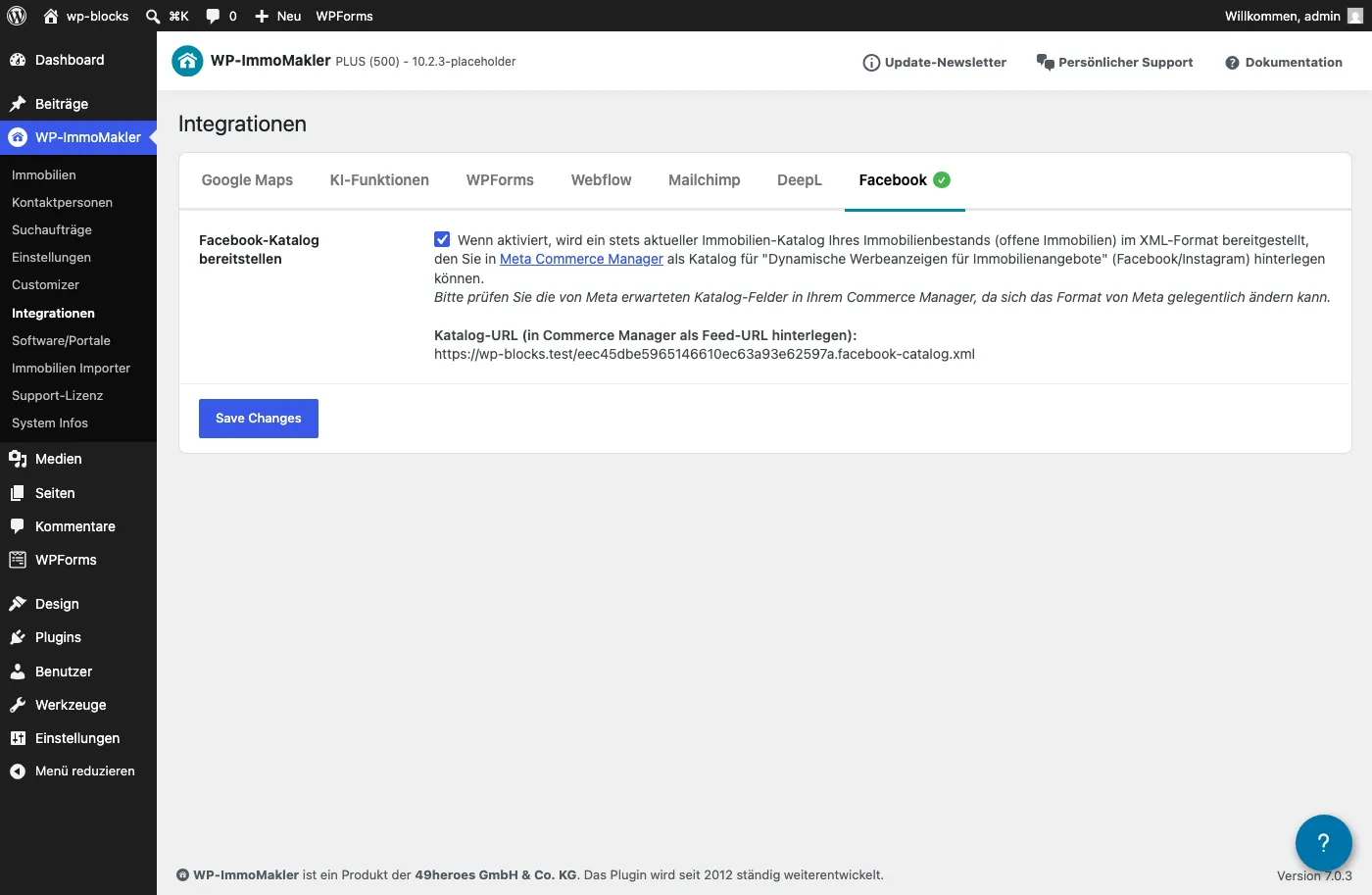
Navigate in your website’s backend (wp-admin) to WP-ImmoMakler → Integrations → Facebook:
- Activate the option Provide Facebook catalog and save.
- Copy the catalog URL that is then displayed.
- Enter this URL in your Meta Commerce Manager under Catalog → Settings as the feed URL of your “Home Listings” catalog.
Which properties are transferred?
Section titled “Which properties are transferred?”The catalog contains all published, open properties in your portfolio that are not reference properties and have a price greater than 0 set (Meta does not support “price on request”).
Which data is transferred?
Section titled “Which data is transferred?”Among other things, the following information is transferred per property:
- Property no., title, description, and link to the detail page
- Purchase/rental price including currency
- Address (street, city, postal code, state, country) as well as geo-coordinates, if available
- Property type (e.g. house, apartment, plot – automatically mapped to Meta’s categories)
- Number of rooms, bedrooms and bathrooms, year built, and living/usable area
- Up to 20 photos (floor plans are not transferred)
Updates
Section titled “Updates”The catalog is automatically regenerated on every property import as well as when a property is edited manually. Meta itself typically fetches the registered feed URL at most once per hour – an instant, real-time transfer of individual changes is not possible for catalog feeds by design.
Frequently asked questions
Section titled “Frequently asked questions”For which WP-ImmoMakler licenses is the Facebook integration available?
The Facebook/Meta catalog integration is available exclusively in WP-ImmoMakler PLUS licenses.
Which properties are missing from the catalog?
Unpublished, not-open (e.g. reserved or sold) properties, as well as properties marked as reference properties, do not appear in the catalog. Properties without a set price are also missing, since Meta does not support “price on request”.
How long does it take for a new or changed property to appear in the catalog?
The catalog is regenerated immediately after an import or a manual edit. How quickly the change then actually appears in your ads depends on how often Meta Commerce Manager fetches the feed URL – typically at most once per hour.
Can I trigger the catalog generation manually without waiting for the next import?
Yes. To do so, open any page of your website once with the parameter ?facebook_catalog=generate (e.g. https://your-website.com/?facebook_catalog=generate). This triggers a regeneration of the catalog in the background without exposing any data itself.
Is the catalog URL publicly accessible?
The URL itself is not guessable (it contains an unpredictable component derived from your website address), but it is not otherwise protected – the data it contains (address, price, photos) is in any case already visible on your public property detail pages.