

WPForms
WP-ImmoMakler can use an existing WPForms form as the property contact form. Incoming enquiries are automatically forwarded to the contact email address of the requested property.
With WP-ImmoMakler PLUS, an OpenImmo Feedback XML file can additionally be attached to any number of WPForms forms, allowing your real estate CRM software to process incoming enquiries automatically.
Also with WP-ImmoMakler PLUS, you can extend any WPForms form with a Propstack newsletter signup with double opt-in — either as an opt-in on an existing form or as a standalone newsletter form.
If you are currently only using a WP-ImmoMakler BASIC licence, you can upgrade at any time and only pay the difference — if you are interested, please contact our Support.
Requirements
Section titled “Requirements”The plugin WPForms (Lite or Pro) must be installed and activated.
Licence Comparison
Section titled “Licence Comparison”| Feature | BASIC | PLUS |
|---|---|---|
| Use a WPForms form as the property contact form | ✓ | ✓ |
| Automatically set the recipient to the property contact person | ✓ | ✓ |
| Structured property summary in the notification email | ✓ | ✓ |
| Attach OpenImmo Feedback XML to notifications | – | ✓ |
| XML attachment for multiple forms simultaneously (any WPForms form, not just the property contact form selected above) | – | ✓ |
| Propstack newsletter signup with double opt-in in the form | – | ✓ |
Set Up the Property Contact Form
Section titled “Set Up the Property Contact Form”In your website’s admin area, you can set which WPForms form should be displayed on your property detail pages instead of the WP-ImmoMakler contact form. You can select a form that is displayed on all detail pages.
Navigate in your WordPress admin (wp-admin) to WP-ImmoMakler → Integrations → WPForms.

- Activate integration: toggle the switch.
- Property contact form: select the WPForms form to display on detail pages.
- Save.
Multilingual Websites (WPML, Polylang)
Section titled “Multilingual Websites (WPML, Polylang)”If WPML or Polylang is active, the tab shows a separate selection field below Property contact form for each additional language, for example Property contact form (English). The form selected there appears on the property detail pages in that language.
The form in the Property contact form field applies to your website’s default language and to every language set to Use the default language form.
You configure the recipient, XML attachment and PDF exposé settings in each form individually, as described in the following sections.
All further settings (recipient override, XML attachment) have been configured per notification directly in the WPForms form editor since WP-ImmoMakler version 5.60 — see the sections below.
Replace Recipient with Property Contact Person
Section titled “Replace Recipient with Property Contact Person”Should a form notification be sent to the contact person of the requested property — instead of the recipient statically defined in WPForms? Configure this per notification in the WPForms form editor.
Open the desired form in the WPForms form editor and switch to Settings → Notifications. Within each notification you will find the toggle WP-ImmoMakler: Replace recipient with property contact person.

When the toggle is active and the form is submitted on a property detail page, WP-ImmoMakler automatically replaces the stored WPForms recipient with the kontaktperson_email_feedback data field of the requested property. Other form notifications (e.g. a confirmation email to the enquirer) remain unchanged.
OpenImmo Feedback XML Attachment PLUS
Section titled “OpenImmo Feedback XML Attachment ”Since WP-ImmoMakler 5.60, the XML attachment is configured directly in the respective WPForms form — no longer in the global settings tab. This allows you to activate the attachment for any number of forms simultaneously — including forms that exist independently of the property contact form selected above. Examples:
- A separate buyer form and a separate tenant form, both embedded on property detail pages.
- A direct enquiry or callback form on a landing page for a specific property project — setup is explained in Step 3 below.
- A viewing appointment form displayed exclusively for premium properties.
The form does not need to be a “WP-ImmoMakler form” and does not need to be the property contact form selected above. Only if the enquiry should be associated with a property does the form need to be submitted from a property detail page — if it is submitted from any other page, the <objekt> element will contain no property fields, but only the contact data under <interessent>.
The configuration consists of the following steps per form:
- Assign each form field to an OpenImmo XML node.
- Enable the XML attachment per notification.
- Optional, for landing pages with a specific property project: Create a project selection field and assign it to the property.
Step 1: Assign Fields to OpenImmo XML Nodes
Section titled “Step 1: Assign Fields to OpenImmo XML Nodes”Open the form in the WPForms form editor and click on the desired field. In the Field Options → Advanced tab you will find the new selector OpenImmo XML field (WP-ImmoMakler).

Assign one of the following XML nodes per field.
Nodes for the enquirer (placed in the interessent element):
anrede, vorname, nachname, firma, strasse, plz, ort, tel, email
Nodes for the property (placed in the objekt element):
bezeichnung (Objekt) — the property description. See the section “Property description from form fields” below.
Property description from form fields
Section titled “Property description from form fields”The bezeichnung (Objekt) node describes not the enquirer but the property. It is particularly suited for general enquiry forms where the enquirer specifies what they are looking for.
- Multiple-choice and checkbox fields are written comma-separated into the
bezeichnungnode (example:Semi-detached house, Detached house, Villa). - On a property detail page,
bezeichnungis already populated with the property title by default. If a form field is additionally assigned, its value is appended to the title with an em dash (example:Beautiful city flat — Semi-detached house, Detached house). - Without a property detail page (e.g. on a landing page),
bezeichnungcontains exclusively the value of the assigned form field.
Combined “Name” Fields (First Name + Last Name)
Section titled “Combined “Name” Fields (First Name + Last Name)”For a WPForms field of type Name with the format First Last (or First Middle Last), two selectors appear in the Advanced tab:
- OpenImmo XML field for “First name”
- OpenImmo XML field for “Last name”
This allows you to write first and last name to two separate XML nodes (typically vorname and nachname).

Fields without Assignment
Section titled “Fields without Assignment”All fields without an explicit assignment are collected and sent in the XML element interessent → anfrage as free text. The values of ticked checkbox fields appear there under the heading “Confirmed:”. Once you explicitly assign a checkbox or multiple-choice field to an XML node (e.g. bezeichnung), its value is only transferred there comma-separated and is no longer additionally listed in the free text.
Step 2: Enable XML Attachment per Notification
Section titled “Step 2: Enable XML Attachment per Notification”Switch to Settings → Notifications in the same form. Within each notification you will find the toggle WP-ImmoMakler: Send OpenImmo Feedback XML.

Enable the toggle for each notification to which the XML should be attached. Other form notifications (e.g. a confirmation email to the enquirer) remain unchanged.
Step 3: Store / Assign the Project ID
Section titled “Step 3: Store / Assign the Project ID”If the form is embedded on a landing page for a specific property project, you can create a dropdown field with your projects and assign it to the OpenImmo XML node bezeichnung (Objekt). The enquiry will then arrive in your real estate CRM software with the selected project as the property description.
Here is how to store and assign the project ID:
First, create a Dropdown field (e.g. “Project selection”) in the General tab and enter your projects as choices:

Then switch to the Advanced tab and assign the field to the node bezeichnung (Objekt) under OpenImmo XML field (WP-ImmoMakler):

Once an enquirer submits the form, the selected project name is written to the XML element objekt → bezeichnung and automatically matched to the corresponding project in your real estate CRM software.
Migration from Older Versions
Section titled “Migration from Older Versions”If your installation was already using the OpenImmo Feedback XML feature before updating to 5.60, WP-ImmoMakler automatically migrates the previous configuration into the selected form on the first wp-admin load after the update: the old XML activation enables the matching Send toggle in the previously selected notification, and the old field assignments are written into the respective form fields. No manual follow-up is required.
If no XML attachment was active before the update, everything remains quiet after the update — no form will unexpectedly start sending XML.
Property Details in the Notification Email
Section titled “Property Details in the Notification Email”Independently of the XML attachment, WP-ImmoMakler appends a structured summary of the requested property to every notification of the property contact form (see “Set Up the Property Contact Form” above): featured image, title, object number, address, number of rooms, area, price, and commission note.
Attach PDF Exposé PLUS
Section titled “Attach PDF Exposé ”Every notification of a WPForms form can send the PDF exposé of the requested property as an attachment. The toggle sits per notification, so for example the email to the enquirer receives the exposé while the internal email to your team does not.
Switch to Settings → Notifications in the form and enable WP-ImmoMakler: Attach PDF Exposé there.
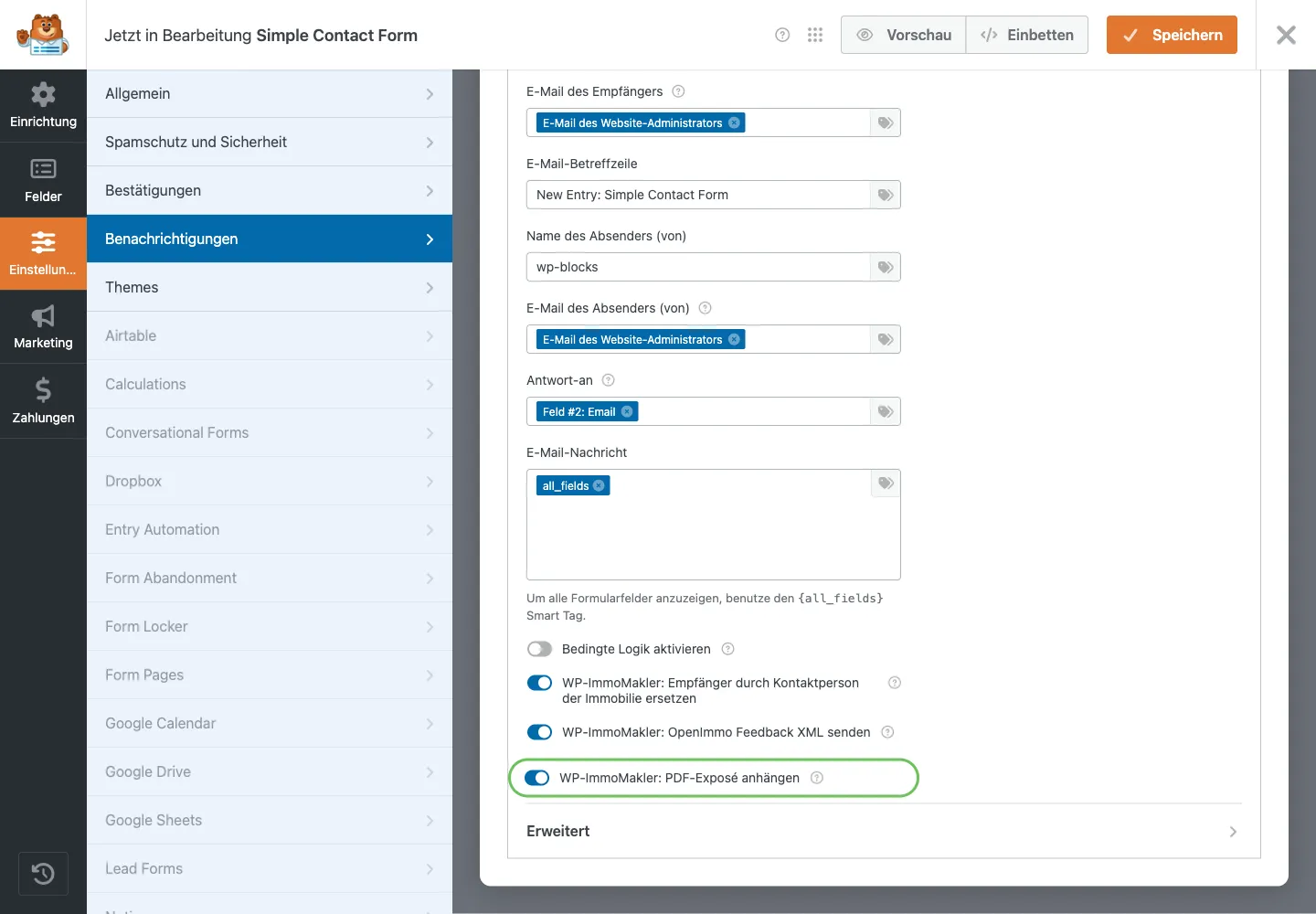
Two conditions must be met for a PDF to be attached:
- The PDF print view is enabled (in your WordPress admin (wp-admin) under WP-ImmoMakler → Settings → PDF Print View).
- The form is submitted on a property detail page. On a page without a property reference — for example a general contact form — there is no property for an exposé to belong to, and the notification is sent without an attachment.
Propstack Newsletter Signup PLUS
Section titled “Propstack Newsletter Signup ”If you use Propstack as your real estate CRM software, any WPForms form can additionally trigger a newsletter signup with double opt-in. When the sender ticks the consent checkbox you chose, WP-ImmoMakler creates the contact in Propstack and lets Propstack send the confirmation email.
This works in two variants:
- Opt-in on an existing form — your contact or enquiry form stays unchanged and simply gets an additional checkbox.
- Standalone newsletter form — a form that exclusively triggers the confirmation email and sends no notification.
The feature is set up per form in the WPForms form editor under Settings → General → Advanced in the WP-ImmoMakler: Propstack Newsletter section. This requires an active Propstack connection with a sender and email template, which you store in your WordPress admin (wp-admin) under WP-ImmoMakler → Software/Portals → Propstack.
PHP Filters
Section titled “PHP Filters”// Override recipient email for testing purposes (BASIC + PLUS).add_filter( 'immomakler_mail_force_recipient_email', function ( $email ) { return 'test@example.com';} );// Override sender name in the OpenImmo Feedback XML (PLUS).add_filter( 'immomakler_openimmofeedback_sender_name', function ( $name ) { return 'My Estate Agency';} );// Which custom field of the property is written to the <oobj_id> XML element? (PLUS)// Default: 'objektnr_extern'.add_filter( 'immomakler_openimmofeedback_key_for_oobj_id', function ( $key, $post_id ) { return 'my_property_id';}, 10, 2 );Settings Overview
Section titled “Settings Overview”Global (WP-ImmoMakler → Integrations → WPForms)
Section titled “Global (WP-ImmoMakler → Integrations → WPForms)”| Label | Type | Default | Description |
|---|---|---|---|
| Activate integration | Toggle | false | Enables WPForms as the property contact form |
| Property contact form | Select | – | WPForms form for the detail pages |
Per WPForms Notification (Settings → Notifications)
Section titled “Per WPForms Notification (Settings → Notifications)”| Label | Type | Description |
|---|---|---|
| WP-ImmoMakler: Replace recipient with property contact person | Toggle | Replaces the WPForms recipient with kontaktperson_email_feedback |
| WP-ImmoMakler: Send OpenImmo Feedback XML PLUS | Toggle | Attaches the XML to this specific notification |
| WP-ImmoMakler: Attach PDF Exposé PLUS | Toggle | Attaches the property’s PDF exposé to this specific notification |
Per WPForms Form (Settings → General → Advanced) PLUS
Section titled “Per WPForms Form (Settings → General → Advanced) ”| Label | Type | Description |
|---|---|---|
| Enable Propstack newsletter signup | Toggle | Turns on the newsletter signup for this form |
| Consent checkbox | Select | The checkbox option whose activation triggers the confirmation email |
| Email field | Select | The form field containing the email address |
| First name field / Last name field | Select | Optional — text field or WPForms name field |
| Salutation field | Select | Optional — dropdown or multiple-choice field with the salutation (Mr/Mrs) |
Per WPForms Form Field (Field Options → Advanced) PLUS
Section titled “Per WPForms Form Field (Field Options → Advanced) ”| Label | Type | Description |
|---|---|---|
| OpenImmo XML field (WP-ImmoMakler) | Select | Assigns the form field to an XML node — Enquirer: anrede, vorname, nachname, firma, strasse, plz, ort, tel, email; Property: bezeichnung (Objekt) (multiple-choice and checkbox values are written comma-separated) |
| OpenImmo XML field for “First name” / “Last name” | Select | Per sub-field of a combined Name field |