

Wix OpenImmo Property Transfer
If your website runs on Wix, you can still use WP-ImmoMakler as a full-featured real estate plugin — through an iFrame integration. WP-ImmoMakler runs on a separate WordPress installation, and the property view is embedded into your Wix page.
Requirements
Section titled “Requirements”You need a WordPress installation that runs WP-ImmoMakler and receives your properties. Since Wix is a hosted platform, this installation always lives on its own server or web hosting — or on our server (see Hosting options).
The WordPress installation must be reachable via HTTPS. Wix only embeds HTTPS content.
What is different with Wix
Section titled “What is different with Wix”Wix displays every embedded element in its own frame with a fixed size that you set in the Wix editor. The automatic height adjustment of WP-ImmoMakler cannot enlarge this frame. The property list and the detail pages therefore scroll inside the embedded area.
So plan the area generously — about as tall as a screen — so that your visitors can browse the properties comfortably. You can find out how to set the size in Step 3.
Step 1: Enable iFrame mode
Section titled “Step 1: Enable iFrame mode”-
Open the settings
In the backend of your WordPress installation (wp-admin), open WP-ImmoMakler → Settings → Display.
-
Enable iFrame mode
Tick the checkbox iFrame mode. The list and detail views of your properties are then output as iFrame content right up to the edge — without the header, menu and footer of the WordPress installation. In this mode, image galleries open in full screen automatically, so they are not limited to the height of the embedded area.
-
Save
Save the settings.
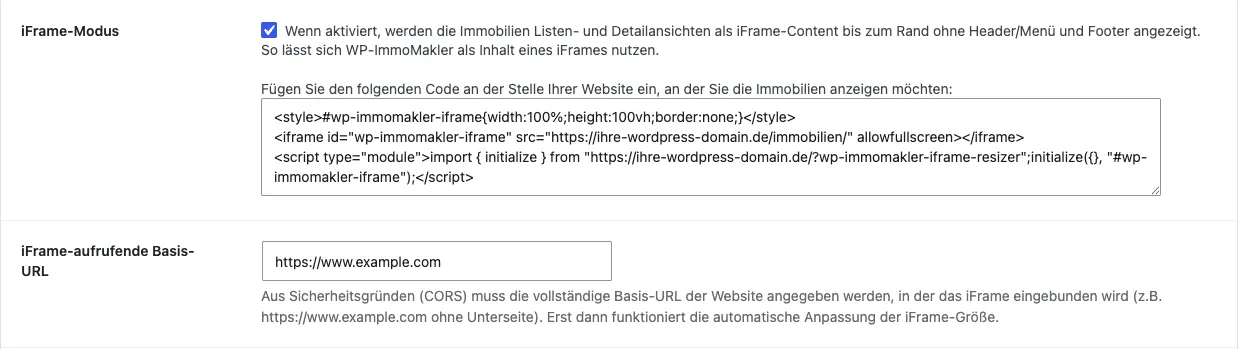
Directly below the iFrame mode option, WP-ImmoMakler shows a ready-made embed code. For Wix, the recommended variant only needs the address of your property list from it — that is the value after src= in the <iframe> tag, for example https://your-wordpress-domain.com/properties/.
You can leave the iFrame-calling base URL field empty for the recommended variant. It is only needed for variant B below.
Step 2: Embed properties in Wix
Section titled “Step 2: Embed properties in Wix”Variant A: Embed as a website (recommended)
Section titled “Variant A: Embed as a website (recommended)”With this variant, Wix embeds the property list directly via its address. You do not need to copy any code, and there is no dependency on further settings.
-
Add an embed
Open the desired page in the Wix editor and click Add on the left → Embed Code → Popular Embeds → Embed a Site.
-
Enter the address
Click Change Site Address and enter the address of your property list under Site address?, for example
https://your-wordpress-domain.com/properties/. -
Apply
Click Apply.
Variant B: Use the embed code
Section titled “Variant B: Use the embed code”Alternatively, you can paste the embed code from the WP-ImmoMakler settings. With Wix this offers no visible advantage, but it is the obvious route if you have already copied the code.
-
Add an embed
In the Wix editor, click Add → Embed Code → Popular Embeds → Embed HTML.
-
Paste the code
Click Enter Code, paste the copied code into the field Add your code here (HTTPS only) and click Apply.
-
Enter the base URL
Wix does not serve embedded code from your own domain, but from a Wix address on
filesusr.com, for examplehttps://www-example-com.filesusr.com. Exactly this address — not the one of your Wix website — goes into the iFrame-calling base URL field in WP-ImmoMakler.Here is how to find it: publish the page, open it in the browser and open the developer tools (F12 in Chrome and Firefox). Search the source for
filesusr.comand take the address up to and including.filesusr.com, without the path after it.
Step 3: Set the size
Section titled “Step 3: Set the size”In the Wix editor, drag the embedded area by its handles to the desired width and height. For the property list, we recommend the full content width and a height of at least about 800 pixels.
Wix manages the mobile view separately. In the editor, switch to the Mobile view at the top and check the width and height of the embedded area there again.
If something does not work
Section titled “If something does not work”- The embedded area stays empty: Check that the address starts with
https://and can be opened directly in the browser. If a security plugin on your WordPress installation blocks embedding in other sites (for example viaX-Frame-Optionsor a Content Security Policy), allow Wix there as an embedding site. - The header, menu and footer of the WordPress installation are visible: iFrame mode is not enabled or the settings were not saved. Afterwards, clear the cache of your WordPress installation if necessary.
- The property list looks cut off: Increase the height of the embedded area in the Wix editor — in both the desktop and the mobile view.
Hosting options
Section titled “Hosting options”You can set up the integration yourself or have your agency configure it. Alternatively, we offer a setup service that takes care of the visual integration of the plugin into the layout of your Wix website. The WordPress installation can run on your own server or on ours.
If you have questions about the setup, please contact our support team.