

SEO Title and SEO Description
On import, WP-ImmoMakler automatically generates an SEO title and an SEO description for every property. Both texts are stored as the property fields seo_title and seo_metadesc and are used by Yoast SEO, Rank Math SEO, the Open Graph preview, the schema.org data, the PDF property brochure and the property’s excerpt.
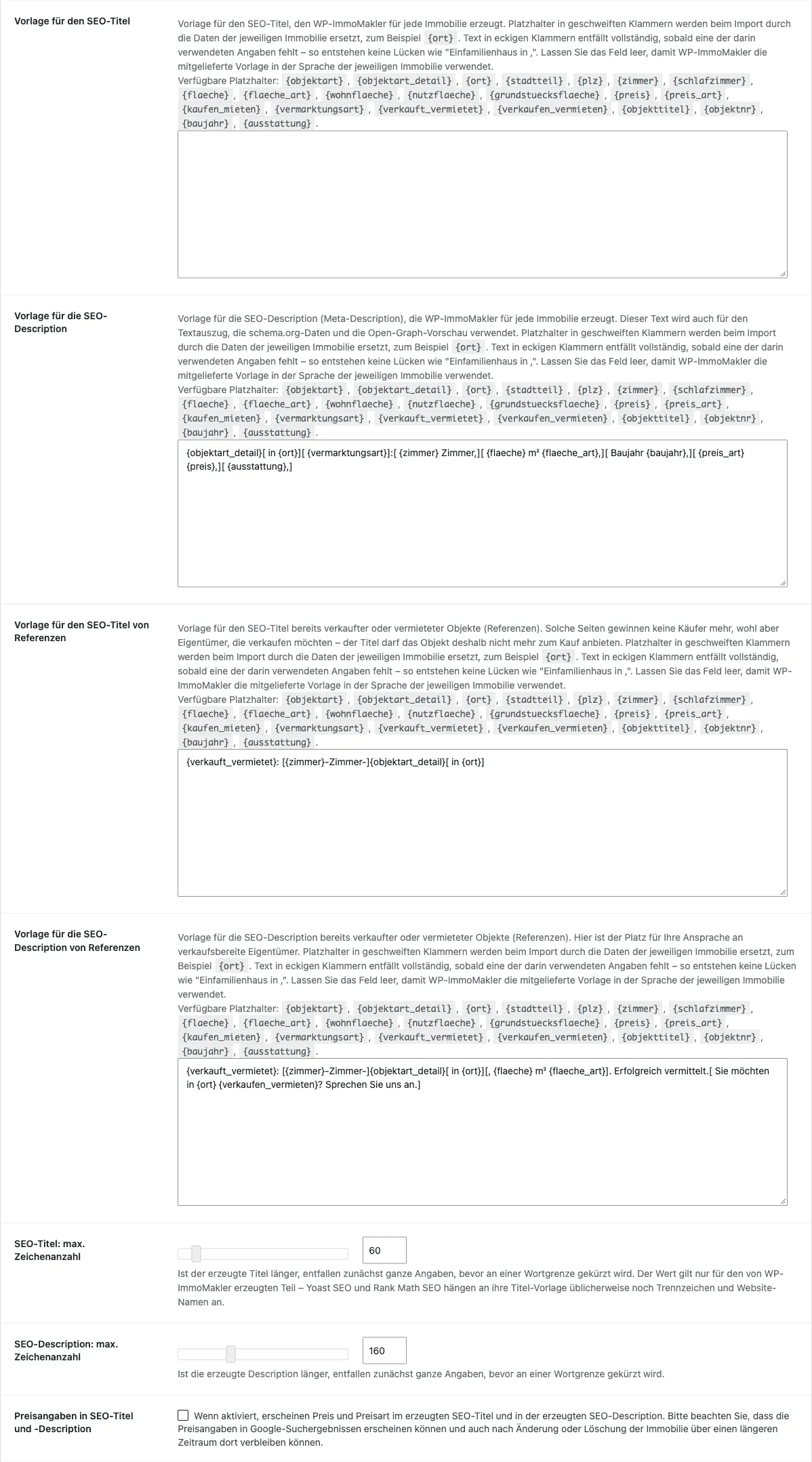
You find the corresponding settings in the back end of your website (wp-admin) under WP-ImmoMakler → Settings → SEO/AEO/GEO.
In every edition, WP-ImmoMakler generates the texts from supplied templates whose length you can define. From PLUS onwards, you design the templates yourself.
Output in the HTML head: SEO plugin required
Section titled “Output in the HTML head: SEO plugin required”For search engines, two elements in a page’s HTML head matter most: the <title>, which appears as the headline in search results, and the <meta name="description">, from which Google builds the text underneath. WP-ImmoMakler does not write these two tags itself. For that you need an SEO plugin.
| Output | Who writes it |
|---|---|
<title> in the HTML head | SEO plugin |
<meta name="description"> in the HTML head | SEO plugin |
Open Graph preview (og:description) for social networks | WP-ImmoMakler |
| Property excerpt, schema.org data and PDF property brochure (both from PLUS onwards) | WP-ImmoMakler |
With Yoast SEO or Rank Math SEO you need do nothing further: WP-ImmoMakler enters matching default values for properties the first time the plugin is activated, so the SEO title and SEO description are output without any further setup. Using its own variables, you can also build the texts into your own title templates there.
Without an SEO plugin, WordPress outputs the property’s title as <title> – usually the property title from your estate agent software, followed by your website’s name. A meta description is then missing entirely, and Google assembles the text under the title itself from the page content.
Why WP-ImmoMakler does not output the page title itself
Section titled “Why WP-ImmoMakler does not output the page title itself”The title and meta description belong to every page of your website, not just to properties. An SEO plugin manages them in one place for all pages — with a consistent separator and website name, a search-result preview, sitemaps and indexing rules. If WP-ImmoMakler also output the tags, they would appear twice in the HTML head on many websites, and search engines would have to choose between the two versions. That is why WP-ImmoMakler supplies the texts and leaves the output to the SEO plugin you already use for the rest of your website.
How a template works PLUS
Section titled “How a template works ”A template is a sentence containing placeholders. On import, WP-ImmoMakler replaces every placeholder with the value of the property in question.
A placeholder is written in curly braces, for example {ort}. The supplied template for the title reads:
[{zimmer}-room ]{objektart_detail}[ in {ort}[ {stadtteil}]][ {vermarktungsart}]For a flat with 3.5 rooms in Hamburg-Eimsbüttel, that produces:
3.5-room Apartment in Hamburg Eimsbüttel for saleSquare brackets let details drop out
Section titled “Square brackets let details drop out”Not every property has every detail. A plot has no rooms, and some properties have no town. So that no text gaps such as “Single-family home in ,” appear, you put a section in square brackets: if one of the details used inside it is missing, the section drops out entirely — along with its connecting words and punctuation.
In the example above, [{zimmer}-room ] disappears by itself for a plot, and what remains is:
Lot in Hamburg for saleSections can also be nested inside one another. [ in {ort}[ {stadtteil}]] from the supplied template produces “in Hamburg Eimsbüttel” when both details are present, “in Hamburg” when only the district is missing, and drops out entirely when the town is missing.
Available placeholders PLUS
Section titled “Available placeholders ”| Placeholder | Content |
|---|---|
{objektart} | Top-level category, for example “House” or “Apartment” |
{objektart_detail} | Exact property type, for example “Single-family home”; if it is missing, the top-level category is used |
{ort} | Town |
{stadtteil} | District from the “Regional addition” field, provided it differs from the town and is not a plain number; a leading town (“Hamburg Eimsbüttel”) is stripped |
{plz} | Postcode |
{zimmer} | Number of rooms; half rooms are preserved |
{schlafzimmer} | Number of bedrooms |
{flaeche} | The property’s decisive area, in m² |
{flaeche_art} | The name of that area, for example “Living area” or “Lot size” |
{wohnflaeche} | Living area |
{nutzflaeche} | Usable area |
{grundstuecksflaeche} | Lot size |
{preis} | The decisive price including currency |
{preis_art} | The name of that price, for example “Purchase Price” or “Base rent” |
{kaufen_mieten} | “buy” or “rent” |
{vermarktungsart} | “for sale”, “for rent” or “with leasehold” |
{verkauft_vermietet} | “Sold” or “Rented” — capitalised, for the beginning of a reference’s sentence |
{verkaufen_vermieten} | “sell” or “rent” — for addressing owners |
{objekttitel} | Property title from your estate agent software |
{objektnr} | Property number from your estate agent software |
{baujahr} | Year built |
{ausstattung} | The three most important amenities, for example “Balcony, Garage, Yard” |
Which area and which price are decisive is decided by WP-ImmoMakler in the same order as in the detail view: for a flat the living area usually wins, for a plot the lot size, for a rental flat the base rent. {flaeche_art} and {preis_art} each name the detail actually used — so the description reads “800 m² Lot size” instead of just “800 m²”.
The supplied templates
Section titled “The supplied templates”| Field | Template |
|---|---|
| SEO title | [{zimmer}-room ]{objektart_detail}[ in {ort}[ {stadtteil}]][ {vermarktungsart}] |
| SEO description | {objektart_detail}[ in {ort}[ {stadtteil}]][ {vermarktungsart}]:[ {zimmer} rooms,][ {flaeche} m² {flaeche_art},][ built in {baujahr},][ {preis_art} {preis},][ {ausstattung},] |
For a single-family home in Hamburg-Eimsbüttel, that produces:
5-room Single-family home in Hamburg Eimsbüttel for saleSingle-family home in Hamburg Eimsbüttel for sale: 5 rooms, 120 m² Living area, built in 1998, Balcony, Garage, Yard.If your estate agent software does not supply a district, this simply reads “in Hamburg”.
These templates apply in every edition. From PLUS onwards you enter your own instead; empty a field again and the supplied template applies once more.
Building projects use their own templates, which begin with the project title. They cannot be changed through the settings, but they can be changed through the PHP filters listed further below.
References
Section titled “References”References are properties you have already sold or let and keep on your website. They are of no interest to buyers — but for owners considering a sale of their own, they are your best evidence. They therefore receive their own pair of templates, which no longer offers the property but names the completed transaction and addresses owners ready to sell:
| Field | Template |
|---|---|
| SEO title | {verkauft_vermietet}: [{zimmer}-room ]{objektart_detail}[ in {ort}[ {stadtteil}]] |
| SEO description | {verkauft_vermietet}: [{zimmer}-room ]{objektart_detail}[ in {ort}[ {stadtteil}]][, {flaeche} m² {flaeche_art}]. Successfully placed.[ Looking to {verkaufen_vermieten} in {ort}? Talk to us.] |
For a sold single-family home, that produces:
Sold: 5-room Single-family home in Hamburg EimsbüttelSold: 5-room Single-family home in Hamburg Eimsbüttel, 120 m² Living area. Successfully placed. Looking to sell in Hamburg? Talk to us.From PLUS onwards you edit both under SEO title template for references and SEO description template for references PLUS.
When a property counts as a reference
Section titled “When a property counts as a reference”WP-ImmoMakler recognises references on import from the details supplied by your estate agent software — from the OpenImmo marker aktionart="REFERENZ" as well as from the corresponding fields of onOffice, FlowFact and Propstack. If the option Mark properties marked as sold/rented as reference properties under WP-ImmoMakler → Settings → Import is active as well, sold and let properties also count as references.
References and the AI features
Section titled “References and the AI features”If the AI features are active (from PLUS onwards), the AI additionally receives the information that the property has already been sold or let. It then no longer offers it for sale or rent, does not invite viewings, and instead addresses owners who are considering selling or letting a comparable property. This applies regardless of the prompt you have stored. See AI features.
Length of the texts
Section titled “Length of the texts”In its search results, Google shows only the first 60 characters or so of a title and around 160 characters of a description. You set both values under SEO title: max. number of characters and SEO Description: Max. character count.
If a text is too long, the last section in square brackets drops out first, then the second to last, and so on. Only when that is not enough is the text cut at a word boundary. That way the text loses a detail instead of breaking off mid-word. Put the most important details at the beginning of your template for that reason.
A section usually brings its own leading space ([ in {ort}]). If it comes directly after a punctuation mark, the space belongs in front of the bracket ({verkauft_vermietet}: [{zimmer}-room ]), so that no Sold:Single-family home appears when the section drops out.
Price information
Section titled “Price information”The placeholders {preis} and {preis_art} stay empty as long as the setting Price information in SEO title and description is switched off. The corresponding section in square brackets then drops out by itself, so you do not have to change your template to switch it on or off.
Multilingual websites PLUS
Section titled “Multilingual websites ”As long as both template fields are empty, WP-ImmoMakler uses the supplied template in the language of the respective property — on a multilingual website, every language version therefore receives suitable texts.
As soon as you enter a template of your own, that one template applies to all languages. Empty the field again and the supplied templates apply once more.
When the texts are generated
Section titled “When the texts are generated”The texts are created when a property is imported. A changed template or character count therefore only affects your portfolio on the next import.
In the WordPress administration you can adjust the texts of an individual property by hand in its record. On the next import of that property they are generated afresh from the template.
With the AI features (from PLUS onwards), the SEO title and SEO description can instead be written by an artificial intelligence – see the following section.
Alternative: Have the AI write the SEO texts PLUS
Section titled “Alternative: Have the AI write the SEO texts ”Instead of assembling the texts using a fixed template, WP-ImmoMakler can have them written by an artificial intelligence. For this, the AI receives the property data and description texts of the property and, following your prompt, formulates an SEO title, an SEO description and, if you wish, an excerpt. How to connect an AI provider and configure the prompts is described under AI Features.
The templates remain in use throughout: on import, the texts are first created from the template, and shortly afterwards the AI version replaces them in the background. If the AI does not respond, the texts from the template remain in place.
| Templates | AI features | |
|---|---|---|
| Edition | every edition, own templates from PLUS onwards | from PLUS onwards |
| Cost | none | usage-based, with your AI provider |
| Setup | none | API key for an AI provider under Settings → Connectors |
| Data sharing | none, everything stays on your website | property data and description texts go to the AI provider |
| Available | immediately on import | shortly after import, gradually for many properties |
| Content | only the details from the placeholders | also location, special features and style from the description texts |
| Wording | built the same way for every property of a kind | individually formulated for every property |
| Predictability | you know exactly what text results | you steer the wording via the prompt, but the AI chooses it |
| Language | supplied templates in the property’s language, a custom template applies to all languages | always in the property’s language |
The templates are a good fit if you want consistent, immediately available texts with no ongoing cost and no data sharing. The AI features are a good fit if every property should receive its own wording that also draws on the description texts. Check the AI texts occasionally, since you do not determine their exact wording yourself.
PHP filters
Section titled “PHP filters”The following filters are available in every edition.
// Set the SEO title template in code.add_filter( 'immomakler_seo_title_template', function ( $template, $openimmo_data ) { return '{objektart_detail}[ in {ort}[-{stadtteil}]][ {vermarktungsart}]'; }, 10, 2);// Set the SEO description template in code.add_filter( 'immomakler_seo_metadesc_template', function ( $template, $openimmo_data ) { return '{objektart_detail}[ in {ort}]:[ {zimmer} rooms,][ {flaeche} m² {flaeche_art}.] Request the brochure now.';}, 10, 2 );// Force price information regardless of the setting.add_filter( 'immomakler_seo_show_price_title_desc', '__return_true' );// Decide for yourself which properties count as references.add_filter( 'immomakler_seo_is_reference', function ( $is_reference, $openimmo_data ) { return $is_reference || ! empty( $openimmo_data['verkauft'] );}, 10, 2 );// List more amenities in the SEO description.add_filter( 'immomakler_seo_metadesc_feature_count', fn() => 5 );// Set the character count regardless of the settings.add_filter( 'immomakler_seo_title_max_length', fn() => 55 );add_filter( 'immomakler_seo_metadesc_max_length', fn() => 155 );