

Elementor Pro Property Presentation
WP-ImmoMakler includes a complete Elementor add-on that provides custom widgets, Dynamic Tags, Display Conditions, and Theme Conditions. Elementor Pro (version 3.20.0 or later) is required for most features.
Design your property presentation with ease using drag & drop — no coding knowledge required — in exactly the style you want.
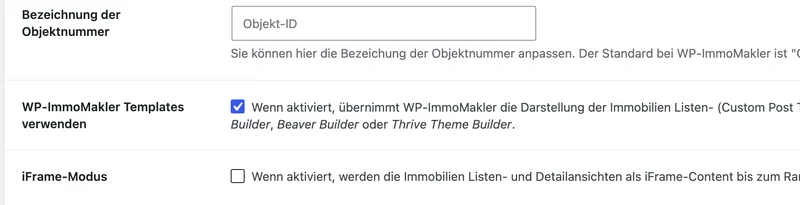
List view
Section titled “List view”With Elementor Pro you create custom property list views as an Archive Template. Use the standard Loop Grid or design your own loop item templates (property loop cards) for the property tiles with the WP-ImmoMakler widgets and Dynamic Tags. The map with the search results can be added via drag & drop — together with the property search form. Use the WP-ImmoMakler Archive Template widgets for this: Property search form and Real estate results list.
All 90+ Elementor widgets as well as third-party extensions are available to you.
Using the Loop Grid Widget
Section titled “Using the Loop Grid Widget”For the search filters to be correctly connected to the Loop Grid, the CSS class properties must be set directly on the Loop Grid element.
Detail view
Section titled “Detail view”The detail view is also designed entirely with Elementor Pro. Specialized widgets for image galleries, videos, 360-degree tours, downloads, maps, data sheets, property features, energy certificates, contact forms, and contact details are available.
Widget categories
Section titled “Widget categories”WP-ImmoMakler registers the following Elementor categories:
| Category | Description |
|---|---|
| WP-ImmoMakler: site-wide | Widgets that can be used on any page |
| WP-ImmoMakler: 1-Click HTML Version | Ready-made HTML templates (requires Elementor Pro) |
| WP-ImmoMakler: Archive Template | Widgets for list views (requires Elementor Pro) |
| WP-ImmoMakler: Single Post Template | Widgets for detail views (requires Elementor Pro) |
Widgets
Section titled “Widgets”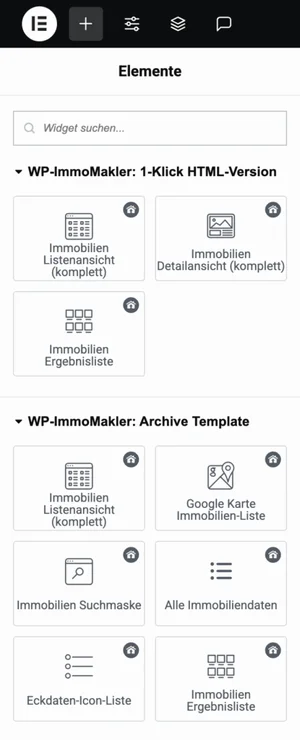
WP-ImmoMakler: site-wide
Section titled “WP-ImmoMakler: site-wide”These widgets can be used on any page and in any template.
| Widget | Description |
|---|---|
| Real Estate Carousel PLUS | Property carousel |
| Real estate map list view PLUS | Map with all property locations |
| Property search form PLUS | Property search form with filters |
| Real estate quantity watch list PLUS | Counter of saved properties |
| Propstack search profile form PLUS | Propstack search/saved-profile form |
| Cancellation button | Button for the revocation notice |
| Cancellation form | Form for the revocation notice |
WP-ImmoMakler: 1-Click HTML Version
Section titled “WP-ImmoMakler: 1-Click HTML Version”These widgets display WP-ImmoMakler’s proven HTML templates. Adjustments can be made via the Customizer and through HTML and CSS using the WP-ImmoMakler Child-Skin-Plugin.
| Widget | Description |
|---|---|
| Property List View (complete) | Complete list view as an HTML block |
| Property Detail View (complete) | Complete detail view as an HTML block |
| Real estate results list | Configurable property card loop |
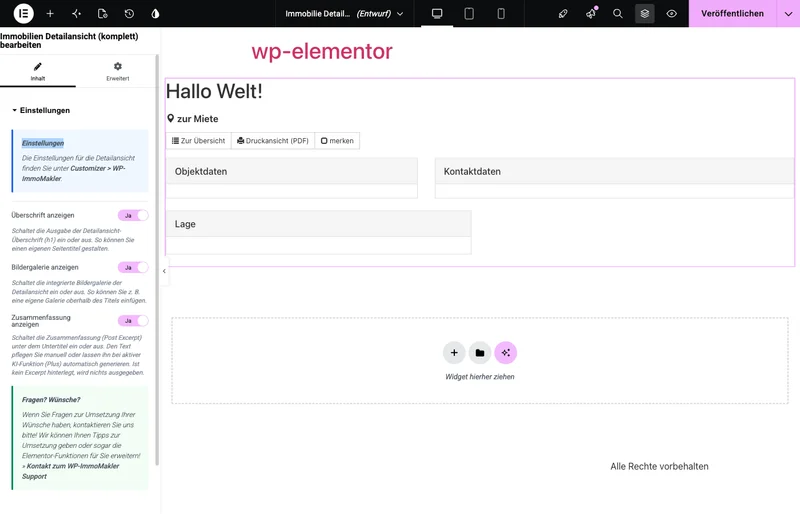
Each 1-Click widget offers its own options in the Content tab. The Detailed view of real estate (complete) widget, for example, lets you toggle the page heading, the integrated image gallery, and the summary individually.
WP-ImmoMakler: Archive Template
Section titled “WP-ImmoMakler: Archive Template”| Widget | Description |
|---|---|
| Property List View (complete) | Complete list view as an HTML block |
| Real estate results list | Configurable property card loop |
| Key data text list | Compact inline list view |
| Real estate map list view | Map with property locations |
| Property search form | Property search form with filters |
| All real estate data | Freely configurable data table |
| Key data icon list | Key figures as an icon list |
| Key data boxes | Key figures as visual tiles |
WP-ImmoMakler: Single Post Template
Section titled “WP-ImmoMakler: Single Post Template”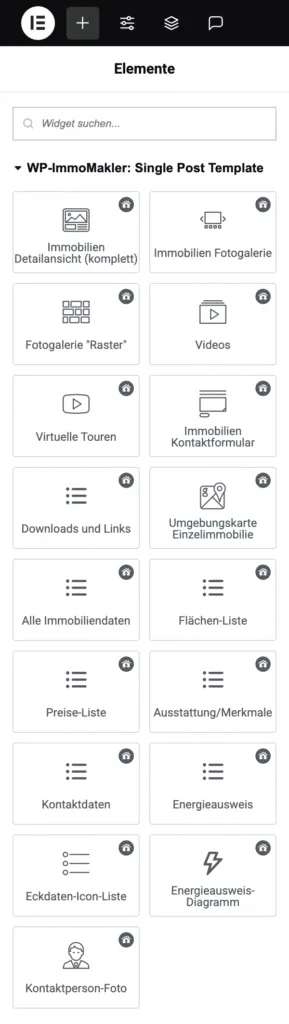
| Widget | Description |
|---|---|
| Property Detail View (complete) | Complete detail view as an HTML block |
| Real estate photo gallery | Image gallery with Swiper (Slideshow or static) |
| Gallery Grid | Deprecated – now the Static layout “Mosaic” of the Real estate photo gallery; instances already placed continue to be displayed |
| Videos | Embedded videos |
| Real estate contact form | WP-ImmoMakler contact form |
| Downloads and links | Download files and external links |
| Area map of individual property | Map showing the property’s location |
| All real estate data | Data table (freely configurable) |
| Area list | Area information |
| Price list | Price information |
| Equipment/features | Property features |
| Contact details | Contact person information |
| Energy certificate | Energy certificate data |
| Key data icon list | Data as an icon list |
| Key data boxes | Data as tiles |
| Energy certificate diagram PLUS | Graphical energy certificate scale |
| Virtual tours PLUS | 360-degree tours |
| Contact person photo | Photo of the contact person |
Dynamic Tags
Section titled “Dynamic Tags”With Elementor Pro you can use Dynamic Tags in any widget to display property data dynamically. All WP-ImmoMakler tags appear in the tag selection dialog under the WP-ImmoMakler group.
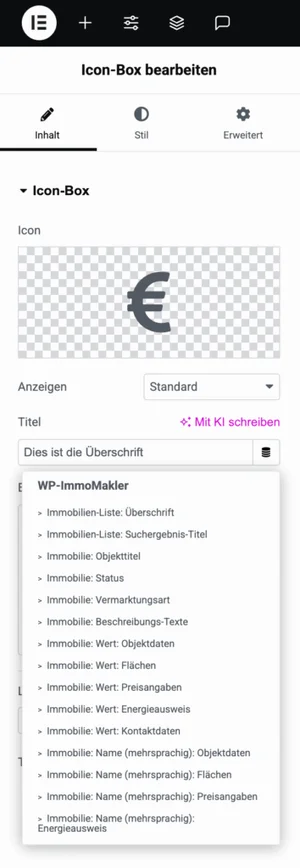
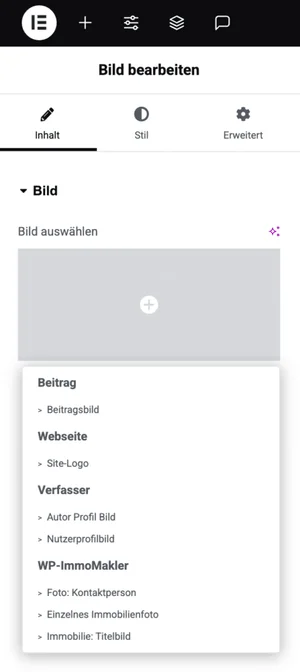
| Tag | Type | Description |
|---|---|---|
| Property: Title | Text | Property title from the real estate software |
| Property: Status | Text | Current status of the property |
| Property: Marketing type | Text | Sale or rental |
| Property: Description texts | Text | Free-text description field |
| Property: Value: Property data | Text | Value of any data field |
| Property: Value: Areas | Text | Value of an area field |
| Property: Value: Prices | Text | Price |
| Property: Value: Energy certificate | Text | Energy value |
| Property: Value: Contact data | Text | Contact person field |
| Property: Name (multilingual): Property data | Text | Label of a data field |
| Property: Name (multilingual): Areas | Text | Label of an area field |
| Property: Name (multilingual): Prices | Text | Price label |
| Property: Name (multilingual): Energy certificate | Text | Energy label |
| Property list: Heading | Text | Headline of the current list view |
| Property list: Search result title | Text | Subline of the list view |
| Property: Link to detail view | URL | Permalink of the property |
| Property: Link to PDF print view | URL | URL of the generated PDF |
| Property: First PDF attachment | URL | URL of the uploaded PDF attachment |
| Property: First PDF attachment with “floor plan” in the title or file name | URL | URL of the first PDF attachment whose title or file name contains “floor plan” |
| Property: Link to extra gallery page | URL | URL of the standalone gallery view |
| Properties: Link to general list view | URL | URL of the current list view |
| Property: Link back to list view (to the property’s card) | URL | Leads back to the list the visitor came from and scrolls there to the property’s card - even with a caching plugin |
| Property: Featured image | Image | Featured image of the property |
| Contact person photo | Image | Photo of the contact person |
| Single property photo | Image | Single image by its position |
| Property photos | Gallery | All photos |
| Floor plans | Gallery | Floor plans only |
Display Conditions
Section titled “Display Conditions”Display Conditions control which elements are visible on the page — depending on which data is available for each property. You find the conditions in the Advanced tab of any widget or container; in the selection dialog they appear in the WP-ImmoMakler group. Combine each condition with an operator (e.g. Is not empty / Is empty).
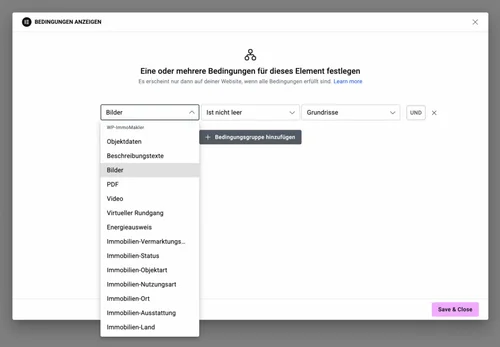
- Property content — specific content present / not present: images, floor plans, videos, virtual tours, documents, PDF, links, summary and description texts, features, energy certificate, map, contact person, and their photo. Divi 5 offers the same list
- Reference object — show the element only for reference objects or only for properties that are not
- Property data — data field present / not present
- Description texts — description fields present, including the summary
- Images — images or floor plans present; a floor plan PDF also counts as a floor plan
- PDF — PDF present
- Video — videos present
- Energy certificate — energy data present
- Contact person — contact data present
- Links / Downloads — downloads or links present
- Virtual tour — virtual tours present PLUS
- Taxonomies: Marketing type, Status, Property type, Usage type, Location, Features, Country
Theme Conditions
Section titled “Theme Conditions”WP-ImmoMakler registers Elementor Theme Conditions that you can select as a condition when publishing a template. In the selection menu they appear in their own WP-ImmoMakler group (make sure not to choose the identically named entries from the standard Property Archive group):
| Condition | Applies to |
|---|---|
| Property | Individual property (detail view) |
| All Property Lists | Property archive (list view) |
| Reference property | Individual property by reference ID |
| Reference property list | Archive of reference properties |
| Property with ?preview in URL | URL-parameter-based preview of a detail page |
| Property list with ?preview in URL | URL-parameter-based preview of a list view |
| Property with ?galerie or ?gallery in URL | Standalone gallery view of a property |
Preview property
Section titled “Preview property”In the Elementor editor, WP-ImmoMakler widgets display real property data as a preview. Elementor Pro has its own selection for this: click the gear icon (Page Settings) in the editor footer, then under Preview Settings choose a specific property under Preview dynamic content as (for an archive template, choose Property Archive) and confirm with Apply & Preview. This selection takes priority over the global Preview property from WP-ImmoMakler → Settings → Theme Builder — the global setting only applies when no property is selected in Elementor.
Step-by-step guides
Section titled “Step-by-step guides”- Create Archive Template — Design a property list view with Elementor Pro
- Create Single Template — Design a property detail view with Elementor Pro
You might also be interested in
Section titled “You might also be interested in”- Settings: Theme Builder — Global preview property and priority order
- Divi Theme Builder
- Bricks Builder
- WPBakery Page Builder