

Connecting an AI Website to Your CRM Software: Lovable, Bolt, v0 and Base44
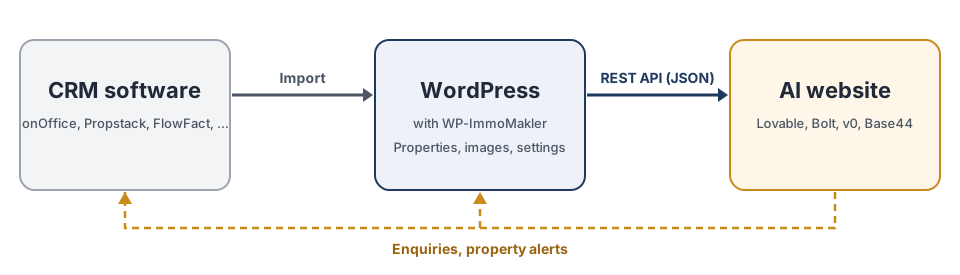
PLUS With AI website builders such as Lovable, Bolt, v0, Base44 or Replit, you describe your website in your own words and the builder creates it. For your properties to appear on it, the website needs a data source. WP-ImmoMakler is that data source: it receives the properties from your CRM software, prepares them and passes them on to the AI website through a REST API. It accepts contact enquiries from the AI website and forwards them to you and your CRM software.
If you have already created your website with an AI website builder, usually only this connection is missing: a prompt in the builder replaces the sample data with your properties and connects the contact form, while the design and structure stay as they are. The guides for the individual builders therefore start with this step.
This is how you connect, for example, Lovable to Propstack, Bolt to onOffice, Base44 to FlowFact or v0 to ImmoScout24, without the AI website builder having to know the interface of your CRM software.
Why WP-ImmoMakler instead of the API of your CRM software
Section titled “Why WP-ImmoMakler instead of the API of your CRM software”Many CRM programs have an API of their own, and an AI website builder can try to call it directly. What the website would then have to do itself is handled by WP-ImmoMakler:
- One interface for every CRM software. The WP-ImmoMakler REST API is the same whether your properties come from Propstack, onOffice, FlowFact, JustImmo, ImmobilienScout24 (ImmoScout24) or another CRM software. All keys are in English and identical on every website. If you switch CRM software, your AI website stays unchanged.
- No API key of your CRM software in the website. The API key of a CRM program gives access to more than your published properties, such as contacts. It stays in WordPress. The read endpoints of WP-ImmoMakler only return what your website shows every visitor anyway, and can additionally be protected with an API key of their own if you wish.
- Only the properties that are meant to be public. Reference properties, archived properties and hidden construction projects are left out unless the website explicitly requests them.
- Ready-to-use data. Every data field comes with a label and display text in the order of your settings, for example “Purchase price: €350,000” instead of a raw number. Description texts arrive as HTML with the text filters from your settings.
- Optimised images in WebP or AVIF. On import, WP-ImmoMakler converts your property photos to WebP (the default) or AVIF, with a quality you can set per format, and creates them in several sizes from 200 to 1,200 pixels wide. The interface lists every size of each image with its width and height, so the website serves every device the right size without converting a photo itself; plus a separate preview image for shared links. See How WP-ImmoMakler processes property images.
- Search like on your WordPress website. Filters by property type, marketing type, location, price, rooms and area, radius search, hit counts per filter, map markers, similar properties and the units of a construction project.
- SEO data. The SEO title and meta description of every property, written by AI if you wish, and the schema.org data of the detail view.
- Contact enquiries with spam protection. Forms on the AI website submit through the interface, with the same required fields, consents and spam protection as your WordPress contact form. The enquiry reaches the contact person of the property and, depending on your setup, your CRM software, see Forms via the headless interface. Withdrawals and property alerts work the same way.
- Automatic processing in your CRM software. The e-mail of an enquiry to your CRM software carries an OpenImmo feedback XML attachment. The CRM software uses it to create the prospect as a contact and assign the enquiry to the property, without anyone retyping it and without the AI website having to call the interface of your CRM software.
- Up to date after every transfer. A webhook tells the website after every transfer from your CRM software which properties have changed.
- Described in a form AI can read. The interface describes itself at
llms.txtandopenapi.json, so the AI website builder understands it without further explanation.
Supported CRM software
Section titled “Supported CRM software”The REST API delivers the properties of every CRM software that WP-ImmoMakler connects to, including:
- Propstack, step by step: AI website with Propstack
- onOffice, step by step: AI website with onOffice
- FlowFact
- JustImmo, step by step: AI website with JustImmo
- ImmobilienScout24 (ImmoScout24)
- estateOffice, EVERREAL, FIO WEBMAKLER, immotion and any other software with an OpenImmo export
The complete list is available under Connecting CRM software to WordPress.
Guides for individual AI website builders
Section titled “Guides for individual AI website builders”- Connecting Lovable to your CRM software
- Connecting Bolt to your CRM software
- Connecting v0 to your CRM software
- Connecting Base44 to your CRM software
- Connecting Replit to your CRM software
If you would rather have the website built as a project of its own, using the coding tools of ChatGPT, Claude, Gemini or Cursor, with a framework of your choice or none at all, read Connecting or Programming a Property Website with ChatGPT, Claude, Gemini or Cursor. If you work with Astro, you will also find our Astro starter there, which you can get on request. You connect other AI tools in the same way: by giving the address of llms.txt in the prompt.
How to proceed
Section titled “How to proceed”-
Connect your CRM software
Set up the transfer of your properties to WordPress as described in the guide for your CRM software. WordPress stays in the background as the administration of your properties; visitors only see your AI website.
-
Enable the REST API
In the back end of your website (wp-admin) under WP-ImmoMakler → Integrations → Headless, enable the interface and enter the address of your AI website, see Setup.
-
Connect or create the website
Give the builder the address of the interface description in the prompt:
https://your-wordpress-address.com/wp-json/immomakler-headless/v1/llms.txtThe guides for the individual builders contain prompts you can copy: first for an existing website that you only need to connect, then for a new one.
-
Check the contact form
The prompts connect the contact form as well. Send a test enquiry and, if the form does not submit from the builder’s preview, enter its preview address under “Allowed origins”; details are under Forms via the headless interface.
-
Match the addresses
Adjust “Path of a property” and “Path of the property list” in the headless settings to the addresses of your AI website, so that links in e-mails and the redirect from WordPress point to the right pages.
Your AI website in search engines
Section titled “Your AI website in search engines”For every property, the interface delivers an SEO title, a meta description and schema.org data. Whether search engines and AI search services see them depends on how your AI website delivers its pages:
- A website that only loads its content in the visitor’s browser initially gives search engines an empty page. Google runs JavaScript and sees the content later; many other crawlers, including those of some AI search services, do not run it.
- A website that generates its pages on the server or builds them in advance when publishing (server-side rendering or prerendering) gives every crawler the finished page with title, description and structured data.
Check in the documentation of your AI website builder how it delivers pages and whether server-side rendering or prerendering can be switched on; the guides for the individual builders point to the relevant place. In the prompt, also have the page title and meta description taken from seo and the structured data from json_ld.