

Project units
With the element Project units you place the units table of a development project yourself in your detail view template. The element is available in Elementor Pro, Gutenberg, Divi 5, Divi 4, Bricks, WPBakery, Enfold and Avada. It shows the same table as the default WP-ImmoMakler display:
- On the page of a development project, the units of the project, with the heading “Units in this project”.
- On the page of a unit, the other units of the same project, with the heading “Other units in this project” and the button “View project page”.
On all other properties the element outputs nothing. You can therefore put it in a shared template for all properties.
Inserting the element
Section titled “Inserting the element”-
Open the detail view template
Open the template your page builder uses to design the detail view of your properties, or the template page of the detail view.
-
Add the element
Search the element list for Project units and drag the element to the desired position. In the editor, the element shows a development project from your website as an example.
-
Adjust the settings
Under Units, choose which list the element shows, and adjust the heading and the table if needed.
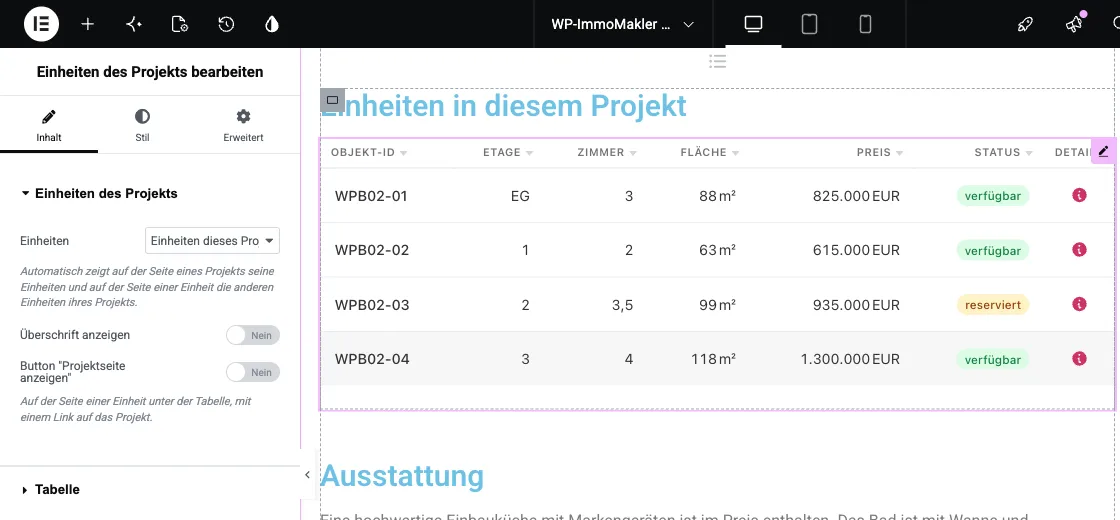
Settings
Section titled “Settings”| Setting | Meaning |
|---|---|
| Units | Automatic (default) decides based on the property. Units in this project shows the table only on development projects, Other units in the project only on units. |
| Show heading, Heading, HTML tag of the heading | Hides the heading or replaces its text. An empty text field keeps the default headings. |
| Button “View project page” | On a unit’s page, the link to the development project below the table. |
| Columns, Sort by column, Sort order | Comma-separated column keys and the initial sort order, as with the [immomakler-project-units] shortcode. |
| Status column, Details column, Expandable rows, Link the entire row, Hide the price of sold and rented units | Switch on or off for each element. |
If a setting is on Default (settings) or a text field is left empty, your setting in your website’s admin area (wp-admin) under WP-ImmoMakler → Settings → Projects applies. The option “Show other units on the unit detail page” only affects the default display: an element that you place yourself always shows its list.
Showing sections only for development projects
Section titled “Showing sections only for development projects”The Property content condition of the page builders and of template pages offers two matching contents:
- Project units PLUS: The property is a development project with units, or a unit whose project has further units. This lets you hide a whole section, including its own heading, when the element would show nothing.
- Parent project: The property is a unit of a development project.
For a separate template just for development projects, Elementor Pro, Divi, Bricks and Avada offer the template condition for projects; in Avada it is found under properties as Projects (WP-ImmoMakler).
Linking from the unit to the project
Section titled “Linking from the unit to the project”The dynamic fields Parent project: Heading and Detail page of the parent project supply the title and address of a unit’s development project on the unit’s page, for example for a sentence such as “Part of the project …” with a link. They are available wherever your page builder offers the dynamic data of WP-ImmoMakler, and stay empty on other properties.